Download Android Apps and Games
AppBrain
  • Apps
  • Apps being viewed right now Trending apps today Most popular apps All-time most downloaded apps Top rated apps
  • Intelligence ▾
    Intelligence overview → Track any Android app or your whole market
    Track & analyze
    Keyword Tracker & OptimizerTrack & improve Play rankings App Performance ReportOne-off PDF for any app StatisticsFree Android & Play market stats
    Promote your app
    Featured Apps App Links
  • Intelligence
  • Pricing
  • Dashboard
  • Sign up
  • Log in
Last updated on: 2026-06-09
App Store Apps > Lifestyle > Warclock
Warclock icon

Warclock

1.2.1
Christophe Garreau
0.00
0 reviews
Free

Not recently updated — last update was on 2022-06-23. This app may no longer be actively maintained.
Warclock Screenshot 1 of 6
Warclock Screenshot 2 of 6
Warclock Screenshot 3 of 6
Warclock Screenshot 4 of 6
Warclock Screenshot 5 of 6
Warclock Screenshot 6 of 6
Download from the App Store

About Warclock

Warclock is an overall app developed by Christophe Garreau.

How many times has Warclock been downloaded?

What is the rating of Warclock?

Warclock has no ratings yet.

Is Warclock free?

Warclock is free to download. The APK download size is 29.30 MB. The latest version available is 1.2.1. The last update was on June 23, 2022.

What are the requirements for Warclock?

The app has a content rating of Everyone. The app has been available on Google Play January 2022.

Description
Warclock is a shared clock with points trackers for Wargamers.

The app has different setting options for the timer and points trackers functions. Some options are reserved for those who support the app with a coffee.

● Timer function:

The main clock function can be used without time limit. By default, the playing time per player is set to 1.5 hours, but can be freely modified.

Warclock works like a chess clock. To start the game, the first player presses his timer button, which starts their time countdown.
After playing his turn, the active player hands over by pressing his timer button, which then starts the countdown of the opponent timer.

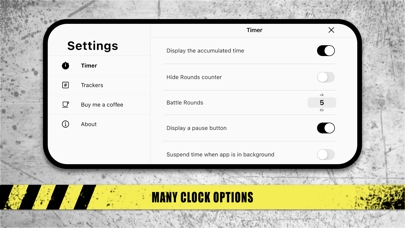
A central indicator displays the Rounds (this indicator can be hidden). A simple tap on the indicator adds a round, and it is also possible to scroll the rounds in both directions if necessary.

An option allows to display the cumulated game time of the player on each button (in addition to the time countdown).

The timer buttons can be customized with the army name of each player, which can be filled in manually or chosen from the army lists available for the 2 most common wargames*.

The timer is supplied with an anti-sleep function, which prevents the app from going to sleep by itself, in order to avoid any interruption in the countdown and loss of game time display on the table.
By default, if the app is set in the background, the clock continues to run to allow the player to consult its documentation. However, an option allows to invert this behavior by suspending the clock.

If necessary, a button within the timer options allows to stop and reset the clock immediately.
At the players' choice, a "Pause" button can also be added, in order to suspend the countdown during the game.

When one of the timers reaches zero, the hand automatically passes to the other player.

At the end of the game time, a panel indicates the end of the game.

● Points trackers:

Each player has a set of points trackers (which can optionally be hidden).

The bottom trackers keep points for a primary objective (P) and for 3 secondary objectives (S1, S2, S3).

At the top of the screen, a first tracker allows you to note the command points (C) and a second one allows you to note the victory points (V), which can be calculated automatically at the end of the game (this option can be disabled).

Adding points is done by simply pressing the tracker of your choice, which brings up a drop-down menu allowing you to add 1 to 5 points, remove 1 point, reset the tracker used (RESET) or reset all the points trackers (RES. ALL).

The maximum number of points that can be added to the different trackers (primary objective, secondary objectives and commands) can be modified.

Starting the clock resets all the point trackers to zero.

(*) Warclock can be used for Warhammer AOS© and Warhammer 40.000© games. Please note that Warclock is in no way supported by or affiliated with Games Workshop Limited.
Show more Show less

More data about Warclock

Price Free to download
Rating No ratings
Ranking Not ranked
Version 1.2.1
App download size 29.3 MB
Suitable for Everyone

Alternative downloads for the Warclock app

(OLD) Warhammer Age of Sigmar icon (OLD) Warhammer Age of Sigmar
Games Workshop Limited
3.4
Free
241 ratings
Warhammer 40,000: The App icon Warhammer 40,000: The App
Games Workshop Limited
3.1
Free
1.3K ratings
(OLD) Warhammer 40,000:The App icon (OLD) Warhammer 40,000:The App
Games Workshop Limited
1.8
Free
1.3K ratings
Warhammer Colour: The App icon Warhammer Colour: The App
Games Workshop Limited
3.5
Free
534 ratings
Tinnibot | Tinnitus Relief icon Tinnibot | Tinnitus Relief
Odio Tech Pty Ltd
4.5
Free
15 ratings
AutoClicker - Auto Tap Tool icon AutoClicker - Auto Tap Tool
莉莉 王
4.1
Free
272 ratings
Cladwell: Outfit Planner icon Cladwell: Outfit Planner
Cladwell Inc.
4.3
Free
998 ratings
Live Watch Faces & Wallpapers icon Live Watch Faces & Wallpapers
Besiness Pte. Ltd.
4.7
Free
2.1K ratings

More from Christophe Garreau

MiniPaints icon MiniPaints
Christophe Garreau
4.6
Free
61 ratings

Changelog of Warclock

No changelog data

Developer information for Christophe Garreau

Christophe Garreau

Address:

Share Warclock

Comments on Warclock for iOS

We don't have enough comments to show example comments. Please check back later.

App Store Rankings for Warclock

This app is not ranked

Technologies used by Warclock

(OLD) Warhammer Age of Sigmar icon (OLD) Warhammer Age of Sigmar
Warhammer 40,000: The App icon Warhammer 40,000: The App
(OLD) Warhammer 40,000:The App icon (OLD) Warhammer 40,000:The App
Warhammer Colour: The App icon Warhammer Colour: The App
Tinnibot | Tinnitus Relief icon Tinnibot | Tinnitus Relief
AutoClicker - Auto Tap Tool icon AutoClicker - Auto Tap Tool
Cladwell: Outfit Planner icon Cladwell: Outfit Planner
Live Watch Faces & Wallpapers icon Live Watch Faces & Wallpapers

Back to top
AppBrain Intelligence premium content

Subscribe now to get full and unlimited access to AppBrain Intelligence. You'll have access to:

  • App Intelligence dashboard (performance timeline, competitor comparison, country rankings, insight cards)
  • Detailed ranking data per app
  • Full timeline per developer
  • Device market shares data per country
1 Month

$75/mo
(billed every month)

SAVE 0%
Subscribe
3 Months

$65/mo
($195 billed every 3 months)

SAVE 13%
Subscribe
1 Year

$57.50/mo
($690 billed every year)

SAVE 23%
Subscribe
Each subscription will automatically renew 3 days before the expiration date for the same time period. Subscriptions can be cancelled at any time before the renewal.

AppBrain is a directory focused on discovering great apps and games. We give statistics, rankings and search options that Google Play and the App Store don't have. All trademarks are owned by their respective owners. AppBrain doesn't offer APKs or binaries, and always lets users install the official version from Google Play or the App Store.

More apps

  • Top Android apps being viewed
  • Clickapporter
  • Tic Followers Up Likes Tracker
  • Super Voice Recorder

Android Statistics

  • Android statistics
  • Google Play Developer stats
  • Trending Android Apps
  • Top popular Apps
  • Buy the best Android phone

About AppBrain

  • Contact
  • Privacy
  • Documentation
  • DMCA takedowns
  • Articles
  • Blog
  • Android Interstitial Ads: Best practices to optimize your app's earnings
© 2010-2026 - AppBrain