Download Android Apps and Games
AppBrain
  • Apps
  • Apps being viewed right now Trending apps today Most popular apps All-time most downloaded apps Top rated apps
  • Intelligence ▾
    Intelligence overview → Track any Android app or your whole market
    Track & analyze
    Keyword Tracker & OptimizerTrack & improve Play rankings App Performance ReportOne-off PDF for any app StatisticsFree Android & Play market stats
    Promote your app
    Featured Apps App Links
  • Intelligence
  • Pricing
  • Dashboard
  • Sign up
  • Log in
Last updated on: 2026-06-09
App Store Apps > Entertainment > Was There
Was There icon

Was There

8.2.1
JAM Productions LLC
0.00
0 reviews
Free

Was There Screenshot 1 of 5
Was There Screenshot 2 of 5
Was There Screenshot 3 of 5
Was There Screenshot 4 of 5
Was There Screenshot 5 of 5
Download from the App Store

Alternative downloads for the Was There app

Voice Changer Microphone | OYO icon Voice Changer Microphone | OYO
Shafi Chime
0.0
$0.99
Truth or Dare: Watch Party icon Truth or Dare: Watch Party
Hemal Modi
0.0
$0.99
Sortened icon Sortened
Arturo Rivas
4.0
Free
1 ratings
Circle Jump - Instant Shoot icon Circle Jump - Instant Shoot
Oscar Tsang
0.0
$3.00
ShakeNShot - Airgun AR icon ShakeNShot - Airgun AR
Ali Mert TUFEKCI
0.0
Free
LunarLander! icon LunarLander!
Ivan Cerra de Castro
3.0
$1.99
2 ratings
Dixmoji icon Dixmoji
Mohamed Hazem
5.0
Free
2 ratings
Frames - Lock Screen Videos icon Frames - Lock Screen Videos
Good Snooze
4.5
Free
4 ratings

More from JAM Productions LLC

HomeEc icon HomeEc
JAM Productions LLC
0.0
Free

About Was There

Was There is an overall app developed by JAM Productions LLC.

Download Statistics

User Ratings

The app has no ratings yet.

App Information

Was There is FREE to download. The APK download size is 7.90 MB. The latest version available is 8.2.1. The last update was on November 2, 2025.

Technical Requirements

The app has a content rating of Everyone. The app has been available on Google Play December 2021.

Description
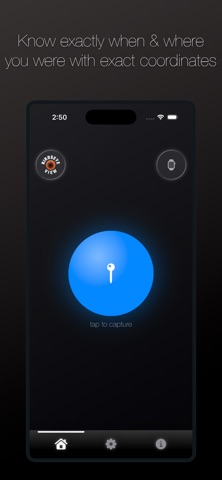
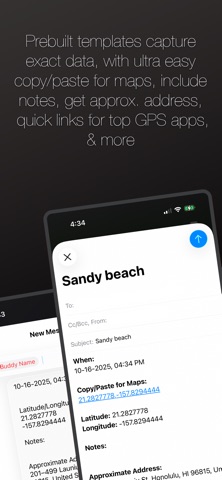
Was There is a location finding app that pulls the users precise latitude and longitude coordinates on demand and prepares the data to be sent to a user defined email address or text number. The app is designed to be used in conjunction with Evernote's organization and management platform, however using Evernote is optional.

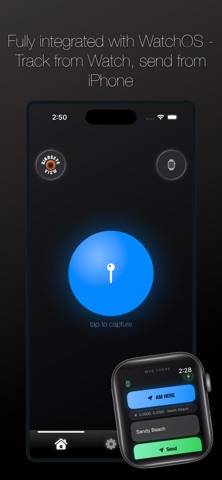
To use the app, press the "Am Here" button from the main page. That function instantly grabs location coordinates. Users then have the option to include a subject line and additional notes within the body. These fields are not required, but intended to better identify the message and contents. Pressing the "Send" button activates either an email or text message and prepares the preformatted message. With the preferred sending option displayed, the user has access to the functionality included with Mail or Messages, including attaching a photo if desired. The final step is to send the mail or text as normal via the send button within Mail or Messages.

The Birdseye View button provides an overhead look of the current location, and like any Maps view, can panned around and zoomed in or out.

If the user wishes to clear data in either the subject or notes fields, a clear button activates in the subject field when the cursor is placed inside, and a grey "X" button activates to clear the notes field when the cursor is placed inside. If the user just wants to close the keyboard, tapping in any open area outside the text fields closes the keyboard.

Please note: approximate address data is dependent on network bandwidth. If the address is not pulled in a timely manner, a note indicating such will display on the email or text message. Canceling the message and reclicking the "Am Here" button generally rectifies any delay in fetching data.

A menu is included at the bottom. Three options include: Home - the main page, Settings - the user configuration page, and Info - includes basic usage instructions.

The Settings page includes detail about the user's currently defined and saved data, mainly the email address or cell used to send messages, plus an option to include an Evernote Notebook name. If an Evernote Notebook is included, and a properly configured Evernote email address is saved, the notes will populate in the appropriate notebook on Evernote's platform. To do this, the email message subject is appended appropriately with the proper suffix and notebook name. If not included, the email subject will either be the user defined field from the main page, or blank.

The Clear Settings section allows the user to remove/delete either or all of the saved email address, the Evernote Notebook name, or the cell number. Similarly, the Update Settings section allows the user to redefine and save any of those saved settings. Clear field buttons activate once cursor is placed in any field, and the green "Disk" button saves the updated data to the iPhone's database.

The Update Send Option Setting allows the user to toggle back and forth between sending email or text. And watch notification and access setting is available for toggle as well.

The Additional Information page provides instructions for setting up Apple ID email and locating an Evernote account email address. Likewise additional app tips are displayed, plus contact information for the developer is provided.
Show more Show less

More data about Was There

Price Free to download
Rating No ratings
Ranking Not ranked
Version 8.2.1
App download size 7.90 MB
Suitable for Everyone

Changelog of Was There

No changelog data

Developer information for JAM Productions LLC

JAM Productions LLC

Address:

Share Was There

Comments on Was There for iOS

We don't have enough comments to show example comments. Please check back later.

App Store Rankings for Was There

This app is not ranked

Technologies used by Was There

Voice Changer Microphone | OYO icon Voice Changer Microphone | OYO
Truth or Dare: Watch Party icon Truth or Dare: Watch Party
Sortened icon Sortened
Circle Jump - Instant Shoot icon Circle Jump - Instant Shoot
ShakeNShot - Airgun AR icon ShakeNShot - Airgun AR
LunarLander! icon LunarLander!
Dixmoji icon Dixmoji
Frames - Lock Screen Videos icon Frames - Lock Screen Videos

Back to top
AppBrain Intelligence premium content

Subscribe now to get full and unlimited access to AppBrain Intelligence. You'll have access to:

  • App Intelligence dashboard (performance timeline, competitor comparison, country rankings, insight cards)
  • Detailed ranking data per app
  • Full timeline per developer
  • Device market shares data per country
1 Month

$75/mo
(billed every month)

SAVE 0%
Subscribe
3 Months

$65/mo
($195 billed every 3 months)

SAVE 13%
Subscribe
1 Year

$57.50/mo
($690 billed every year)

SAVE 23%
Subscribe
Each subscription will automatically renew 3 days before the expiration date for the same time period. Subscriptions can be cancelled at any time before the renewal.

AppBrain is a directory focused on discovering great apps and games. We give statistics, rankings and search options that Google Play and the App Store don't have. All trademarks are owned by their respective owners. AppBrain doesn't offer APKs or binaries, and always lets users install the official version from Google Play or the App Store.

More apps

  • Top Android apps being viewed
  • Astrovila™-Talk to Astrologers
  • UVIMate - UV Index Now Android App
  • Burma TV Pro

Android Statistics

  • Android statistics
  • Google Play Developer stats
  • Trending Android Apps
  • Top popular Apps
  • Buy the best Android phone

About AppBrain

  • Contact
  • Privacy
  • Documentation
  • DMCA takedowns
  • Articles
  • Blog
  • Android app Install tracking and attribution options for the AppBrain ad network
© 2010-2026 - AppBrain