

Watch Tower Pro
Watch Tower Pro is made and published by Blackfox Media LLC. AppBrain is an independent app data site and isn't affiliated with Blackfox Media LLC. The app name, icon, screenshots and description belong to Blackfox Media LLC and are shown as published on the App Store.
AppBrain's verdict
- Rating on App Store
- 4.20
- 5 ratings
- Last updated
- October 31, 2026
It doesn't have enough ratings yet to judge what users think.
Rankings
App Store top chartsApp Store Rankings for Watch Tower Pro
Competitors
Similar apps and more from Blackfox Media LLCMore from Blackfox Media LLC


Also available on Google Play

Releases
Updates seen on the App Store- Version
- 1.5.1
- Launched
- July 2026
No changelog data
User feedback
Ratings and reviews on the App StoreComments on Watch Tower Pro for iOS
We don't have enough comments to show example comments. Please check back later.
Technology
Found in the app by AppBrain- Price
- $4.99
- App size
- 23.5 MB
- Content rating
- Everyone
Technologies used by Watch Tower Pro
About the app and developer
About Watch Tower Pro
Watch Tower Pro is an utilities app developed by Blackfox Media LLC.
What is the rating of Watch Tower Pro?
Watch Tower Pro is rated 4.20 out of 5 stars, based on 5 ratings.
Is Watch Tower Pro free?
Watch Tower Pro costs $4.99. The app size is 23.48 MB. The latest version available is 1.5.1. The last update was on October 31, 2026.
What are the requirements for Watch Tower Pro?
The app has a content rating of Everyone. The app has been available on the App Store since July 2026.
Developer information for Blackfox Media LLC
Address:
Store listing
By Blackfox Media LLC, from the App Store


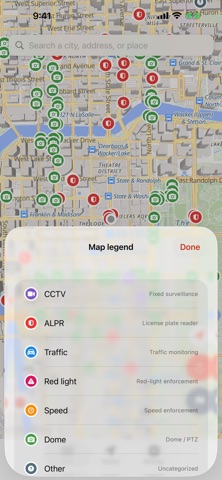


Description by Blackfox Media LLC Written by the developer, not by AppBrain. Click to read.
Most people pass a dozen cameras a day without noticing. Watch Tower Pro is a privacy-awareness tool: it shows you what's documented so you can make informed decisions about where you go and how you get there.
WHAT'S NEW IN 1.5
• Refreshed worldwide database: 670,344 cameras, rebuilt across all seven continents and de-duplicated so no two entries share a location.
• Wider detection of mapped cameras, especially speed, red-light and plate-reader sites.
• New in 1.5.1: Settings now spells out exactly what works offline and what needs a connection.
WHAT IT DOES
• The camera database works offline. All 670,000+ camera locations ship inside the app, so camera lookups and proximity alerts work with no signal and no server to query. The background street map, place search and live camera images need a connection.
• Color-codes every camera by type so you can tell an ALPR from a traffic cam at a glance.
• Optional proximity alerts: a local notification when you enter the range of an alert-eligible camera. Choose which types alert you and how close.
• Travel mode widens coverage automatically when you're driving so alerts fire at highway speed.
• Nearby list ranks every documented camera within 8 km by distance, with the operator where known.
• Directions to any camera, plus a link to its public source record.
WHAT IT DOESN'T DO
• No accounts. No login. No analytics. No tracking. No ads.
• The app never sends your GPS position anywhere. Alerts use iOS region monitoring entirely on the phone.
• BlackFox Media runs no server for the app. The only things we ever receive are emails you choose to send us, such as camera reports.
• We do not include residential cameras (Ring, Blink, Nest, etc.). Their locations aren't public, and aggregating them would be wrong.
NETWORK USE, PLAINLY
The street map is downloaded from OpenFreeMap for the area on screen, so OpenFreeMap's servers can see that area and your IP address. Place search sends only the text you type to Apple. A live traffic-camera image is loaded directly from the government agency that publishes it. Without a connection, camera markers and alerts keep working; the streets behind them do not load.
LIMITATIONS
Public databases lag reality. A missing marker does not mean there's no camera there — treat all public space as observed. Reported cameras are reviewed by a person and added in the next data update, never posted automatically.
DATA SOURCES
Almost every location comes from OpenStreetMap (© OpenStreetMap contributors, ODbL), including the plate-reader locations, which are ordinary OpenStreetMap nodes. A smaller set comes from camera feeds published openly by government transportation agencies. Each camera's detail screen credits its source and links to the original record.
Watch Tower Pro is informational, not legal advice. By using it you agree to use it for lawful, defensive privacy-awareness purposes only.
Made by BlackFox Media LLC.