

Watermark & Remover - MarkOff
Watermark & Remover - MarkOff is made and published by Ben Does Apps Ltd. AppBrain is an independent app data site and isn't affiliated with Ben Does Apps Ltd. The app name, icon, screenshots and description belong to Ben Does Apps Ltd and are shown as published on the App Store.
AppBrain's verdict
- Rating on App Store
- 3.40
- 5 ratings
- Last updated
- September 25, 2026
- Size
- 155.5 MB
It doesn't have enough ratings yet to judge what users think.
User feedback
Ratings and reviews on the App StoreComments on Watermark & Remover - MarkOff for iOS
We don't have enough comments to show example comments. Please check back later.
Store listing
By Ben Does Apps Ltd, from the App Store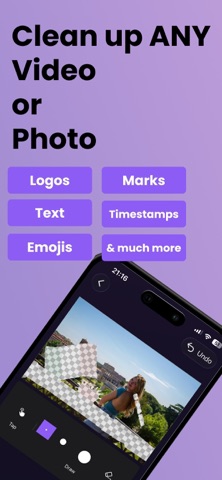



Description by Ben Does Apps Ltd Written by the developer, not by AppBrain. Click to read.
• Uses the latest in AI technology and can handle even large and complex objects without blur!
• Works on any video or photo.
• No need for drawing, just tap the area with the distraction and we will find it for you.
• Save your TikTok videos with a link.
• Handle moving objects on videos with frame-by-frame removal.
• You can also add watermarks to your content whether it's videos or photos.
FAQs
Can I remove unwanted distractions from my photography?
Yes our latest AI can handle even the largest and most complex objects.
Can I remove distractions from my photos and videos downloaded from social media?
Yes you can. For TikTok videos you can save the video using a link. For the others you can select the unwanted area to erase by tapping or drawing and it will be removed using AI so it looks natural (no blur).
Can I remove distractions from my AI generated videos?
Yes absolutely. Whether they're from Sora, Veo, or any other generator, you can select the area to erase by tapping or drawing and it will be removed using AI so it looks natural (no blur).
Can I remove distractions from outputs of my video editing software?
Yes, we can handle these easily. Just tap on the unwanted area.
Can I remove distractions from my AI generated photos?
Yes, just tap on things you want to remove, or draw over them. It gets removed perfectly as if it was never there.
Does MarkOff blur the removed area of the video like other apps?
No, other object removers, especially video ones, just blur the area which looks bad. We use AI for incredible, non-blurry results.
Can Markoff handle distractions in videos that move to different places?
Yes you can have tap/draw different areas to remove for different parts of the video, so you can get rid of things even if it they move or change shape.
Is MarkOff free?
You can try out the app for free to see if it works for you, but to continue to use it you'll need to subscribe to pro.
How can I find out more about MarkOff and how to use it?
Go to our website: https://MarkOff.app
Pro:
• You can subscribe to unlock Pro, which gives you unlimited free access to removing distractions from photos and videos.
• Subscriptions auto-renew at the end of current period, unless cancelled 24-hours in advance prior to the end of the current period. The subscription fee is charged to your iTunes account at confirmation of purchase. You may manage your subscription and turn off auto-renewal by going to your Account Settings after purchase. Per Apple policy, no cancellation of the current subscription is allowed during active subscription period. Once purchased, refunds will not be provided for any unused portion of the term.
Terms of use: https://www.apple.com/legal/internet-services/itunes/dev/stdeula/
Privacy policy: https://bendoesapps.com/privacy
Contact us: ben@bendoesapps.com
Disclaimer
This App is not affiliated with or endorsed by any app, platform, product or organisation mentioned. Any violations of intellectual property rights is the sole responsibility of the user. Before editing content, you must make sure to have the permission to edit that content from all copyright owners.
Safety and technology
Found in the app by AppBrain- Price
- Free
- App size
- 155.5 MB
- Content rating
- Everyone
Technologies used by Watermark & Remover - MarkOff
Releases
Updates seen on the App Store- Version
- 15
- Launched
- May 2026
No changelog data
Alternatives
Similar apps and more from Ben Does Apps LtdAlternatives to Watermark & Remover - MarkOff


More from Ben Does Apps Ltd




Rankings
App Store top chartsApp Store Rankings for Watermark & Remover - MarkOff
About the app and developer
About Watermark & Remover - MarkOff
Watermark & Remover - MarkOff is a photo & video app developed by Ben Does Apps Ltd.
What is the rating of Watermark & Remover - MarkOff?
Watermark & Remover - MarkOff is rated 3.40 out of 5 stars, based on 5 ratings.
Is Watermark & Remover - MarkOff free?
Watermark & Remover - MarkOff is free. The app size is 155.52 MB. The latest version available is 15. The last update was on September 25, 2026.
What are the requirements for Watermark & Remover - MarkOff?
The app has a content rating of Everyone. The app has been available on the App Store since May 2026.
Developer information for Ben Does Apps Ltd
Address:
Frequently asked questions about Watermark & Remover - MarkOff
Is Watermark & Remover - MarkOff free?
Yes. Watermark & Remover - MarkOff is free on the App Store.
Is Watermark & Remover - MarkOff still available?
Yes. Watermark & Remover - MarkOff is on the App Store, and the last update we saw was on September 25, 2026.
How large is Watermark & Remover - MarkOff?
Watermark & Remover - MarkOff is 155.52 MB.
Is Watermark & Remover - MarkOff suitable for children?
App Store rates the content of Watermark & Remover - MarkOff as suitable for everyone.
How do people rate Watermark & Remover - MarkOff?
Watermark & Remover - MarkOff scores 3.40 out of 5 stars, from 5 ratings on the App Store.
Who made Watermark & Remover - MarkOff?
Watermark & Remover - MarkOff was developed by Ben Does Apps Ltd. It is listed in the photo & video category on the App Store.
What are the best alternatives to Watermark & Remover - MarkOff?
People looking at Watermark & Remover - MarkOff also look at these photo & video apps: AutoCut: Silence Remover, QuellCut - Silence Remover, Dual Camera Recorder: Duocamly, Photo Booth – Vintage camera, Watermark Remover AI Eraser.