

Waylens Fleet is made and published by Waylens, Inc. AppBrain is an independent app data site and isn't affiliated with Waylens, Inc. The app name, icon, screenshots and description belong to Waylens, Inc. and are shown as published on the App Store.
AppBrain's verdict
Established- Rating on App Store
- 4.20
- 5 ratings
- Last updated
- August 20, 2026
It doesn't have enough ratings yet to judge what users think.
Rankings
App Store top chartsApp Store Rankings for Waylens Fleet
Competitors
Similar apps and more from Waylens, Inc.Alternatives to Waylens Fleet






More from Waylens, Inc.

Releases
Updates seen on the App Store- Version
- 2.6.1
- Launched
- August 2019
No changelog data
User feedback
Ratings and reviews on the App StoreComments on Waylens Fleet for iOS
We don't have enough comments to show example comments. Please check back later.
Technology
Found in the app by AppBrain- Price
- Free
- App size
- 53.0 MB
- Content rating
- Medium
Technologies used by Waylens Fleet
About the app and developer
About Waylens Fleet
Waylens Fleet is an utilities app developed by Waylens, Inc.
User Ratings
Waylens Fleet is rated 4.20 out of 5 stars. The rating is based on 5 ratings.
App Information
Waylens Fleet is freely available from the App Store. The app size is 53.01 MB. The latest version available is 2.6.1. The last update was on August 20, 2026.
Technical Requirements
The app has a content rating of Medium Maturity. The app has been available on the App Store since August 2019.
Developer information for Waylens, Inc.
Address:
Store listing
By Waylens, Inc., from the App Store

Description by Waylens, Inc. Written by the developer, not by AppBrain. Click to read.
Verify Installation Step-by-step installation verification makes it easy for installers. Steps include:
1. Power wiring check (for direct, 3-wire installs)
2. Video Check to ensure the placement and angle of the camera is properly set
3. FW check to ensure the camera is up to date
4. LTE check to ensure the camera is connected to the network
5. Aux camera check to verify placement and video stream
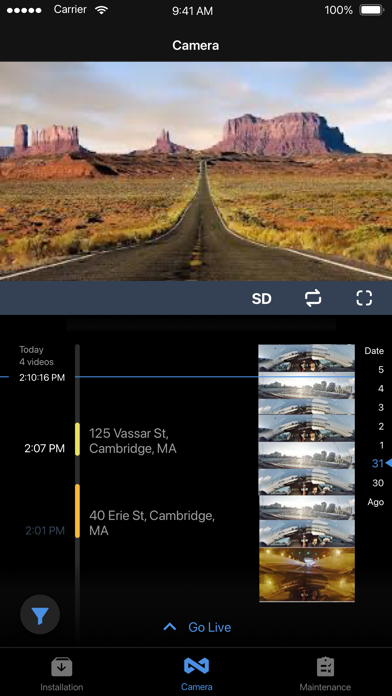
Review, Extract, and Share Historical Video
Fleet Managers can connect to the camera to review historical video from the SD card. Once a video segment of interest is found, they can choose to share it from their smartphone. Filtering capabilities make it easy to identify risky events requiring review, saving managers from sifting through hours of historical video.
Maintain, Troubleshoot, and Verify Camera Operations
Full menu of performance tests that can be used to:
1. Check LTE network
2. Check Power cord wiring
3. Review SD card usage
4. Provision APN, if applicable
5. Check vehicle battery voltage
6. Submit camera logs for support
7. Review aux camera video stream, configure proper orientation