

Waymotion - Travel Animations
Waymotion - Travel Animations is made and published by Vadym Drahanov. AppBrain is an independent app data site and isn't affiliated with Vadym Drahanov. The app name, icon, screenshots and description belong to Vadym Drahanov and are shown as published on the App Store.
AppBrain's verdict
- Last updated
- October 7, 2026
Rankings
App Store top chartsApp Store Rankings for Waymotion - Travel Animations
Competitors
Similar apps and more from Vadym DrahanovAlternatives to Waymotion - Travel Animations


Releases
Updates seen on the App Store- Version
- 1.9.1
- Launched
- July 2026
No changelog data
User feedback
Ratings and reviews on the App StoreComments on Waymotion - Travel Animations for iOS
We don't have enough comments to show example comments. Please check back later.
Technology
Found in the app by AppBrain- Price
- Free
- App size
- 97.1 MB
- Content rating
- Everyone
Technologies used by Waymotion - Travel Animations
About the app and developer
About Waymotion - Travel Animations
Waymotion - Travel Animations is a photo & video app developed by Vadym Drahanov.
User Ratings
The app has no ratings yet.
App Information
Waymotion - Travel Animations is freely available from the App Store. The app size is 97.08 MB. The latest version available is 1.9.1. The last update was on October 7, 2026.
Technical Requirements
The app has a content rating of Everyone. The app has been available on the App Store since July 2026.
Developer information for Vadym Drahanov
Address:
Frequently asked questions about Waymotion - Travel Animations
Is Waymotion - Travel Animations free?
Yes. Waymotion - Travel Animations is free on the App Store.
Is Waymotion - Travel Animations still available?
Yes. Waymotion - Travel Animations is on the App Store, and the last update we saw was on October 7, 2026.
How large is Waymotion - Travel Animations?
Waymotion - Travel Animations is 97.08 MB.
Is Waymotion - Travel Animations suitable for children?
App Store rates the content of Waymotion - Travel Animations as suitable for everyone.
Who made Waymotion - Travel Animations?
Waymotion - Travel Animations was developed by Vadym Drahanov. It is listed in the photo & video category on the App Store.
What are the best alternatives to Waymotion - Travel Animations?
People looking at Waymotion - Travel Animations also look at these photo & video apps: TourVision: Travel Map Video, TravelMotion: Journey Animator, TripScene, AeroAnimate: Travel Map Video, Routeclip.
Store listing
By Vadym Drahanov, from the App Store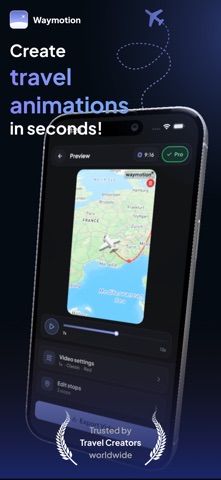

Description by Vadym Drahanov Written by the developer, not by AppBrain. Click to read.
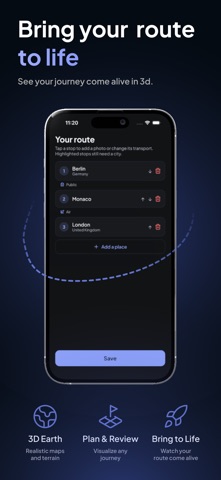
Waymotion turns your real routes into cinematic animated map videos — a vehicle moving along your path, stop by stop, city by city, country by country. And now you don't even have to plot it by hand: just describe your trip in plain words, and AI builds the route for you.
HOW IT WORKS
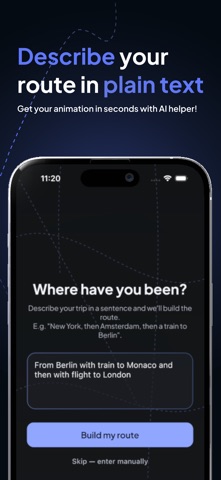
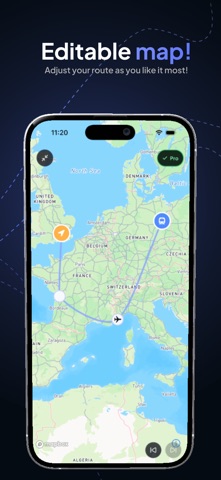
1.Describe your trip — type "New York, then Amsterdam, then a train to Berlin" and AI builds the route, or add waypoints on the map yourself
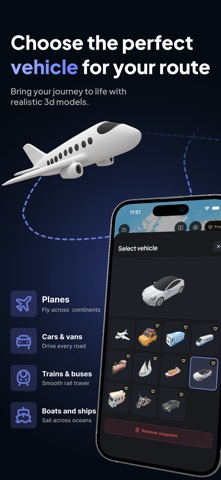
2.Pick your vehicle — car, plane, train, bus, and more
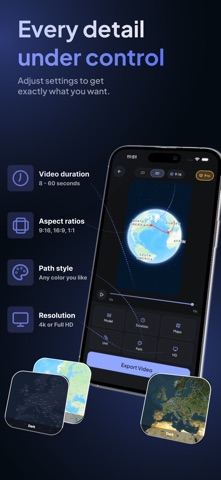
3.Choose your map style — satellite, flat, globe, and more
4.Export — HD or 4K video, ready to share in minutes
No editing skills. No design experience. Just your trip.
FEATURES
•
NEW: AI route builder — describe your journey in words and watch it come to life
•
Animated moving vehicle along your exact route
•
Car, plane, train, bus and more transport modes
•
Globe and satellite views, plus a range of map styles
•
4K and HD video export
•
Add photos from your trip at any waypoint
•
Customize speed, camera angle, and animation style
•
Export optimized for Instagram Reels, TikTok, YouTube Shorts
PERFECT FOR
•
Road trip lovers wanting to replay every mile
•
Travel vloggers and content creators
•
Pilots and frequent flyers logging their routes
•
Cyclists, hikers, and adventurers
•
Anyone who took a trip worth remembering
WHY WAYMOTION
Photo dumps don't tell the full story. An animated route map does — it gives your journey a narrative, a direction, a sense of movement. Your audience doesn't just see where you went. They feel the distance you traveled.
No PowerPoint hacks. No complex video editors. No manual keyframes. Describe your route or drop it on the map, pick your vehicle, hit export.
Every route has a story. Now yours has a video.
Terms of Use (EULA): https://www.apple.com/legal/internet-services/itunes/dev/stdeula/