

WebCheck2 is made and published by Tom Stankey. AppBrain is an independent app data site and isn't affiliated with Tom Stankey. The app name, icon, screenshots and description belong to Tom Stankey and are shown as published on the App Store.
AppBrain's verdict
- Last updated
- June 9, 2026
- Size
- 1.71 MB
User feedback
Ratings and reviews on the App StoreComments on WebCheck2 for iOS
We don't have enough comments to show example comments. Please check back later.
Store listing
By Tom Stankey, from the App Store
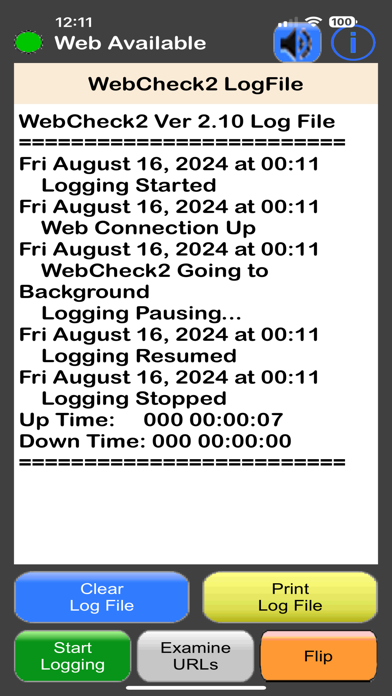


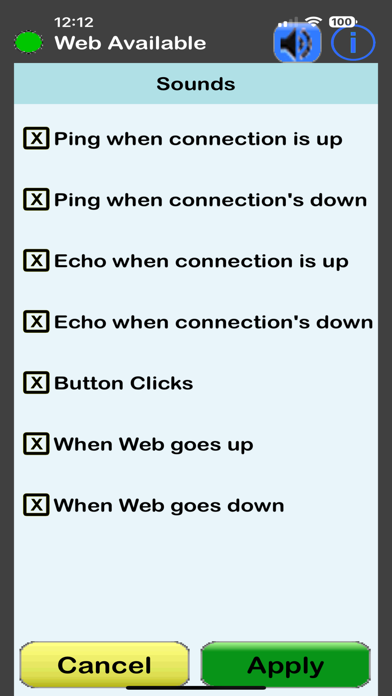


Screenshots by Tom Stankey, from the the App Store listing
Description by Tom Stankey Written by the developer, not by AppBrain. Click to read.
Version 2.20
No Advertisements, no In-App Purchases
Ever wish you knew how long the Internet was down last night? WebCheck2 pings several Web addresses commonly used by Internet Professionals to watch for dropouts in your connectivity. Interruptions caused by your ISP, your local telephone or cable line, your router or hub, your wireless connection or even the WiFi on your iPhone®,iPod touch®or iPad® are detected and can be recorded in a log file. You can also supply WebCheck2 with up to six URLs of your own choice to be pinged along with those built-in to the App. Additionally, any of these URLs can be “disabled” (that is, not included in the list of pinged URLs) or “enabled” as you deem fit.
USER NOTE: Be aware that a poorly typed alphanumeric URL such as “Asherdftffdf” may in fact result in a successful ping. This all depends on the ability of the Web’s Domain Name System (DNS) servers to produce an Internet Protocol (IP) address (URL) that corresponds to this string of characters.
Also note that there are some servers that do not support the Ping Packets and will therefore not respond to WebCheck2.
Here’s a brief list of WebCheck2’s features.
Automatically does nearly continuous checks of your Internet connection status
Can record pertinent information into a log file, complete with time and date stamps.
The log file can be printed to a WiFi printer
WebCheck2 can be left in foreground so logging is continuous.
WebCheck2 will dim the screen after 2 minutes of hands-off operation. Any touch will restore the screen to its previous brightness level.
WebCheck2’s functionality is available on two screens.
The Front Screen:
Web Availability is indicated by a Green Light
Log file generation can be started or stopped
The total connection up time and connection down time for the most recent logging session are displayed.
A simulated oscilloscope screen shows a nice animation of an outgoing pulse whenever a ping has started and an animated “echo” image when the ping is successful.
Sounds corresponding to the beginning of a ping, the end of a ping, Web Up, Web Down and button clicks are provided. Individual sounds may be muted by the user.
The Back Screen:
Web Availability is indicated by a Green Light
Log file generation can be started or stopped
The log file can be viewed at any time.
The log file can be printed to a WiFi printer if desired.
During logging, events such as gaps in connectivity, ping failures, starting and stopping monitoring, exiting and restarting WebCheck2 are recorded in the log file, along with time and date stamps.
The log file can be cleared out at any time.
All sounds can be individually muted or un-muted
The built-in URLs can be removed from the pinging list via a touch as desired.
Up to six user URLs can be added to the list of those pinged.
Safety and technology
Found in the app by AppBrain- Price
- $0.99
- App size
- 1.71 MB
- Content rating
- Everyone
Technologies used by WebCheck2
Releases
Updates seen on the App Store- Version
- 2.20
- Launched
- July 2020
No changelog data
Alternatives
Similar apps and more from Tom StankeyAlternatives to WebCheck2







More from Tom Stankey

Rankings
App Store top charts- Highest rank
- #87
- Chart
- Top Paid
- Utilities
- Country
- Turkey
App Store Rankings for WebCheck2
Top rankings
| Rank | Country | Category | List |
|---|---|---|---|
| 87 | Turkey | Utilities | Top Paid |
Ranking history in Turkey
About the app and developer
About WebCheck2
WebCheck2 is an utilities app developed by Tom Stankey.
User Ratings
The app has no ratings yet.
App Information
WebCheck2 costs $0.99. The app size is 1.71 MB. The latest version available is 2.20. The last update was on June 9, 2026.
Technical Requirements
The app has a content rating of Everyone. The app has been available on the App Store since July 2020.
Developer information for Tom Stankey
Address: