WeekSquire: AI Weekly Planner is made and published by
Squire Builds.
AppBrain is an independent app data site and isn't affiliated with Squire Builds.
The app name, icon, screenshots and description belong to Squire Builds and are shown as
published on the App Store.
About WeekSquire: AI Weekly Planner
WeekSquire: AI Weekly Planner is a productivity app developed by Squire Builds.
User Ratings
The app has no ratings yet.
App Information
WeekSquire: AI Weekly Planner is freely available from the App Store. The app size is 39.20 MB. The latest version available is 1.0.3. The last update was on September 13, 2026.
Technical Requirements
The app has a content rating of Everyone. The app has been available on the App Store since August 2026.
Description by Squire Builds(from the App Store)
Most planning apps want you to follow a schedule. WeekSquire follows you.
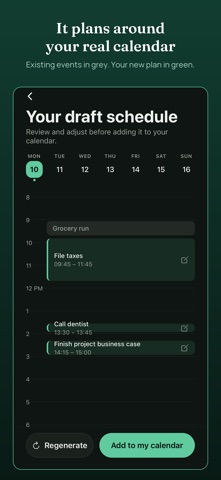
A list in your head has no times on it, so the week fills up with everything else. Once a week, brain-dump what needs doing and WeekSquire proposes times for each task around the calendar you already keep. You review, adjust, and confirm. Each task becomes a real event in your existing calendar, not a fourth app to check.
Then life happens, and that's fine. Nothing here tracks a streak or scolds you for a missed task. Didn't get to something? It just moves to your backlog for next time, or you mark it Someday. Plans change mid-week all the time, and WeekSquire can rebuild the rest of the week around what actually happened, not what you originally guessed.
HOW IT WORKS
1. Brain-dump your tasks. Type in whatever needs doing this week, no formatting, no folders, just the list.
2. AI proposes a schedule. WeekSquire reads your existing calendar and proposes times for each task around what's already there, fit to your week, not a template.
3. Review, adjust, confirm. Nudge anything that doesn't fit, then confirm. Each task becomes a real calendar event.
WHAT MAKES IT DIFFERENT
- Built around your rhythm, not a rigid plan. Move things, skip things, catch up later. There's no penalty for a week going sideways. - No account, no sign-in. Your device is all it needs. - Works with the calendar you already use. No new app to check every day, WeekSquire writes straight to your existing calendar. - One-way sync. WeekSquire reads your calendar for context and writes the schedule you confirm. It never edits or deletes anything it didn't create. - Deadlines and pinned days. Tell WeekSquire a task must land on a specific day, or just needs to be done by a certain date, and it plans around that. - Recurring tasks. Set something to repeat once or several times a week and it re-enters your plan automatically, no rebuilding from scratch.
FREE
- Up to 5 scheduled tasks per weekly planning session - Full backlog storage, no cap - One regenerate per session if the first proposal doesn't work - Deadlines, one pinned day per task, and hour-range constraints
WEEKSQUIRE PRO (monthly or yearly subscription, 14-day free trial on the yearly plan, price shown at checkout)
- Unlimited tasks each week - Recurring tasks and full backlog - Midweek reshuffle, anytime your week changes - Unlimited quick-add shortcuts - Pin a task to more than one day a week - Smarter scheduling for harder weeks
PRIVACY
No account or sign-in is required. Your tasks and calendar are sent securely to build your plan. They are never sold, and never used for anything but your plan. Full privacy policy: weeksquire.com/privacy.html
TERMS
WeekSquire Pro is an auto-renewing subscription. Full terms of use, including subscription and cancellation details: weeksquire.com/terms.html
Each subscription will automatically renew 3 days before the expiration date for
the same time period. Subscriptions can be cancelled at any time before the renewal.