

Weight Widgets - Tracker & Log
Weight Widgets - Tracker & Log is made and published by Suguru Yamada. AppBrain is an independent app data site and isn't affiliated with Suguru Yamada. The app name, icon, screenshots and description belong to Suguru Yamada and are shown as published on the App Store.
AppBrain's verdict
- Rating on App Store
- 5.00
- 3 ratings
- Last updated
- October 8, 2026
- Size
- 9.85 MB
It doesn't have enough ratings yet to judge what users think.
User feedback
Ratings and reviews on the App StoreComments on Weight Widgets - Tracker & Log for iOS
We don't have enough comments to show example comments. Please check back later.
Store listing
By Suguru Yamada, from the App Store

Description by Suguru Yamada Written by the developer, not by AppBrain. Click to read.
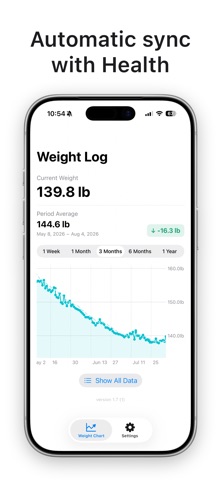
The app reads what is already recorded in the Health app and draws it as a smooth, interactive chart. With Home Screen and Lock Screen widgets and an Apple Watch app, your progress is always a glance away — no need to open the app.
WHAT YOU CAN TRACK
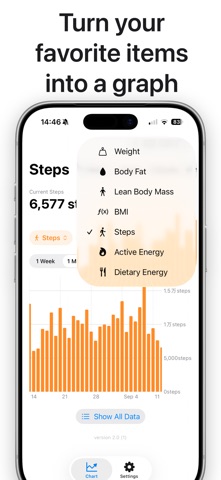
Seven metrics: weight, body fat percentage, lean body mass, BMI, steps, active energy and dietary energy. Show only the ones you care about — the app asks Health for permission to read just those.
FEATURES
- Automatic Health sync
Your data flows in from the Health app. No manual entry: any scale, tracker or food app that writes to Apple Health works right away.
- An interactive trend chart
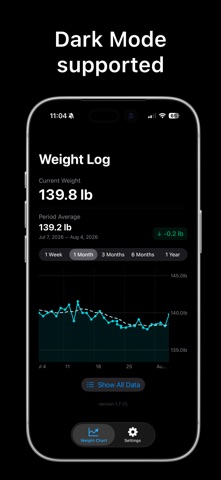
View 1 week, 1 month, 3 months, 6 months or 1 year. Scroll sideways to explore your full history. Metrics that accumulate through the day, like steps and calories, are shown as daily totals in a bar chart.
- 7-day moving average
Cut through daily fluctuations and see your true trend. The moving average line can be toggled on or off at any time.
- Period stats that follow your scroll
As you move through the chart, the average and the total change for the visible window update in real time.
- Home Screen and Lock Screen widgets
Three Home Screen sizes (small, medium, large) plus rectangular, circular and inline Lock Screen widgets. Each widget can be set to its own metric and time period.
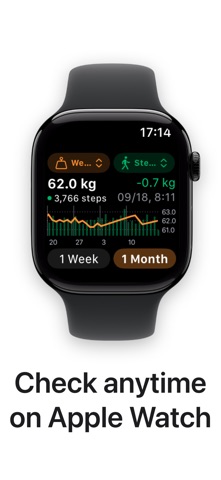
- Apple Watch app
See charts for the past week or month and your latest value right on your wrist, and switch metrics on the watch. Complications and the Smart Stack are supported too, with the metric of your choice for each widget.
- Themes
Pick from 30+ themes, in light and dark variants, to recolour the whole app, your widgets and Apple Watch at once. Prefer no theme? Choose from 20 chart colours instead.
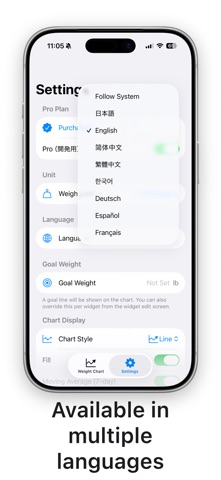
- Available in 8 languages
English, Japanese, Simplified Chinese, Traditional Chinese, Korean, German, Spanish and French. Follows your system language, or set one inside the app.
ABOUT PRO
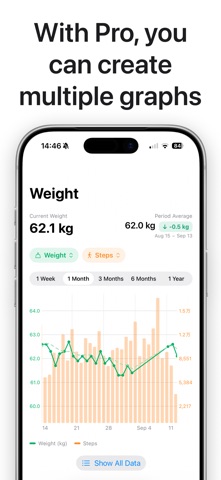
- Dual-axis chart
Overlay two metrics on one chart — weight against steps, for example — in the app, in your widgets and on Apple Watch.
- All themes
Use all 30+ themes, not just the 4 free ones.
- No ads
Pro comes as a monthly plan (auto-renewing), a yearly plan (auto-renewing), or a one-time purchase that never expires. Prices are shown on the purchase screen in the app.
Subscriptions renew automatically unless auto-renew is turned off at least 24 hours before the end of the current period. Payment is charged to your Apple Account at confirmation of purchase, and renewals are charged within 24 hours before the period ends. You can cancel at any time in Settings > Apple Account > Subscriptions.
Terms of Use: https://aucfan-suguru-yamada.github.io/weight-widget/terms
Privacy Policy: https://aucfan-suguru-yamada.github.io/weight-widget/privacy-policy
PRIVACY
The app reads only the metrics you choose to display, and never writes to the Health app. Your data stays on your iPhone and Apple Watch and is never sent to any server. No account is required.
The free version may use an advertising identifier (IDFA) to show relevant ads. Health data is never used for advertising.
Make tracking your body simple enough to actually keep up with.
Safety and technology
Found in the app by AppBrain- Price
- Free
- App size
- 9.85 MB
- Content rating
- Everyone
Technologies used by Weight Widgets - Tracker & Log
Releases
Updates seen on the App Store- Version
- 2.3
- Launched
- April 2026
No changelog data
Alternatives
Similar apps and more from Suguru YamadaAlternatives to Weight Widgets - Tracker & Log


More from Suguru Yamada


Rankings
App Store top chartsApp Store Rankings for Weight Widgets - Tracker & Log
About the app and developer
About Weight Widgets - Tracker & Log
Weight Widgets - Tracker & Log is a health & fitness app developed by Suguru Yamada.
User Ratings
Weight Widgets - Tracker & Log is rated 5.00 out of 5 stars. The rating is based on 3 ratings.
App Information
Weight Widgets - Tracker & Log is freely available from the App Store. The app size is 9.85 MB. The latest version available is 2.3. The last update was on October 8, 2026.
Technical Requirements
The app has a content rating of Everyone. The app has been available on the App Store since April 2026.
Developer information for Suguru Yamada
Address:
Frequently asked questions about Weight Widgets - Tracker & Log
Is Weight Widgets - Tracker & Log free?
Yes. Weight Widgets - Tracker & Log is free on the App Store.
Is Weight Widgets - Tracker & Log still available?
Yes. Weight Widgets - Tracker & Log is on the App Store, and the last update we saw was on October 8, 2026.
How large is Weight Widgets - Tracker & Log?
Weight Widgets - Tracker & Log is 9.85 MB.
Is Weight Widgets - Tracker & Log suitable for children?
App Store rates the content of Weight Widgets - Tracker & Log as suitable for everyone.
How do people rate Weight Widgets - Tracker & Log?
Weight Widgets - Tracker & Log scores 5.00 out of 5 stars, from 3 ratings on the App Store.
Who made Weight Widgets - Tracker & Log?
Weight Widgets - Tracker & Log was developed by Suguru Yamada. It is listed in the health & fitness category on the App Store.
What are the best alternatives to Weight Widgets - Tracker & Log?
People looking at Weight Widgets - Tracker & Log also look at these health & fitness apps: PillTap, Pregnancy Tracker - Bloom, HealthPort - ヘルスケアデータ出力・血圧手帳, My Weight Goal : My Weight, BMI calculator: Weightnote.