

wemera: Dual Front Back Camera
wemera: Dual Front Back Camera is made and published by Younghwa Kim. AppBrain is an independent app data site and isn't affiliated with Younghwa Kim. The app name, icon, screenshots and description belong to Younghwa Kim and are shown as published on the App Store.
AppBrain's verdict
- Last updated
- October 5, 2026
Rankings
App Store top chartsApp Store Rankings for wemera: Dual Front Back Camera
Competitors
Similar apps and more from Younghwa KimAlternatives to wemera: Dual Front Back Camera


Releases
Updates seen on the App Store- Version
- 1.0.13
- Launched
- August 2026
No changelog data
User feedback
Ratings and reviews on the App StoreComments on wemera: Dual Front Back Camera for iOS
We don't have enough comments to show example comments. Please check back later.
Technology
Found in the app by AppBrain- Price
- Free
- App size
- 119.1 MB
- Content rating
- Everyone
Technologies used by wemera: Dual Front Back Camera
About the app and developer
About wemera: Dual Front Back Camera
wemera: Dual Front Back Camera is a photo & video app developed by Younghwa Kim.
User Ratings
The app has no ratings yet.
App Information
wemera: Dual Front Back Camera is freely available from the App Store. The app size is 119.11 MB. The latest version available is 1.0.13. The last update was on October 5, 2026.
Technical Requirements
The app has a content rating of Everyone. The app has been available on the App Store since August 2026.
Developer information for Younghwa Kim
Address:
Store listing
By Younghwa Kim, from the App Store



Description by Younghwa Kim Written by the developer, not by AppBrain. Click to read.
BOTH CAMERAS, ONE SHOT
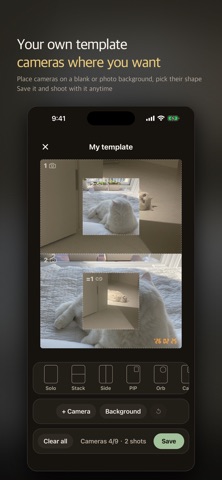
• The view in front of you and your face at the same time — a true simultaneous capture, not two shots stitched together
• Move and resize the small window wherever you want
• Record video with both cameras too (up to 30 seconds)
A PHOTO BOOTH ANYWHERE
• Shoot 4 or 6 frames into one strip
• Retake only the frame you do not like
• Voice countdown so you can shoot alone
• Drop photos from your album into any frame
SET IT BEFORE YOU SHOOT
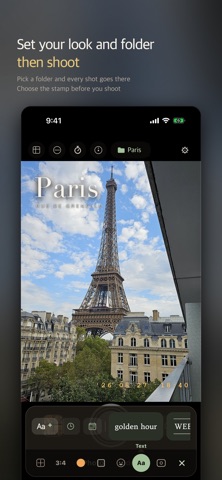
• Choose filters, textures and templates up front — that is how it captures
• Shooting solo, go wider or zoom in and stay sharp (0.5×·1×·2×)
• Raise photo quality in Settings, up to what your device supports
• The color on screen is the color you save
• Set a destination folder and every shot goes straight there
• Save a setup as My Template and reuse it anytime
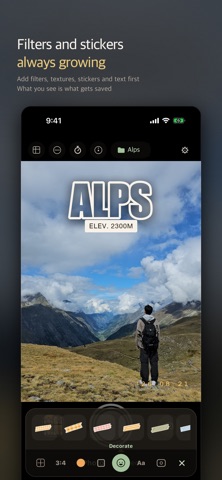
FILTERS AND DECORATION
• Pick a filter and texture, then dial the strength
• Place stickers and text anywhere — turn your own photos into stickers
• Leave the time and date as a film engraving ('26 08 26)
• New filters and decorations keep arriving with updates
WHEN YOU NEED QUIET
• Silent shutter — beside a sleeping baby, in a quiet cafe or gallery
• It saves from the video stream, so quality is a little lower than a normal shot
AFTER THE SHOT
• Sort into folders and browse by month
• Re-edit saved shots — change the template and filters anytime
• Right after the shot, Other frames saves the same photo with a different frame
KEPT SIMPLE
• No account, no sign-up — open and shoot
• Your photos never leave your device
Requires iOS 15.1 or later. Simultaneous front + back capture and recording work on iPhone XS / XR and later; earlier models shoot with one camera at a time.