

WeSpend - Snap or chat to log
WeSpend - Snap or chat to log is made and published by Studio Taeo. AppBrain is an independent app data site and isn't affiliated with Studio Taeo. The app name, icon, screenshots and description belong to Studio Taeo and are shown as published on the App Store.
AppBrain's verdict
- Last updated
- September 10, 2026
Rankings
App Store top chartsApp Store Rankings for WeSpend - Snap or chat to log
Releases
Updates seen on the App Store- Version
- 1.3.3
- Launched
- May 2026
No changelog data
User feedback
Ratings and reviews on the App StoreComments on WeSpend - Snap or chat to log for iOS
We don't have enough comments to show example comments. Please check back later.
Technology
Found in the app by AppBrain- Price
- Free
- App size
- 59.5 MB
- Content rating
- Everyone
Technologies used by WeSpend - Snap or chat to log
About the app and developer
About WeSpend - Snap or chat to log
WeSpend - Snap or chat to log is a finance app developed by Studio Taeo.
What is the rating of WeSpend - Snap or chat to log?
WeSpend - Snap or chat to log has no ratings yet.
Is WeSpend - Snap or chat to log free?
WeSpend - Snap or chat to log is free. The app size is 59.49 MB. The latest version available is 1.3.3. The last update was on September 10, 2026.
What are the requirements for WeSpend - Snap or chat to log?
The app has a content rating of Everyone. The app has been available on the App Store since May 2026.
Developer information for Studio Taeo
Address:
Store listing
By Studio Taeo, from the App Store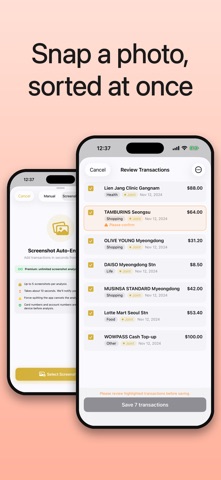



Description by Studio Taeo Written by the developer, not by AppBrain. Click to read.
WeSpend is an easy, shared budget app that sorts your spending from a photo or screenshot — no complex bank or card linking, and no tedious typing.
Stop typing. A photo or screenshot is all it takes
Just pick a photo or screenshot of your spending. WeSpend reads the transactions and adds them to your budget at once. Card and account numbers are hidden on your device before analysis, so your data stays safe.
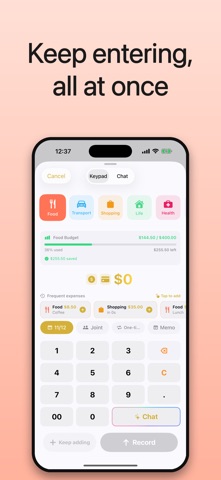
Quick to enter by hand, too
Want to add one at a time? The calculator-style keypad makes it instant — just a few taps.
Just talk to your budget
Meet Money Helper. Jot "Coffee 5,000 yesterday" and it sorts the expense for you — or ask "How much did I spend this month?" and get an answer right away. Plain-language entry plus instant breakdowns for today, this week, and this month, right from the Home screen.
What matters is what comes next
The point isn't only where the money went — it's what you do next. Set category budgets by day, week, or month, and every time you spend you'll see how much you've used and how much is left, turning vague resolutions into real control.
A budget you share
Got a partner or a group? Keep one budget together with your members, with clear and transparent records.
Even when you go abroad
Almost every world currency with near real-time exchange rates. Log expenses in different currencies and they're converted to your budget's base currency automatically.
A separate budget for every purpose
Travel, home, a group — when the purpose differs, create as many budgets as you like and keep them from mixing.
Handy features
• Check spending from the Lock/Home Screen widget
• Money Helper — log and ask in plain language
• Auto-add transactions from a photo or screenshot
• Calculator-style keypad for fast entry
• Tell card and cash apart
• One-time vs. recurring expenses
• Log in any currency — converted automatically
• Almost every world currency with near real-time rates
• Add unlimited budget members
• Add unlimited budgets by purpose
• 38 languages supported