Download Android Apps and Games
AppBrain
  • Apps
  • Apps being viewed right now Trending apps today Most popular apps All-time most downloaded apps Top rated apps iPhone and iPad apps
  • Intelligence ▾
    Intelligence overview → Track any Android app or your whole market
    Track & analyze
    Keyword Tracker & OptimizerTrack & improve Play rankings App Performance ReportOne-off PDF for any app StatisticsFree Android & Play market stats
    Promote your app
    Featured Apps App Links
  • Intelligence
  • Pricing
  • Dashboard
  • Sign up
  • Log in
Last updated on: 2026-09-18
App Store Apps > Utilities > WhatChanged – Folder Compare
WhatChanged – Folder Compare icon

WhatChanged – Folder Compare

1.80.0
Iri You
0.00
0 reviews
$9.99

WhatChanged – Folder Compare Screenshot 1 of 9
WhatChanged – Folder Compare Screenshot 2 of 9
WhatChanged – Folder Compare Screenshot 3 of 9
WhatChanged – Folder Compare Screenshot 4 of 9
WhatChanged – Folder Compare Screenshot 5 of 9
WhatChanged – Folder Compare Screenshot 6 of 9
WhatChanged – Folder Compare Screenshot 7 of 9
WhatChanged – Folder Compare Screenshot 8 of 9
WhatChanged – Folder Compare Screenshot 9 of 9
Download from the App Store

About WhatChanged – Folder Compare

WhatChanged – Folder Compare is an utilities app developed by Iri You.

User Ratings

The app has no ratings yet.

App Information

WhatChanged – Folder Compare costs $9.99 to download. The download size is 30.57 MB. The latest version available is 1.80.0. The last update was on September 1, 2026.

Technical Requirements

The app has a content rating of Everyone. The app has been available on the App Store since February 2026.

Description
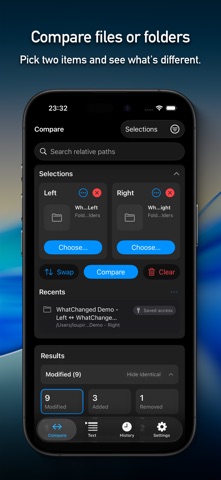
WhatChanged is a file and folder comparison app built to answer one practical question: what changed between these two copies?

Compare two files or two folders on iPhone, iPad, and Mac and get a clear summary of added, removed, modified, renamed, and identical items. Use optional SHA-256 verification when metadata alone is not enough.

On iPhone and iPad, start inside the app or send exactly two files from Files straight to WhatChanged. It is useful for backups, exports, cloud-drive copies, builds, and any “did this transfer match?” check.


◼ File and folder comparison

• Compare two files or two folders as Left and Right

• Review added, removed, modified, renamed, and identical items

• Use smart ignore rules for hidden items, extensions, names, and patterns

• Ignore line-ending or whitespace-only changes when appropriate

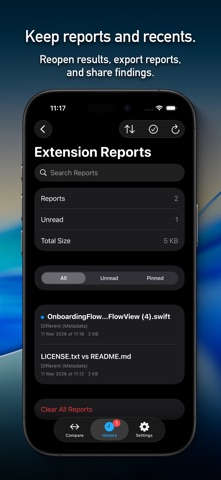
• Preview supported files, keep recent comparisons, and export or share reports

• Verify content with optional SHA-256 and cached re-checks

• Use the app in 25 languages, with an optional in-app language override


◼ From the share sheet

In Files, or another app that can share files, select exactly two files.

Tap Share → WhatChanged.

The comparison opens automatically.

Tip:
The extension is intended for file-to-file comparison. To compare folders, open the main app.


◼ Safe Merge

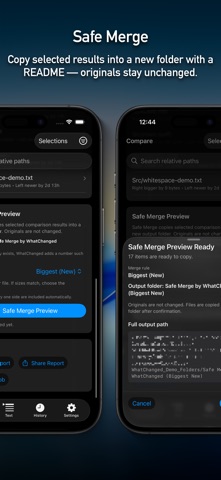
Run a folder comparison, open Safe Merge, and choose a main rule: Newest, Oldest, Smallest (New), Smallest (Old), Biggest (New), or Biggest (Old).

The Safe Merge Assistant shows selected items, recommendations, conflicts, blocking issues, output details, and safety checks before anything is copied.

For individual output paths, you can keep the main Merge Rule or choose Left or Right. Recommended continues to show what the main rule would choose, while Selected shows what will actually be copied. The “+ Custom” indicator appears whenever exceptions are active.

WhatChanged recalculates the plan and verifies it again before copying. Custom merges use a clearly named output folder, such as “Safe Merge by WhatChanged (Newest + Custom).”

Successful merges include a generated README describing the compared folders, main rule, custom selections, copied items, output paths, counts, and safety notes.


◼ Quick text checks

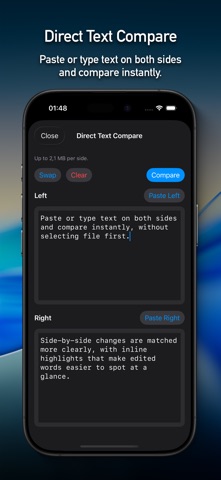
Use Direct Text Compare, supported text files, or folder-pair text results for convenient text checks.

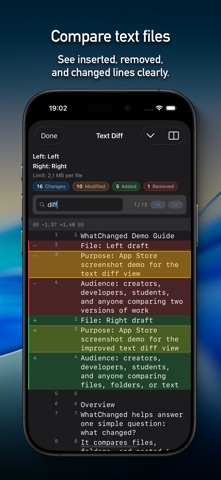
Copy a unified-diff-style result, search with Find in Diff, move between matches, highlight rows, and review Diff Summary counts.

These text tools are included for quick comparison inside a file-and-folder utility. WhatChanged is not designed as a full drafting workspace.


◼ Looking for a dedicated text workspace?

DiffDraft is designed specifically for comparing text versions and composing a clean final draft in a row-aware workspace. Source rows, draft rows, manual rows, and intentional gaps stay visually aligned, helping long reviews remain stable and trustworthy while you cherry-pick, edit, and continue later.

View DiffDraft on the App Store:
https://apps.apple.com/us/app/diffdraft/id6779625050


◼ Safe by design

WhatChanged does not modify or delete your originals.

Comparisons are read-only. Safe Merge writes only to a new output folder after you confirm the merge and every required safety check passes.


◼ Official website

Product information, support, privacy details, and terms are available here:

https://hazybyte.studio/whatchanged/


Requires iOS 16.6 or later.


Terms of Use:
https://hazybyte.studio/whatchanged/terms-of-use/
Show more Show less

More data about WhatChanged – Folder Compare

Price $9.99
Rating No ratings
Ranking Not ranked
Version 1.80.0
App download size 30.6 MB
Suitable for Everyone

More from Iri You

Hangul Tactica: Jamo icon Hangul Tactica: Jamo
Iri You
0.0
Free
SoundsFit icon SoundsFit
Iri You
0.0
$9.99
Kcal Crash icon Kcal Crash
Iri You
0.0
$0.99
OnMyDesk: Private Vault icon OnMyDesk: Private Vault
Iri You
0.0
$9.99

Changelog of WhatChanged – Folder Compare

No changelog data

Developer information for Iri You

Iri You

Address:

Share WhatChanged – Folder Compare

Comments on WhatChanged – Folder Compare for iOS

We don't have enough comments to show example comments. Please check back later.

App Store Rankings for WhatChanged – Folder Compare

This app is not ranked

Technologies used by WhatChanged – Folder Compare

Frequently asked questions about WhatChanged – Folder Compare

Is WhatChanged – Folder Compare free?

No. WhatChanged – Folder Compare costs $9.99 on the App Store.

Is WhatChanged – Folder Compare still available?

Yes. WhatChanged – Folder Compare is on the App Store, and the last update we saw was on September 1, 2026.

How large is the WhatChanged – Folder Compare download?

WhatChanged – Folder Compare is 30.57 MB to download.

Is WhatChanged – Folder Compare suitable for children?

App Store rates the content of WhatChanged – Folder Compare as suitable for everyone.

Who made WhatChanged – Folder Compare?

WhatChanged – Folder Compare was developed by Iri You. It is listed in the utilities category on the App Store.

Popular Utilities Apps Apps on sale Today's trending apps Apps other people are watching Top new apps
Overview Reviews Rankings Technology
More hot apps 🔥
AppBrain Intelligence premium content

Subscribe now to get full and unlimited access to AppBrain Intelligence. You'll have access to:

  • App Intelligence dashboard (performance timeline, competitor comparison, country rankings, insight cards)
  • Detailed ranking data per app
  • Full timeline per developer
  • Device market shares data per country
  • Unlimited keyword tracking
1 Month

$75/mo
(billed every month)

SAVE 0%
Subscribe
3 Months

$65/mo
($195 billed every 3 months)

SAVE 13%
Subscribe
1 Year

$57.50/mo
($690 billed every year)

SAVE 23%
Subscribe
Each subscription will automatically renew 3 days before the expiration date for the same time period. Subscriptions can be cancelled at any time before the renewal.

AppBrain is a directory focused on discovering great apps and games. We give statistics, rankings and search options that Google Play and the App Store don't have. All trademarks are owned by their respective owners. AppBrain doesn't offer APKs or binaries, and always lets users install the official version from Google Play or the App Store.

More apps

  • Top Android apps being viewed
  • View Happy Birthday Photo Frame
  • Army CID Tips Android App
  • Earn More

App statistics

  • Android statistics
  • Google Play Developer stats
  • Trending Android Apps
  • Trending iOS apps
  • Top popular Apps
  • Buy the best Android phone

About AppBrain

  • Contact
  • Privacy
  • Documentation
  • DMCA takedowns
  • Articles
  • Blog
  • Free webpage for your Android app
© 2010-2026 - AppBrain