

Whats Web: Dual Messenger
Whats Web: Dual Messenger is made and published by IV Finance SIA. AppBrain is an independent app data site and isn't affiliated with IV Finance SIA. The app name, icon, screenshots and description belong to IV Finance SIA and are shown as published on the App Store.
AppBrain's verdict
- Rating on App Store
- 4.86
- 7 ratings
- Last updated
- November 21, 2025
It doesn't have enough ratings yet to judge what users think.
Rankings
App Store top chartsApp Store Rankings for Whats Web: Dual Messenger
Competitors
Similar apps and more from IV Finance SIAAlternatives to Whats Web: Dual Messenger


Releases
Updates seen on the App Store- Version
- 1.0.1
- Launched
- September 2025
No changelog data
User feedback
Ratings and reviews on the App StoreComments on Whats Web: Dual Messenger for iOS
We don't have enough comments to show example comments. Please check back later.
Technology
Found in the app by AppBrain- Price
- Free
- App size
- 78.3 MB
- Content rating
- Everyone
Technologies used by Whats Web: Dual Messenger
About the app and developer
About Whats Web: Dual Messenger
Whats Web: Dual Messenger is a social networking app developed by IV Finance SIA.
User Ratings
Whats Web: Dual Messenger is rated 4.86 out of 5 stars. The rating is based on 7 ratings.
App Information
Whats Web: Dual Messenger is freely available from the App Store. The app size is 78.32 MB. The latest version available is 1.0.1. The last update was on November 21, 2025.
Technical Requirements
The app has a content rating of Everyone. The app has been available on the App Store since September 2025.
Developer information for IV Finance SIA
Address:
Frequently asked questions about Whats Web: Dual Messenger
Is Whats Web: Dual Messenger free?
Yes. Whats Web: Dual Messenger is free on the App Store.
Is Whats Web: Dual Messenger still available?
Yes. Whats Web: Dual Messenger is on the App Store, and the last update we saw was on November 21, 2025.
How large is Whats Web: Dual Messenger?
Whats Web: Dual Messenger is 78.32 MB.
Is Whats Web: Dual Messenger suitable for children?
App Store rates the content of Whats Web: Dual Messenger as suitable for everyone.
How do people rate Whats Web: Dual Messenger?
Whats Web: Dual Messenger scores 4.86 out of 5 stars, from 7 ratings on the App Store.
Who made Whats Web: Dual Messenger?
Whats Web: Dual Messenger was developed by IV Finance SIA. It is listed in the social networking category on the App Store.
What are the best alternatives to Whats Web: Dual Messenger?
People looking at Whats Web: Dual Messenger also look at these social networking apps: Kalika Nagarpalika, Khairahani Nagarpalika, Clone App - Direct Chat, Spreely Social, Brizz : Anonymous Q&A and Chat.
Store listing
By IV Finance SIA, from the App Store


Description by IV Finance SIA Written by the developer, not by AppBrain. Click to read.
Main Features:
1. Dual Account Access: Add a second messaging service by scanning a QR code through Linked Devices.
2. Seamless Web Interface: View chats, send messages, photos, videos, and files through the standard iOS pickers inside the browser-based interface.
3. App Lock & Security: Protect your private talks with a 4-digit PIN. Optional auto-lock when the secure messenger runs in the background.
4. Session Management: Keep your login active for instant access, or clear it manually to require QR connection again.
5. Chat Controls: Search conversations, create a new group, check starred items, select multiple threads, or log out.
6. Network Handling: Clear notifications in case of connection errors or timeouts, with quick retry options.
Additional Tools for Better Communication:
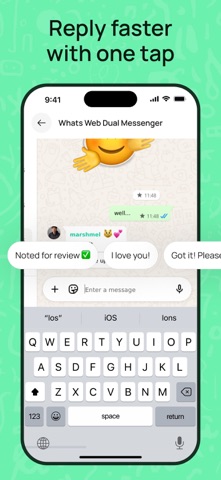
1) Quick Replies: Create a personal library of message templates for frequent phrases and insert them into the chat input field with a single tap.
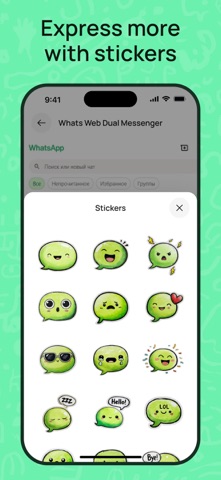
2) Stickers: Browse a local sticker gallery and easily insert stickers into messages using simple copy/paste into the chat field.
3) Quote Cards: Turn any message or quote into a beautiful card image with gradients, textures, or your own photo background — save and send it as a picture from your device.
4) Emoji+: Access favorite emojis, kaomoji, and symbols in one place for quick copy and paste directly into your chat input field.
Customizable Lock Settings:
• Enable/disable App Lock (PIN)
• Lock on background toggle
• Auto-lock delay: immediately / 30 seconds / 1 minute
Note: Access to chat connections is available through an active Premium subscription.
Privacy Policy: https://docs.google.com/document/d/1ffGy79Amn1OGIeQIbBTyKtcAn2Auien4f_OCS9_sRF0/edit?usp=sharing
Term of Use: https://docs.google.com/document/d/1-qBodz4WWfDzofIKY-fOGxHmiPpjT6yUGWPKqkqAB3U/edit?usp=sharing