

WHERE Organize is made and published by 星宇 罗. AppBrain is an independent app data site and isn't affiliated with 星宇 罗. The app name, icon, screenshots and description belong to 星宇 罗 and are shown as published on the App Store.
AppBrain's verdict
- Last updated
- April 10, 2026
- Size
- 5.21 MB
User feedback
Ratings and reviews on the App StoreComments on WHERE Organize for iOS
We don't have enough comments to show example comments. Please check back later.
Store listing
By 星宇 罗, from the App Store


Description by 星宇 罗 Written by the developer, not by AppBrain. Click to read.
1. Organize your items with support for adding photos, descriptions, reminders, and tags.
2. Freely assign items to your house, floor, room, and storage location.
3. Quick search to find what you need in a second.
4. Support batch moving for item organization.
5. Seamless sync across multiple devices.
6. Share item cards directly with family members so you’ll never lose things again.
7. Support light and dark modes for easy switching.
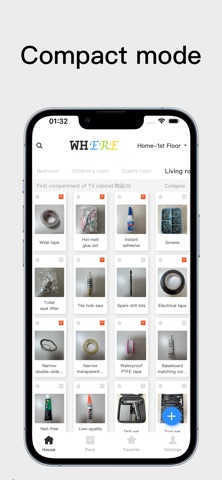
8. Offer both spacious and compact display layouts.
9. Allow folding and expanding storage locations.
---
If you enjoy this app, please leave a review to encourage us.
If you have any questions, suggestions, or feedback, feel free to contact me at sui_hai_cheng@163.com.
You may also submit feedback via the “Feedback” entry in Settings.
Automatic Subscription Service Terms
1. Subscription Service: One Month VIP(1Month),Quarterly VIP(3Months),One Year VIP(1Year)。
2. Subscription Price: One Month VIP(1Month)Price $0.99,Quarterly VIP(3Months)Price $1.99,One Year VIP(1Year) Price $3.99。
3. Payment: Subscriptions are managed by the user. Charges will be applied to your iTunes account upon confirmation of purchase and payment.
4. Renewal: Your Apple iTunes account will be charged within 24 hours prior to the end of the current subscription period. Once payment is successful, the subscription period will be extended by one full cycle.
5. Cancellation: To cancel your subscription, go to your iPhone **Settings** → **iTunes Store & App Store** → tap your **Apple ID**, select **View Apple ID**, go to **Account Settings**, tap **Subscriptions**, then select the subscription service to cancel. If you do not turn off auto-renewal at least 24 hours before the end of the subscription period, the subscription will renew automatically.
Safety and technology
Found in the app by AppBrain- Price
- Free
- App size
- 5.21 MB
- Content rating
- Everyone
Technologies used by WHERE Organize
Releases
Updates seen on the App Store- Version
- 1.0.1
- Launched
- March 2026
No changelog data
Alternatives
Similar apps and more from 星宇 罗Alternatives to WHERE Organize


Rankings
App Store top chartsApp Store Rankings for WHERE Organize
About the app and developer
About WHERE Organize
WHERE Organize is a lifestyle app developed by 星宇 罗.
What is the rating of WHERE Organize?
WHERE Organize has no ratings yet.
Is WHERE Organize free?
WHERE Organize is free. The app size is 5.21 MB. The latest version available is 1.0.1. The last update was on April 10, 2026.
What are the requirements for WHERE Organize?
The app has a content rating of Everyone. The app has been available on the App Store since March 2026.
Developer information for 星宇 罗
Address:
Frequently asked questions about WHERE Organize
Is WHERE Organize free?
Yes. WHERE Organize is free on the App Store.
Is WHERE Organize still available?
Yes. WHERE Organize is on the App Store, and the last update we saw was on April 10, 2026.
How large is WHERE Organize?
WHERE Organize is 5.21 MB.
Is WHERE Organize suitable for children?
App Store rates the content of WHERE Organize as suitable for everyone.
Who made WHERE Organize?
WHERE Organize was developed by 星宇 罗. It is listed in the lifestyle category on the App Store.
What are the best alternatives to WHERE Organize?
People looking at WHERE Organize also look at these lifestyle apps: どこだっけ? 収納・備蓄の保管場所メモ, lilicoco - 居家收納.物品管理.到期提醒, 幸福到家SAAS, Fresho Food Expiry Tracker, StuffBox Reminder.