

WhichWrench
WhichWrench is made and published by Jacob Patrick Sullivan. AppBrain is an independent app data site and isn't affiliated with Jacob Patrick Sullivan. The app name, icon, screenshots and description belong to Jacob Patrick Sullivan and are shown as published on the App Store.
AppBrain's verdict
- Rating on App Store
- 5.00
- 3 ratings
- Last updated
- July 23, 2024
- Size
- 1.07 MB
It doesn't have enough ratings yet to judge what users think.
User feedback
Ratings and reviews on the App StoreComments on WhichWrench for iOS
We don't have enough comments to show example comments. Please check back later.
Store listing
By Jacob Patrick Sullivan, from the App Store




Description by Jacob Patrick Sullivan Written by the developer, not by AppBrain. Click to read.
The WhichWrench paradigm does not impede you with your Note creation. You are empowered to choose the simplest and most effective means to populate WhichWrench with your needed data. This tool combines four independent methods that preserve and present you with convenient retrieval of your information
• Create a note
• Create a note and add picture(s) to the Photos Album (You will need to create your WhichWrench Album in the Apple Photos)
• Simply add a picture to the WhichWrench Album
• Utilize WhichWrench for collecting your needed items or quick notes.
Consistently integrating the WhichWrench note creations and simple interface that Lists the varied notes into your different activities will assist you with reviewing your myriad tasks that are easily forgotten. You will now know to check WhichWrench for tasks and info that you created in the past for future use.
It is important to enter some information into one of the three fields in the DESCRIPTION group. Those fields will display in the List view to allow you to choose the desired note. The entries are updated into the database when you insert or delete characters.
Although WhichWrench was originally created for maintenance it is fully usable for other tasks. The hints in the note edit View are only hints. There is no requirement on what information is entered or how much or how little information is entered into a note.
The notes can consist of any combination text and emoji’s:
• input by keyboard,
• copy and paste,
• Voice Transcription.
The contents in the Photos Album are whatever is valid in Photos. Screenshots and pictures.
Usage Examples:
Support deferred tasks: (Brief entry in Description field. Possibly a picture)
• Too small to make a dedicated trip to the store but great to pick up on a future trip.
• Screws: Create a note with Purpose and screws in the top field. Description of size, type, number needed. Possibly a picture if complex
• Can of spray for metal protection: Probably just a picture of the can in the Album
Important for a brief time: (Type a brief entry into a field in the Description Section)
• the keycode for a bathroom
• the keycode to open the gate from the beach to the resort
Longer lead items that struggle to be remembered as time goes by:
• The part number of the filters and fluids for the tractor oil change. The web address of an online vendor for those supplies.
• A picture from the owner’s manual to for specific procedures or descriptive tables
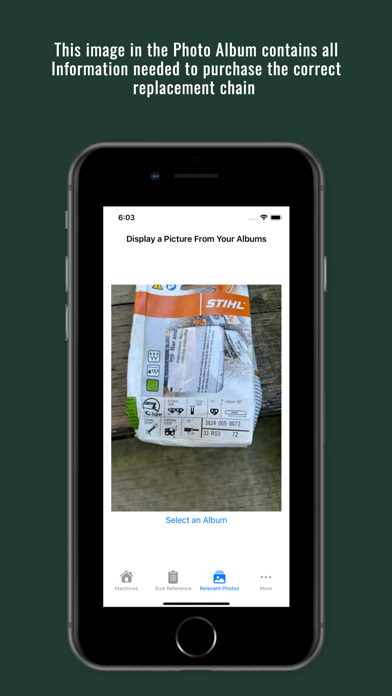
• Chain saw replacement chain. (Create a note with chainsaw model in name and a picture of the replacement chain box)
WhichWrench was created to access critical information which is only needed when actually working on that task. Projects that were not critical to the daily work schedule tended to be forgotten until the pertinent notes are not readily available. Productivity is then frustratingly impacted. The goal of WhichWrench is to decrease the frustration level and increase the success of the user.
Comments and suggestions are always welcome at:
apps@snoreslab.com
Thank You!
Safety and technology
Found in the app by AppBrain- Price
- $0.99
- App size
- 1.07 MB
- Content rating
- Everyone
Technologies used by WhichWrench
Releases
Updates seen on the App Store- Version
- 1.1
- Launched
- July 2024
No changelog data
Rankings
App Store top chartsApp Store Rankings for WhichWrench
About the app and developer
About WhichWrench
WhichWrench is a productivity app developed by Jacob Patrick Sullivan.
What is the rating of WhichWrench?
WhichWrench is rated 5.00 out of 5 stars, based on 3 ratings.
Is WhichWrench free?
WhichWrench costs $0.99. The app size is 1.07 MB. The latest version available is 1.1. The last update was on July 23, 2024.
What are the requirements for WhichWrench?
The app has a content rating of Everyone. The app has been available on the App Store since July 2024.
Developer information for Jacob Patrick Sullivan
Address: