

WholeNote: Export Notes
WholeNote: Export Notes is made and published by 伟 王. AppBrain is an independent app data site and isn't affiliated with 伟 王. The app name, icon, screenshots and description belong to 伟 王 and are shown as published on the App Store.
AppBrain's verdict
- Rating on App Store
- 4.00
- 1 ratings
- Last updated
- August 11, 2026
- Size
- 14.8 MB
It doesn't have enough ratings yet to judge what users think.
User feedback
Ratings and reviews on the App StoreComments on WholeNote: Export Notes for iOS
We don't have enough comments to show example comments. Please check back later.
Store listing
By 伟 王, from the App Store
Description by 伟 王 Written by the developer, not by AppBrain. Click to read.
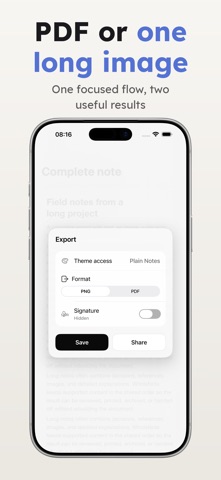
Share a note from Apple Notes, review the imported content, adjust its reading style, and export. WholeNote keeps the supported text, images, and detected tables in order, so you do not have to rebuild the note in another editor.
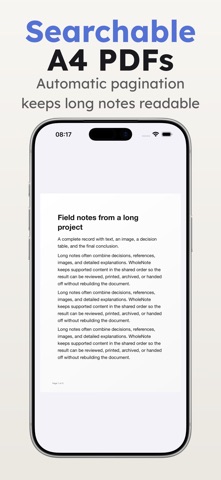
• Export searchable PDF
Create a fixed A4 document with automatic pagination and selectable, searchable text.
• Save one continuous image
Turn supported content into a single long PNG for quick viewing, saving to Photos, or sharing. If the note exceeds the safe image limit, WholeNote tells you to use PDF instead of removing content.
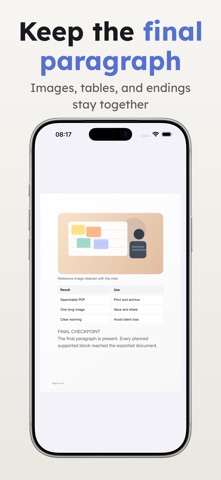
• Keep mixed content in order
Import supported text, images, and detected tables from the iOS Share Sheet and preserve their sequence.
• Know when something is missing
Import diagnostics and export checks surface unsupported content, size limits, and failures. WholeNote does not silently call an incomplete result successful.
• Make long notes easier to read
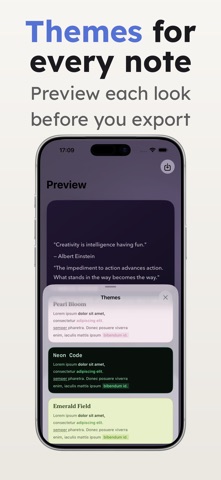
Choose a theme and adjust type size, line spacing, margins, and block spacing before export.
• Buy once
No subscription, no account, and no runtime paywall.
Important: WholeNote can only process content that iOS provides through sharing and that the app supports. It does not batch-export your Notes library, preserve every Apple Notes formatting detail, expand every attachment, or export Word documents.
Safety and technology
Found in the app by AppBrain- Price
- $3.99
- App size
- 14.8 MB
- Content rating
- Everyone
Technologies used by WholeNote: Export Notes
Releases
Updates seen on the App Store- Version
- 1.1
- Launched
- April 2026
No changelog data
Alternatives
Similar apps and more from 伟 王Alternatives to WholeNote: Export Notes





More from 伟 王


Rankings
App Store top chartsApp Store Rankings for WholeNote: Export Notes
About the app and developer
About WholeNote: Export Notes
WholeNote: Export Notes is a graphics & design app developed by 伟 王.
What is the rating of WholeNote: Export Notes?
WholeNote: Export Notes is rated 4.00 out of 5 stars, based on one rating ratings.
Is WholeNote: Export Notes free?
WholeNote: Export Notes costs $3.99. The app size is 14.81 MB. The latest version available is 1.1. The last update was on August 11, 2026.
What are the requirements for WholeNote: Export Notes?
The app has a content rating of Everyone. The app has been available on the App Store since April 2026.
Developer information for 伟 王
Address:
Frequently asked questions about WholeNote: Export Notes
Is WholeNote: Export Notes free?
No. WholeNote: Export Notes costs $3.99 on the App Store.
Is WholeNote: Export Notes still available?
Yes. WholeNote: Export Notes is on the App Store, and the last update we saw was on August 11, 2026.
How large is WholeNote: Export Notes?
WholeNote: Export Notes is 14.81 MB.
Is WholeNote: Export Notes suitable for children?
App Store rates the content of WholeNote: Export Notes as suitable for everyone.
How do people rate WholeNote: Export Notes?
WholeNote: Export Notes has one rating of 4.00 stars on the App Store.
Who made WholeNote: Export Notes?
WholeNote: Export Notes was developed by 伟 王. It is listed in the graphics & design category on the App Store.
What are the best alternatives to WholeNote: Export Notes?
People looking at WholeNote: Export Notes also look at these graphics & design apps: Blanksy: Daily Doodle Diary, Sketudio: Animated Comic Maker, ImageBatch: Resize & Compress, CoverForge: Thumbnail Maker, Pixel Art Maker - Pixel Canvas.