We don't have enough comments to show example comments. Please check back later.
Store listing
By Who's on Second, from the App Store
Description by Who's on SecondWritten by the developer, not by AppBrain. Click to read.
The baseball and softball lineup maker built for Little League, rec, and travel ball coaches. Drag players onto the diamond, auto-generate a fair lineup in one tap, and track pitch counts and playing time all season.
Print a clean lineup card, keep the batting order rotating fairly, and know who can pitch before you fill out the card. Everything works on your phone from the dugout.
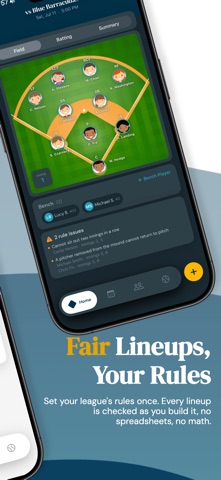
LINEUP BUILDER Build lineups with drag-and-drop on a visual baseball diamond. Assign players to positions inning by inning, set your batting order, and mark absent players. Click a position to quick-assign, or let auto-generate build a compliant lineup in one tap. Everything updates in real time: batting order, position summary, and rule compliance.
AUTO-GENERATE One tap builds a full lineup that respects your league's rules, your batting order, and your fairness history. Handles minimum play requirements, position limits, pitcher eligibility, and more. You can always adjust the result by hand.
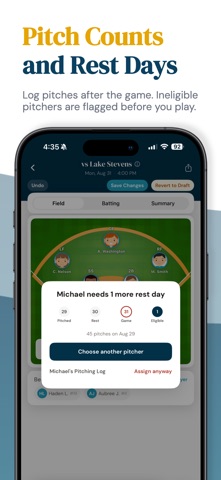
PITCH COUNT TRACKING Log pitch counts after each game. Rest day calculations happen automatically based on your league's thresholds. Ineligible pitchers are flagged before you build your next lineup, so you never have to wonder who's available. Tracks pitches thrown on other teams too, because rest days don't reset when a player plays travel ball on Tuesday.
CONFIGURABLE RULES ENGINE Every league is different. Set your own rules for minimum play, consecutive bench innings, infield requirements, pitcher limits, designated hitter, and more. Rules show real-time warnings in the lineup builder. They're guardrails, not hard blocks: you always have the final call.
FAIRNESS SUMMARY See who played where and how much across the entire season. Per-player innings played, innings sat, position distribution, and pitching totals. When a parent asks about playing time, you've got the answer.
SET LINEUP (SEASON BATTING ORDER) Set your batting order once. After each game, mark who batted last. The rotation handles itself for the next game, so every player moves through the order fairly over the course of the season.
PRINTABLE LINEUP CARD Print a clean lineup card that fits one page. Absent players listed separately. Bring it to the dugout or hand it to the umpire.
TEAM ROLES Invite assistant coaches, scorekeepers, and parents. Each role sees only what they need. Parents get read-only access to their player's position history and pitch count status. Coaches and scorekeepers can enter pitch counts and manage lineups based on their role.
WORKS AT EVERY LEVEL Little League, rec, travel ball, high school, adult leagues. The rules engine is fully configurable, so it adapts to your league instead of the other way around.
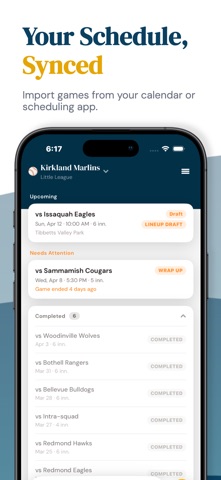
BUILT FOR THE DUGOUT Responsive design that works on phones, tablets, and laptops. Build your lineup on Saturday morning from the bleachers, adjust it in the parking lot when someone no-shows, and pull it up on your phone between innings.
Terms of Use: https://whosonsecond.com/terms Privacy Policy: https://whosonsecond.com/privacy
Safety and technology
Found in the app by AppBrain
Price
Free
App size
33.3 MB
Content rating
Everyone
Technologies used by Who's on Second: Lineup Maker
Releases
Updates seen on the App Store
Version
2.10.0
Launched
April 2026
No changelog data
Rankings
App Store top charts
App Store Rankings for Who's on Second: Lineup Maker
This app is not ranked
About the app and developer
About Who's on Second: Lineup Maker
Who's on Second: Lineup Maker is a sports app developed by Who's on Second.
What is the rating of Who's on Second: Lineup Maker?
Who's on Second: Lineup Maker is rated 4.82 out of 5 stars, based on 22 ratings.
Is Who's on Second: Lineup Maker free?
Who's on Second: Lineup Maker is free. The app size is 33.27 MB. The latest version available is 2.10.0. The last update was on November 10, 2026.
What are the requirements for Who's on Second: Lineup Maker?
The app has a content rating of Everyone. The app has been available on the App Store since April 2026.
Who's on Second: Lineup Maker is made and published by
Who's on Second.
AppBrain is an independent app data site and isn't affiliated with Who's on Second.
The app name, icon, screenshots and description belong to Who's on Second and are shown as published on the App Store.
Each subscription will automatically renew 3 days before the expiration date for
the same time period. Subscriptions can be cancelled at any time before the renewal.