

Wi-Fi Connection Helper
Wi-Fi Connection Helper is made and published by MARGINAL GAINS INC. AppBrain is an independent app data site and isn't affiliated with MARGINAL GAINS INC. The app name, icon, screenshots and description belong to MARGINAL GAINS INC. and are shown as published on the App Store.
AppBrain's verdict
- Last updated
- July 7, 2026
Rankings
App Store top chartsApp Store Rankings for Wi-Fi Connection Helper
Competitors
Similar apps and more from MARGINAL GAINS INC.Alternatives to Wi-Fi Connection Helper


More from MARGINAL GAINS INC.


Releases
Updates seen on the App Store- Version
- 1.0.1
- Launched
- June 2026
No changelog data
User feedback
Ratings and reviews on the App StoreComments on Wi-Fi Connection Helper for iOS
We don't have enough comments to show example comments. Please check back later.
Technology
Found in the app by AppBrain- Price
- Free
- App size
- 8.35 MB
- Content rating
- Everyone
Technologies used by Wi-Fi Connection Helper
About the app and developer
About Wi-Fi Connection Helper
Wi-Fi Connection Helper is an utilities app developed by MARGINAL GAINS INC.
User Ratings
The app has no ratings yet.
App Information
Wi-Fi Connection Helper is freely available from the App Store. The app size is 8.35 MB. The latest version available is 1.0.1. The last update was on July 7, 2026.
Technical Requirements
The app has a content rating of Everyone. The app has been available on the App Store since June 2026.
Developer information for MARGINAL GAINS INC.
Address:
Store listing
By MARGINAL GAINS INC., from the App Store



Description by MARGINAL GAINS INC. Written by the developer, not by AppBrain. Click to read.
What it does
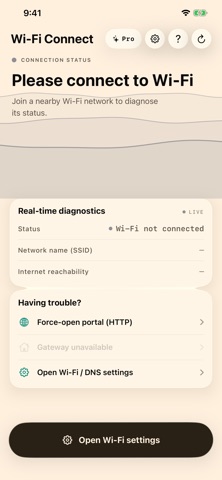
• Opens the Wi-Fi sign-in (captive portal) page so you can agree to the terms and get online.
• Finds common blockers like public DNS or a VPN and guides you to the right setting.
• Just read the on-screen status and tap the suggested button — no guesswork.
Live diagnostics
• The dashboard shows what matters: connection state, network name, local and gateway IP, DNS servers, VPN state, and a real HTTP reachability check.
• Pro mode adds ping and download speed tests with a diagnostic log.
It verifies connectivity with a real HTTP check — the same endpoint iOS itself uses for captive-portal detection — and reaches the portal over HTTP. It can't fix every network, but it covers the most common reasons a login page won't open.
Light and dark themes, 21 languages, and a layout that works on iPhone and iPad.
No account, no setup. Just connect to a Wi-Fi network, read the status, and tap the suggested button.