

Wide Conversion Lens
Wide Conversion Lens is made and published by Masanori Katsuta. AppBrain is an independent app data site and isn't affiliated with Masanori Katsuta. The app name, icon, screenshots and description belong to Masanori Katsuta and are shown as published on the App Store.
AppBrain's verdict
Established- Best rank
- #66
- Top Paid, Japan
- Rating on App Store
- 1.00
- 1 ratings
- Last updated
- April 27, 2024
It doesn't have enough ratings yet to judge what users think. Its best ranking is #66 in Top Paid, Photo & Video in Japan.
Rankings
App Store top charts- Highest rank
- #66
- Chart
- Top Paid
- Photo & Video
- Country
- Japan
App Store Rankings for Wide Conversion Lens
Top rankings
| Rank | Country | Category | List |
|---|---|---|---|
| 66 | Japan | Photo & Video | Top Paid |
Ranking history in Japan
Competitors
Similar apps and more from Masanori KatsutaAlternatives to Wide Conversion Lens




More from Masanori Katsuta








Releases
Updates seen on the App Store- Version
- 1.1.3
- Launched
- April 2020
No changelog data
User feedback
Ratings and reviews on the App StoreComments on Wide Conversion Lens for iOS
We don't have enough comments to show example comments. Please check back later.
Technology
Found in the app by AppBrain- Price
- $1.99
- App size
- 3.14 MB
- Content rating
- Everyone
Technologies used by Wide Conversion Lens
About the app and developer
About Wide Conversion Lens
Wide Conversion Lens is a photo & video app developed by Masanori Katsuta.
What is the rating of Wide Conversion Lens?
Wide Conversion Lens is rated 1.00 out of 5 stars, based on one rating ratings.
Is Wide Conversion Lens free?
Wide Conversion Lens costs $1.99. The app size is 3.14 MB. The latest version available is 1.1.3. The last update was on April 27, 2024.
What are the requirements for Wide Conversion Lens?
The app has a content rating of Everyone. The app has been available on the App Store since April 2020.
Developer information for Masanori Katsuta
Address:
Store listing
By Masanori Katsuta, from the App Store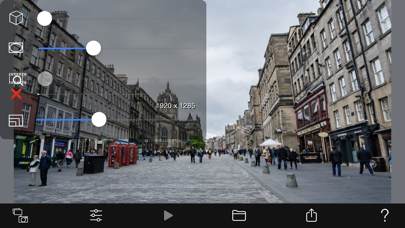



Description by Masanori Katsuta Written by the developer, not by AppBrain. Click to read.
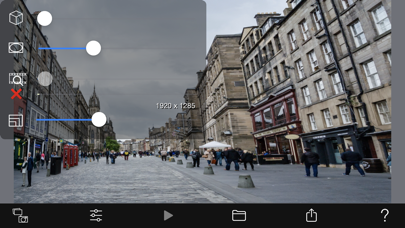
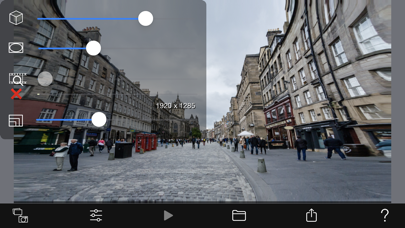
The size of the wide-angle effect is adjustable.
It supports not only videos and photos stored on your smartphone, but also cameras.
[Material]
- Camera shooting: video, photo
- Camera Roll: Load video and photos
[Settings]
- Wide-angle effect setting
- Aspect ratio setting
- Storage resolution: 20 to 100% of the original resolution
[Touch operation]
Touch on the screen image to change the center position for wide angle.
The further away from the center of the image, the greater the image distortion.
[Output]
- Save to Camera Roll: Video, Photo
- Video and photo sharing: AirDrop, LINE, Facebook, Dropbox, Instagram, ...
[Note]
It just makes it look as if it was shot with a wide-angle lens.
For example, shooting a tall building from a short distance cannot be used in the same way as a real wide-angle lens.