

WiDI MIDI Studio
WiDI MIDI Studio is made and published by HYPERTIDE SAS. AppBrain is an independent app data site and isn't affiliated with HYPERTIDE SAS. The app name, icon, screenshots and description belong to HYPERTIDE SAS and are shown as published on the App Store.
AppBrain's verdict
Established- Rating on App Store
- 5.00
- 2 ratings
- Last updated
- August 8, 2024
It doesn't have enough ratings yet to judge what users think.
Rankings
App Store top chartsApp Store Rankings for WiDI MIDI Studio
Competitors
Similar apps and more from HYPERTIDE SASAlternatives to WiDI MIDI Studio





More from HYPERTIDE SAS

Releases
Updates seen on the App Store- Version
- 1.8.3
- Launched
- September 2018
No changelog data
User feedback
Ratings and reviews on the App StoreComments on WiDI MIDI Studio for iOS
We don't have enough comments to show example comments. Please check back later.
Technology
Found in the app by AppBrain- Price
- Free
- App size
- 26.4 MB
- Content rating
- Everyone
Technologies used by WiDI MIDI Studio
About the app and developer
About WiDI MIDI Studio
WiDI MIDI Studio is a music app developed by HYPERTIDE SAS.
What is the rating of WiDI MIDI Studio?
WiDI MIDI Studio is rated 5.00 out of 5 stars, based on 2 ratings.
Is WiDI MIDI Studio free?
WiDI MIDI Studio is free. The app size is 26.36 MB. The latest version available is 1.8.3. The last update was on August 8, 2024.
What are the requirements for WiDI MIDI Studio?
The app has a content rating of Everyone. The app has been available on the App Store since September 2018.
Developer information for HYPERTIDE SAS
Address:
Frequently asked questions about WiDI MIDI Studio
Is WiDI MIDI Studio free?
Yes. WiDI MIDI Studio is free on the App Store.
Is WiDI MIDI Studio still available?
Yes. WiDI MIDI Studio is on the App Store, and the last update we saw was on August 8, 2024.
How large is WiDI MIDI Studio?
WiDI MIDI Studio is 26.36 MB.
Is WiDI MIDI Studio suitable for children?
App Store rates the content of WiDI MIDI Studio as suitable for everyone.
How do people rate WiDI MIDI Studio?
WiDI MIDI Studio scores 5.00 out of 5 stars, from 2 ratings on the App Store.
Who made WiDI MIDI Studio?
WiDI MIDI Studio was developed by HYPERTIDE SAS. It is listed in the music category on the App Store.
What are the best alternatives to WiDI MIDI Studio?
People looking at WiDI MIDI Studio also look at these music apps: Knob Lab, midimittr, Protokol - MIDI/OSC Monitor, ProRemote, MC Pad - Bluetooth MIDI.
Store listing
By HYPERTIDE SAS, from the App Store



Description by HYPERTIDE SAS Written by the developer, not by AppBrain. Click to read.
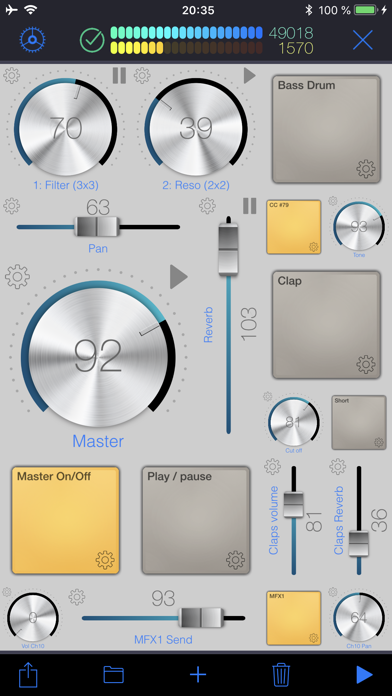
• CONTROL SURFACE AND SEQUENCER:
A control is bound to a channel and a specific MIDI Control Change. You can either specify the CC number if you know it, or let the app learn it. Once placed on the surface, use this control to interact with your MIDI device. Alternatively, any CC event sent by your device will be shown live by the control(s) bound to this CC.
Pads are special controls: they can either produce MIDI CC events, Notes or Program changes. If bound to a CC, the pad can act as an on/off switch (you specify the values for each state.) If bound to a note, each tap produces the specified MIDI note. This is especially useful to operate MIDI instruments without keyboards such as synthesizer modules or drum machines.
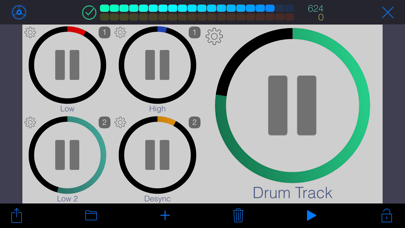
A sequence can hold as many tracks as you wish, and send notes to different MIDI channels. Sequences can play in sync or running freely. You may also group sequences together to start or pause them at the same time.
• MIDI:
To interface WiDI with any MIDI instruments/devices connected to your Mac or PC, connect to a MIDI Network Session on your Mac or your PC. On a Mac, this is natively supported by macOS, and you do not need to install third party software (use Audio MIDI Setup.) On a PC running Windows, you might want to install rtpMIDI.
As an alternative to MIDI Network Sessions, you may use the WiDI Desktop Application. It acts as a MIDI bridge between the network and your MIDI hardware. You can install the desktop application on as many computers as you want (it's free!). It's a very lightweight package that doesn't need to perform any installation procedure whatsoever.
You may download the WiDI Desktop Application for macOS on the Mac App Store, or go to : https://www.hypertide.com/widi/ for both macOS and Windows archives.
Additionally, any class-compliant MIDI interface natively supported by iOS can also be used directly by WiDI without the need of a network connection.
• FEATURES:
○ Use any CoreMIDI-supported MIDI interface connected to your device
○ MIDI network session: use WiDI as an external control surface for any DAW such as Logic Pro, Ableton Live, Cubase, ...
○ Multiple iPhone and iPad can connect to your computer, allowing different control surfaces simultaneously
○ Integrated step sequencer: create sequences, each one holding as many tracks as needed
○ Sequences can run freely or in sync and start simultaneously if grouped together in fire groups
○ Auto discover MIDI CC : you don't need to know each one to add controls, WiDI learns CC numbers sent by your devices
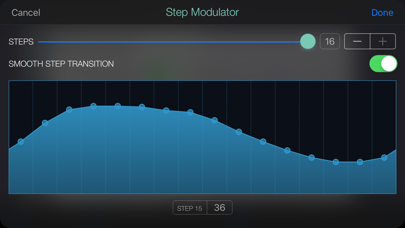
○ Automate CC : sweep ranges or use the step modulator to design patterns to modulate controls values, supporting various advanced options like step-by-step or smooth variations, bouncing, repeating, changing speed
○ Add as many pads as you want to generate MIDI Notes, Control Changes or Program Changes
○ Flexible control surface : set layout and grid size for both portrait and landscape orientations
○ Re-arranging controls is as simple as drag & drop
○ Fully customizable user interface : themes, colors, display of values and labels, aspect ratios, grid spacing, grid coloring, background, ...
○ Integrated File Manager to load and save your surfaces, which are also accessible in the iOS Files app and your computer's iTunes connection
○ Exchange surfaces between devices with the integrated QR code generator and scanner
○ Or use the share feature, so you may import them on any device.
We'd love to hear from you! Should you be in need of support or eager to request a new feature, please contact us at support+widi@hypertide.com