

WiFi Explorer Pro 3
WiFi Explorer Pro 3 is made and published by Intuitibits LLC. AppBrain is an independent app data site and isn't affiliated with Intuitibits LLC. The app name, icon, screenshots and description belong to Intuitibits LLC and are shown as published on the App Store.
AppBrain's verdict
- Last updated
- September 25, 2026
Rankings
App Store top chartsApp Store Rankings for WiFi Explorer Pro 3
Competitors
Similar apps and more from Intuitibits LLCMore from Intuitibits LLC


Releases
Updates seen on the App Store- Version
- 3.10.5
- Launched
- September 2021
No changelog data
User feedback
Ratings and reviews on the App StoreComments on WiFi Explorer Pro 3 for iOS
We don't have enough comments to show example comments. Please check back later.
Technology
Found in the app by AppBrain- Price
- $149.99
- App size
- 9.75 MB
- Content rating
- Everyone
Technologies used by WiFi Explorer Pro 3
About the app and developer
About WiFi Explorer Pro 3
WiFi Explorer Pro 3 is an utilities app developed by Intuitibits LLC.
What is the rating of WiFi Explorer Pro 3?
WiFi Explorer Pro 3 has no ratings yet.
Is WiFi Explorer Pro 3 free?
WiFi Explorer Pro 3 costs $149.99. The app size is 9.75 MB. The latest version available is 3.10.5. The last update was on September 25, 2026.
What are the requirements for WiFi Explorer Pro 3?
The app has a content rating of Everyone. The app has been available on the App Store since September 2021.
Developer information for Intuitibits LLC
Address:
Store listing
By Intuitibits LLC, from the App Store


Description by Intuitibits LLC Written by the developer, not by AppBrain. Click to read.
WiFi Explorer Pro 3's unique, advanced details view and customizable columns provide easy access to more than 950 available fields, helping you diagnose most wireless network issues. The best part? You can do all this without expensive and complex tools, providing a cost-effective solution for your daily Wi-Fi management needs.
With support for Wi-Fi 7 and regular updates, no other Wi-Fi scanner today supports the latest Wi-Fi standards and technologies like WiFi Explorer Pro 3.
• Easy-to-use, intuitive user interface
• Suitable for home, small office, and enterprise Wi-Fi networks
• Graphical visualization of the Wi-Fi environment
• Supports 2.4, 5, and 6 GHz frequency bands as well as 20, 40, 80, 160, and 320 MHz channels
• Supports Wi-Fi 4, 5, 6, 6E, and 7
• Works with 802.11a/b/g/n/ac/ax/be networks
MULTIPLE SCAN MODES AND REMOTE SCAN SUPPORT
• Find Wi-Fi networks using active, passive, or directed scan modes.
• Listen for encapsulated 802.11 capture feeds from access points running in "sniffer" or "monitor mode."
• Scan for Wi-Fi networks remotely using a supported remote sensor such as the WLAN Pi.
CUSTOM PROFILES, FILTERS, AND COLORING RULES
• Create column profiles and add columns from more than 850 available fields.
• Pin columns so they're always visible when scrolling the list of networks horizontally.
• Create custom filters or coloring rules for specific troubleshooting tasks.
CAPTURE FILE AND SCAN RESULTS VISUALIZATION
• Import capture files (.pcap, .pcapng, .pkt) to visualize the Wi-Fi networks found in them.
• Import and display scan results in CSV format from supported tools such as AirPort Utility, Analiti, Aruba Utilities, or Mobile Eye.
SPECTRUM ANALYSIS INTEGRATION
• Visualize RF information and correlate it with Wi-Fi data to identify non-802.11 interference using a supported spectrum analyzer, such as Wi-Spy Lucid, Wi-Spy DBx, Wi-Spy 2.4, WiPry Clarity, and WiPry 2500x.
ZIGBEE INTEGRATION
• Scan nearby Zigbee networks with a compatible USB adapter and visualize Zigbee and Wi-Fi coexistence for more effective planning, design, and troubleshooting of Wi-Fi networks in environments with Zigbee-based IoT devices.
AND MUCH MORE
• Organize networks by name, access point, access point radio, or vendor
• Get per-channel metrics, such as estimated SSID overhead, number of networks, number of overlapping networks, and estimated number of associated clients
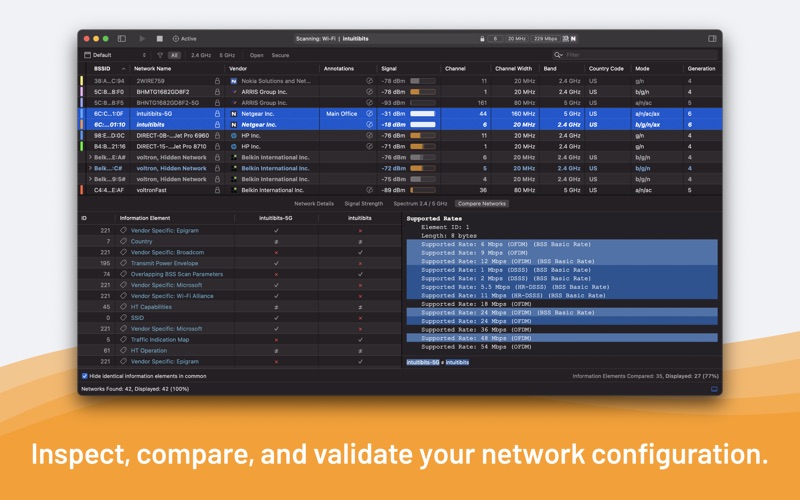
• Get detailed network capabilities and a complete description of information elements for advanced troubleshooting
• Compare the capabilities and configuration of any two networks
• Add labels or annotations to facilitate the identification of networks
• Export scan results in PCAPNG, PCAP, and CSV format
Learn more about all the available features and how to use WiFi Explorer Pro 3 by going to Help > WiFi Explorer Pro 3 Help or by visiting https://docs.intuitibits.com/wifiexplorerpro3
Notes:
• Requires a Mac with built-in Wi-Fi.
• Requires passive, listener, or remote scan modes for detecting associated clients.
• Passive scan mode is not available on M1 Apple silicon Macs.