

WiFi Heatmap & Speed Survey
WiFi Heatmap & Speed Survey is made and published by christopher posey. AppBrain is an independent app data site and isn't affiliated with christopher posey. The app name, icon, screenshots and description belong to christopher posey and are shown as published on the App Store.
AppBrain's verdict
- Rating on App Store
- 2.67
- 3 ratings
- Last updated
- June 2, 2026
It doesn't have enough ratings yet to judge what users think.
Rankings
App Store top chartsApp Store Rankings for WiFi Heatmap & Speed Survey
Competitors
Similar apps and more from christopher poseyAlternatives to WiFi Heatmap & Speed Survey



Releases
Updates seen on the App Store- Version
- 1.4.5
- Launched
- March 2026
No changelog data
User feedback
Ratings and reviews on the App StoreComments on WiFi Heatmap & Speed Survey for iOS
We don't have enough comments to show example comments. Please check back later.
Technology
Found in the app by AppBrain- Price
- Free
- App size
- 60.7 MB
- Content rating
- Everyone
Technologies used by WiFi Heatmap & Speed Survey
About the app and developer
About WiFi Heatmap & Speed Survey
WiFi Heatmap & Speed Survey is an utilities app developed by christopher posey.
User Ratings
WiFi Heatmap & Speed Survey is rated 2.67 out of 5 stars. The rating is based on 3 ratings.
App Information
WiFi Heatmap & Speed Survey is freely available from the App Store. The app size is 60.75 MB. The latest version available is 1.4.5. The last update was on June 2, 2026.
Technical Requirements
The app has a content rating of Everyone. The app has been available on the App Store since March 2026.
Developer information for christopher posey
Address:
Frequently asked questions about WiFi Heatmap & Speed Survey
Is WiFi Heatmap & Speed Survey free?
Yes. WiFi Heatmap & Speed Survey is free on the App Store.
Is WiFi Heatmap & Speed Survey still available?
Yes. WiFi Heatmap & Speed Survey is on the App Store, and the last update we saw was on June 2, 2026.
How large is WiFi Heatmap & Speed Survey?
WiFi Heatmap & Speed Survey is 60.75 MB.
Is WiFi Heatmap & Speed Survey suitable for children?
App Store rates the content of WiFi Heatmap & Speed Survey as suitable for everyone.
How do people rate WiFi Heatmap & Speed Survey?
WiFi Heatmap & Speed Survey scores 2.67 out of 5 stars, from 3 ratings on the App Store.
Who made WiFi Heatmap & Speed Survey?
WiFi Heatmap & Speed Survey was developed by christopher posey. It is listed in the utilities category on the App Store.
What are the best alternatives to WiFi Heatmap & Speed Survey?
People looking at WiFi Heatmap & Speed Survey also look at these utilities apps: WiFi Analyzer and Heat Map, Noise Reducer Audio Enhancer ., NetSpot WiFi Analyzer, WIFI analyzer. Network scanner, Wifi Signal Strength Analyzer.
Store listing
By christopher posey, from the App Store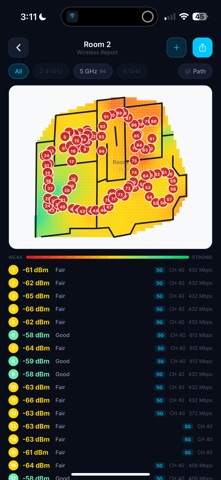


Description by christopher posey Written by the developer, not by AppBrain. Click to read.
See exactly where your WiFi is strong, weak, or dead — mapped in full color onto your floor plan.
WiFi Mapper turns your iPhone into a professional wireless survey tool. Scan entire buildings with multi-room LiDAR or upload your own floor plans, then walk through recording signal readings. The app builds a smooth, color-coded heatmap — green where coverage is strong, fading through yellow and orange to red where it drops off — so problem areas are obvious at a glance.
How It Works:
1. Scan rooms with LiDAR — walk through doorways and the app automatically detects each new room
2. Tap your location on the map to record WiFi signal readings
3. View a smooth, interpolated heatmap showing coverage across your entire space
4. Run speed tests at key locations to measure real-world throughput
5. Export a professional PDF report
Key Features:
• Multi-Room LiDAR Scanning — Scan an entire floor in a single session. Walk room to room and the app automatically detects doorway crossings, captures each space, then merges everything into one spatially accurate floor plan using Apple's StructureBuilder
• Unified Floor Plan View — See all scanned rooms positioned exactly where they are relative to each other, with WiFi coverage mapped across the whole building
• Smooth Signal Heatmap — High-resolution, Ekahau-style color gradient from green (excellent) to red (dead zone)
• PHY Rate Monitoring — See real TX/RX link rates, noise floor, SNR, and Wi-Fi standard (802.11ax/be) via live Shortcuts integration
• Speed Testing — Measure download, upload, and latency at each survey point
• Upload Floor Plans — Import your own blueprints or photos and survey on top of them
• Multi-Room Projects — Organize rooms into projects for building-wide analysis with combined heatmaps and statistics
• PDF Reports — Export detailed wireless reports with heatmaps, per-room breakdowns, band analysis, and AP detection
• Access Point Roaming — Track when your device switches between APs in real time
• Scan & Go — Record WiFi signal readings automatically as you walk during a LiDAR scan
• iOS Shortcuts — One-tap setup for continuous live PHY data
Built For:
• Home users finding and fixing dead zones
• IT professionals planning access point placement
• Network engineers documenting wireless coverage
• Property managers assessing building connectivity
Pro subscription unlocks unlimited projects, full PDF export, and advanced analytics.
Privacy Policy: https://aethercoreusa.com/privacy
Terms of Use: https://aethercoreusa.com/terms