

WiFi Network Speed Meter is made and published by 佳俊 高. AppBrain is an independent app data site and isn't affiliated with 佳俊 高. The app name, icon, screenshots and description belong to 佳俊 高 and are shown as published on the App Store.
AppBrain's verdict
- Rating on App Store
- 3.00
- 2 ratings
- Last updated
- September 10, 2026
- Size
- 42.6 MB
It doesn't have enough ratings yet to judge what users think.
User feedback
Ratings and reviews on the App StoreComments on WiFi Network Speed Meter for iOS
We don't have enough comments to show example comments. Please check back later.
Store listing
By 佳俊 高, from the App Store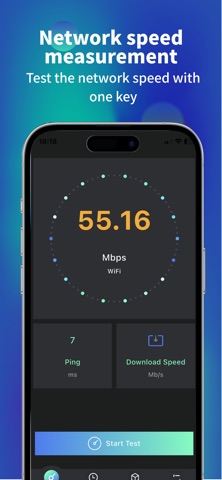
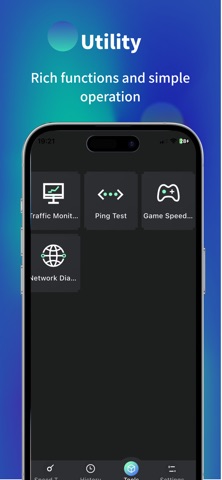
Description by 佳俊 高 Written by the developer, not by AppBrain. Click to read.
[Application Function]
One click precise speed measurement
Quickly test the current download and upload speed.
Real time display of your network connection type (such as Wi Fi or 5G) and signal strength.
Comprehensive network analysis
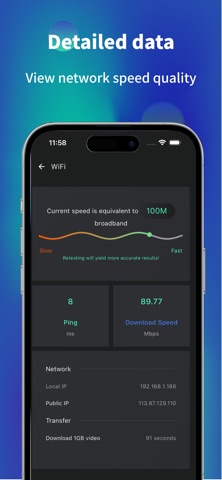
Ping Test: Measure the response time from your device to the server to understand network latency.
Connection stability assessment: Through multiple tests, help determine the stability of network connections.
Clear historical records
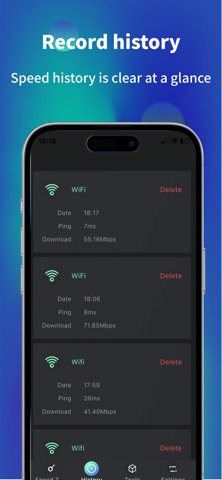
Automatically save each speed measurement result, making it convenient for you to review and compare network performance at different times and locations at any time.
View network information
Display basic connection information such as the current IP address of your device.
We cannot do it
To maintain absolute authenticity of the description, we explicitly state that this application is primarily used for measuring and displaying network performance data and cannot directly repair or optimize your physical network environment (such as carrier signal coverage issues, router hardware failures, etc.).
Thank you for your choice! We continue to optimize and provide you with reliable tools.
Subscription Information
Weekly Subscription – $6.99 / week
Auto-renewable, cancel anytime
Payment will be charged to your Apple ID after confirmation
Auto-renewal will be charged within 24 hours before the current period ends
Go to "Settings" → "Apple ID" → "Subscriptions" to manage or cancel
Privacy Policy: https://mirror-colony-164.notion.site/Privacy-Policy-2637b7610f9780ff9010c8e02e242780?pvs=73
Terms of Use: https://mirror-colony-164.notion.site/User-Agreement-2637b7610f9780d79251ff763a423c04
Safety and technology
Found in the app by AppBrain- Price
- Free
- App size
- 42.6 MB
- Content rating
- Everyone
Technologies used by WiFi Network Speed Meter
Releases
Updates seen on the App Store- Version
- 2.0
- Launched
- May 2025
No changelog data
Alternatives
Similar apps and more from 佳俊 高More from 佳俊 高


Also available on Google Play

Rankings
App Store top chartsApp Store Rankings for WiFi Network Speed Meter
About the app and developer
About WiFi Network Speed Meter
WiFi Network Speed Meter is an utilities app developed by 佳俊 高.
User Ratings
WiFi Network Speed Meter is rated 3.00 out of 5 stars. The rating is based on 2 ratings.
App Information
WiFi Network Speed Meter is freely available from the App Store. The app size is 42.59 MB. The latest version available is 2.0. The last update was on September 10, 2026.
Technical Requirements
The app has a content rating of Everyone. The app has been available on the App Store since May 2025.
Developer information for 佳俊 高
Address:
Frequently asked questions about WiFi Network Speed Meter
Is WiFi Network Speed Meter free?
Yes. WiFi Network Speed Meter is free on the App Store.
Is WiFi Network Speed Meter still available?
Yes. WiFi Network Speed Meter is on the App Store, and the last update we saw was on September 10, 2026.
How large is WiFi Network Speed Meter?
WiFi Network Speed Meter is 42.59 MB.
Is WiFi Network Speed Meter suitable for children?
App Store rates the content of WiFi Network Speed Meter as suitable for everyone.
How do people rate WiFi Network Speed Meter?
WiFi Network Speed Meter scores 3.00 out of 5 stars, from 2 ratings on the App Store.
Who made WiFi Network Speed Meter?
WiFi Network Speed Meter was developed by 佳俊 高. It is listed in the utilities category on the App Store.