

WiFizer is made and published by Ram Steenhaut. AppBrain is an independent app data site and isn't affiliated with Ram Steenhaut. The app name, icon, screenshots and description belong to Ram Steenhaut and are shown as published on the App Store.
AppBrain's verdict
- Rating on App Store
- 5.00
- 1 ratings
- Last updated
- August 11, 2026
It doesn't have enough ratings yet to judge what users think.
Rankings
App Store top chartsApp Store Rankings for WiFizer
Competitors
Similar apps and more from Ram SteenhautMore from Ram Steenhaut


Releases
Updates seen on the App Store- Version
- 3.2
- Launched
- July 2026
No changelog data
User feedback
Ratings and reviews on the App StoreComments on WiFizer for iOS
We don't have enough comments to show example comments. Please check back later.
Technology
Found in the app by AppBrain- Price
- Free
- App size
- 8.48 MB
- Content rating
- Everyone
Technologies used by WiFizer
About the app and developer
About WiFizer
WiFizer is an utilities app developed by Ram Steenhaut.
User Ratings
WiFizer is rated 5.00 out of 5 stars. The rating is based on one rating ratings.
App Information
WiFizer is freely available from the App Store. The app size is 8.48 MB. The latest version available is 3.2. The last update was on August 11, 2026.
Technical Requirements
The app has a content rating of Everyone. The app has been available on the App Store since July 2026.
Developer information for Ram Steenhaut
Address:
Frequently asked questions about WiFizer
Is WiFizer free?
Yes. WiFizer is free on the App Store.
Is WiFizer still available?
Yes. WiFizer is on the App Store, and the last update we saw was on August 11, 2026.
How large is WiFizer?
WiFizer is 8.48 MB.
Is WiFizer suitable for children?
App Store rates the content of WiFizer as suitable for everyone.
How do people rate WiFizer?
WiFizer has one rating of 5.00 stars on the App Store.
Who made WiFizer?
WiFizer was developed by Ram Steenhaut. It is listed in the utilities category on the App Store.
Store listing
By Ram Steenhaut, from the App Store


Description by Ram Steenhaut Written by the developer, not by AppBrain. Click to read.
SEE YOUR SIGNAL — FOR REAL
• Live quality ring driven by real measurements: latency, jitter and packet loss, with a rolling 60-second chart.
• Go Live for true Wi-Fi numbers — RSSI in dBm, channel, band, link rates — using an Apple-Shortcuts companion built on Apple's own actions.
• Mesh-friendly: see every access point you roam between, name your nodes, and track the best signal each one ever gave you.
• On cellular too: no Wi-Fi? WiFizer shows your live connection quality, network type (5G/LTE) and provider.
WI-FI HEATMAP
• Walk your home and watch a live coverage map paint itself onto the floor through your camera.
• On LiDAR iPhones, scan the room and see your signal on a real 2D floor plan and a rotatable 3D model.
PERSONAL HOTSPOT INSIGHTS
• Hosting? See every connected device — name, IP, live latency on an animated meter, updating as devices join and leave.
• On someone's hotspot? See the provider and your latency to the host and to the internet, so you know which hop is slow.
KNOW YOUR NETWORK
• Device scanner: find everything on your network, with names, vendors and a detail page per device — live ping, advertised services, port check.
• Bonjour browser: what every device announces — AirPlay, Chromecast, printers, shares, smart-home gear.
• Bluetooth scanner with distance estimates.
• A private, Face ID-protected vault for your Wi-Fi passwords, with QR sharing.
SPEED TEST
• Multi-stream download and upload with live gauges — no extra server needed.
• Full history with charts, CSV export, and an optional daily background health check that warns you when your connection degrades.
A REAL TOOLKIT
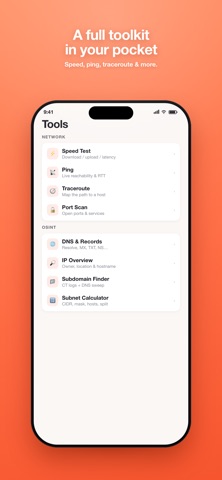
Ping, traceroute, DNS lookup, port scan, subnet tools — plus an OSINT set: WHOIS/RDAP, DNS records, email security grades (SPF/DKIM/DMARC), TLS certificate inspector, HTTP security headers, IP geolocation, subdomain finder and more.
ON YOUR WRIST AND HOME SCREEN
• Apple Watch app: live signal strength and latency while you walk.
• Home and Lock Screen widgets: your network, provider, public IP and last speed test at a glance.
FOUR LOOKS
Choose your vibe: Soft, Mono, Glass or full-on Terminal.
HONEST BY DESIGN
iOS keeps some Wi-Fi details private, and unlike some apps, WiFizer never invents numbers to fill the gap. When something can't be measured, we tell you why — and give you the closest real measurement instead.
FREE + PRO
Almost everything in WiFizer is free. The live signal tools (Go Live, Heatmap, Watch view) are part of WiFizer Pro — one single purchase, yours forever, with a full 14-day free trial. No subscriptions, ever.
PRIVACY
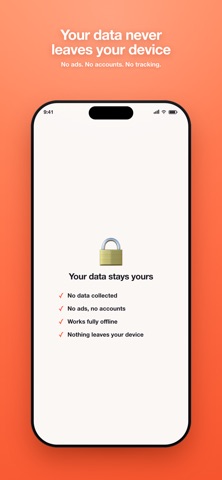
No account. No ads. No tracking. Nothing leaves your device except the lookups you explicitly run.