It doesn't have enough ratings yet to judge what users think.
Wine Cellar Database is made and published by
Adysseus.
AppBrain is an independent app data site and isn't affiliated with Adysseus.
The app name, icon, screenshots and description belong to Adysseus and are shown as
published on the App Store.
About Wine Cellar Database
Wine Cellar Database is a food & drink app developed by Adysseus.
User Ratings
Wine Cellar Database is rated 3.80 out of 5 stars. The rating is based on 5 ratings.
App Information
Wine Cellar Database is freely available from the App Store. The app size is 42.67 MB. The latest version available is 5.05. The last update was on October 6, 2026.
Technical Requirements
The app has a content rating of High Maturity. The app has been available on the App Store since December 2012.
Description by Adysseus(from the App Store)
Every cellar is kept differently. This one lets you keep yours your way.
Wine Cellar Database is an inventory app for a real collection: what you own, how many bottles, where it is stored, what you paid, what you thought of it. You decide which of those it asks about. Add a column, rename one, hide one, put them in the order you want, and every wine in the cellar picks up the change.
Version 5 is a rebuild. Everything below is new or rewritten.
FIND A WINE WITHOUT TYPING IT OUT
A catalog of 210,000 wines from 38,000 producers ships inside the app. Search it, tap a wine, and the producer, region, sub-region, vineyard, designation and color are filled in for you.
It makes no network request. It works on a plane, and in a cellar with no signal.
YOUR COLUMNS, NOT OURS
• Add columns of your own: text, large text, number, yes/no, year or date • Rename and reorder the ones that came with the app, and hide the ones you never use • Choose which columns appear under a wine's name in the list • Your own spreadsheet headings are remembered, so an export comes back the way you sent it
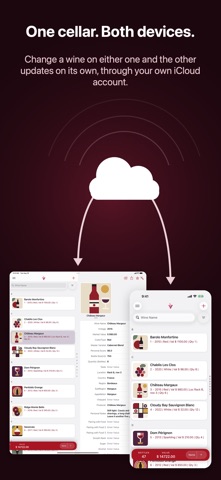
ONE CELLAR ON TWO DEVICES (BETA)
Turn on iCloud Sync and your iPhone and iPad keep the same cellar: wines, photographs, columns and saved filters. It goes to the private database of your own iCloud account, not to a server of ours, because there isn't one.
It stays off until you turn it on, and it will not turn on until you have taken a full backup.
A BACKUP YOU CAN HOLD
One file holds the whole cellar: every wine, every column, every photograph. Save it to Files or iCloud Drive, put it on a Mac, or mail it to yourself. Open one later and look at the wines inside it before you restore anything.
Spreadsheets too. Import a CSV from Cellar Tracker or from a spreadsheet you keep yourself, and export the cellar back out under your own headings.
FIND THE BOTTLE
• Search as you type • Filters you build and save, on your columns, by text, number or date • Favourites and Wishlist, each its own list • Sort by name or vintage, in either direction
AND
• As many photographs per wine as you like: the label, the back label, the receipt • Prices in your own currency, converted at current rates • A dark appearance, and type that scales with the rest of your phone • On iPad, your cellar and the wine side by side — and it shares the screen, in Split View or Slide Over
WHAT IT COSTS
Ten spaces are free. A space is one unique wine, however many bottles of it you have: a 2007 and a 2008 of the same wine are two spaces, and twenty-eight bottles of the 2008 are still one. More spaces are a one-time purchase, and any purchase also removes the ad at the bottom of the list.
No account. No subscription. No sign-in. Your cellar lives on your device and goes nowhere you do not send it.
Each subscription will automatically renew 3 days before the expiration date for
the same time period. Subscriptions can be cancelled at any time before the renewal.