

WINGS: Parenting & Activities
WINGS: Parenting & Activities is made and published by LUBOV BORISOVA. AppBrain is an independent app data site and isn't affiliated with LUBOV BORISOVA. The app name, icon, screenshots and description belong to LUBOV BORISOVA and are shown as published on the App Store.
AppBrain's verdict
- Last updated
- October 29, 2026
Rankings
App Store top chartsApp Store Rankings for WINGS: Parenting & Activities
Competitors
Similar apps and more from LUBOV BORISOVAAlternatives to WINGS: Parenting & Activities


Releases
Updates seen on the App Store- Version
- 1.0.9
- Launched
- June 2026
No changelog data
User feedback
Ratings and reviews on the App StoreComments on WINGS: Parenting & Activities for iOS
We don't have enough comments to show example comments. Please check back later.
Technology
Found in the app by AppBrain- Price
- Free
- App size
- 33.9 MB
- Content rating
- Everyone
Technologies used by WINGS: Parenting & Activities
About the app and developer
About WINGS: Parenting & Activities
WINGS: Parenting & Activities is an education app developed by LUBOV BORISOVA.
User Ratings
The app has no ratings yet.
App Information
WINGS: Parenting & Activities is freely available from the App Store. The app size is 33.93 MB. The latest version available is 1.0.9. The last update was on October 29, 2026.
Technical Requirements
The app has a content rating of Everyone. The app has been available on the App Store since June 2026.
Developer information for LUBOV BORISOVA
Address:
Store listing
By LUBOV BORISOVA, from the App Store


Description by LUBOV BORISOVA Written by the developer, not by AppBrain. Click to read.
Finding a worthwhile activity can take longer than doing it. WINGS brings the ideas and parent prompts together, so you can spend that time with your child.
Many activities take around five minutes and fit into a walk, the trip home or a quiet moment before bed. The phone holds the prompts; your child talks, moves, observes and tries things in the world around them.
A DAILY PLAN THAT FITS YOUR FAMILY
• Choose an activity that suits your child's mood and interests.
• Do it today, save it to return to later, or replace it with another.
• Request extra activities when you want more ideas.
• Use parent prompts and suggestions to make an activity easier or more challenging.
• Save favorites and give feedback to help WINGS adjust future activities.
SEVEN WAYS TO EXPLORE TOGETHER
1. Movement and coordination: short activities involving movement, rhythm and attention.
2. Logic and thinking: explore patterns, use memory and try different ways to solve a problem.
3. Questions and conversation: share opinions, explain an idea and imagine other possibilities.
4. Knowledge and observation: look closely at the world and explore how things work.
5. Your child's day: talk about experiences, feelings, choices and plans.
6. Books and videos: age-appropriate recommendations with ideas for discussing them together.
7. Family projects: plan and make something together, with your child contributing ideas and decisions.
Set aside more time for shared reading and family projects when it suits your family. Everyday activities can begin with the few minutes you already have together.
FOLLOW YOUR CHILD'S IDEAS
Ask a question, leave room for an answer and see where it leads. Your child can explain, experiment and change their mind. You get to hear what interests them, how they see a situation and what they want to try next.
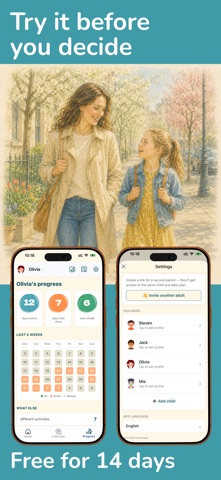
Add profiles for your children and invite another adult to your WINGS family. Share the activities and take part in these moments together.
HOW WE CHOOSE ACTIVITIES
Our approach draws on child-development literature, educational resources and specialist recommendations. Activities are reviewed before publication.
PREMIUM SUBSCRIPTION
Access to activities requires a monthly or yearly Premium subscription. Prices and any available introductory offer are shown before purchase. A 14-day free trial may be available to eligible new subscribers under the App Store's offer terms.
Subscriptions renew automatically unless canceled at least 24 hours before the current period ends. Manage or cancel your subscription in your Apple account settings. Restore Purchases is available in WINGS under Settings > Subscription.
Privacy Policy: https://wings.courses/privacy
Terms of Service: https://wings.courses/terms
Support: https://wings.courses/support