

WiserBoard is made and published by WISERLI. AppBrain is an independent app data site and isn't affiliated with WISERLI. The app name, icon, screenshots and description belong to WISERLI and are shown as published on the App Store.
AppBrain's verdict
- Last updated
- December 9, 2025
Rankings
App Store top chartsApp Store Rankings for WiserBoard
Competitors
Similar apps and more from WISERLI







Releases
Updates seen on the App Store- Version
- 2.0.11+55
- Launched
- April 2023
No changelog data
User feedback
Ratings and reviews on the App StoreComments on WiserBoard for iOS
We don't have enough comments to show example comments. Please check back later.
Technology
Found in the app by AppBrain- Price
- Free
- App size
- 72.9 MB
- Content rating
- Everyone
Technologies used by WiserBoard
About the app and developer
About WiserBoard
WiserBoard is a productivity app developed by WISERLI.
What is the rating of WiserBoard?
WiserBoard has no ratings yet.
Is WiserBoard free?
WiserBoard is free. The app size is 72.88 MB. The latest version available is 2.0.11+55. The last update was on December 9, 2025.
What are the requirements for WiserBoard?
The app has a content rating of Everyone. The app has been available on the App Store since April 2023.
Developer information for WISERLI
Address:
Frequently asked questions about WiserBoard
Is WiserBoard free?
Yes. WiserBoard is free on the App Store.
Is WiserBoard still available?
Yes. WiserBoard is on the App Store, and the last update we saw was on December 9, 2025.
How large is WiserBoard?
WiserBoard is 72.88 MB.
Is WiserBoard suitable for children?
App Store rates the content of WiserBoard as suitable for everyone.
Who made WiserBoard?
WiserBoard was developed by WISERLI. It is listed in the productivity category on the App Store.
What are the best alternatives to WiserBoard?
People looking at WiserBoard also look at these productivity apps: ARTERNAL for iPad, To Do List: Tasks & Reminders, Oovium, Petual | Daily Habits, MS To Do list for Watch.
Store listing
By WISERLI, from the App Store


Description by WISERLI Written by the developer, not by AppBrain. Click to read.
Simply create a WiserBoard Workspace and start managing your work and projects wisely.
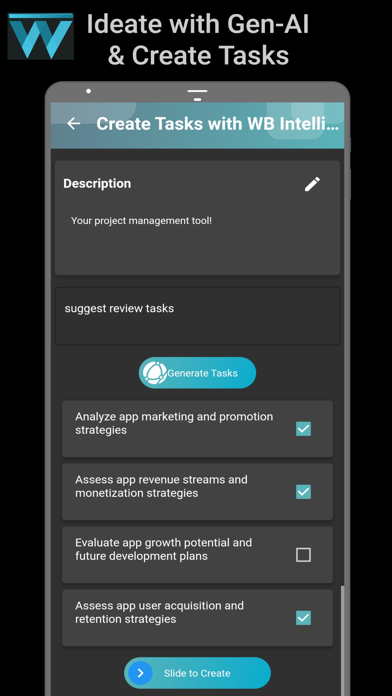
Use Gen-AI WBIntell to generate new task ideas simply from project/task descriptions.
WiserBoard can also connect with your own Kanboard instance, an open-source project management hosting server.
Assign, Organize, Manage, and Track the projects/tasks of your team efficiently in one place, and take control at any time, from anywhere.
Create WiserBoard Workspace:
- Simply sign up and start using the app.
Connect to your Kanboard instance:
- Enter your endpoint URL, sign in and start managing projects from the mobile app WiserBoard.
Main features:
- Track Projects and Tasks at your fingertips.
- Gen-AI to create task ideas from descriptions.
- DocScanner/Camera attachment options.
- Drag and Drop Tasks on Kanban Board.
- User management from Kanboard.
- Daily check-in and task reminders.
- Pin up to two Projects.
- Dark and Light Modes.
- Gen-AI WBIntell Module
WiserBoard is powered by the Gen-AI module that assists in creating various ideas for tasks/subtasks. Add these generated ideas directly to the project by choosing checkboxes.
- Ease of Access
WiserBoard seamlessly syncs with Kanboard projects, making it easier to stay connected with your projects and team members. It fully integrates with Kanboard, allowing access to project dashboards, progress tracking, report generation, and viewing team members' workload in one place.
- Drag and Drop Tasks to Organize Your Project
Locate all tasks on the Kanban board and easily move them through the swimlane columns using drag-and-drop features at your fingertips. Manage multiple swimlanes with horizontal separations on your board.
- Organize Your Projects: Tracking Tasks and Subtasks
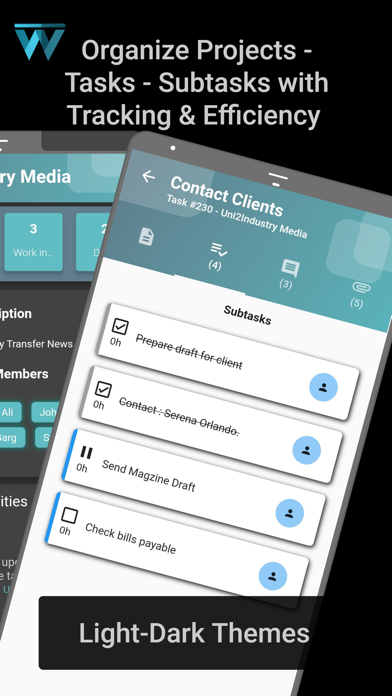
Divide a project into tasks and tasks into subtasks. Task descriptions include fields with all necessary information, images, documents, deadlines, work distribution, etc. Subtasks help execute each task to perfection.
- Efficient Teamwork - Comments and Mentions
Assign tasks to team members easily and track efficiently with discussions/comments. The assignee can communicate ideas through comments, documents, images, links, etc. The comment and description sections can mention members (with the @username attribute).
- Secure Connection and Fresh UI with Dark/Light Modes
The app is secure with the data it handles and is a one-stop solution to get efficiency out of agile management. Get a fresh perspective on the Kanboard with an emerging UI, and we continue improvements, so stay tuned.
- Stay Updated with your Projects
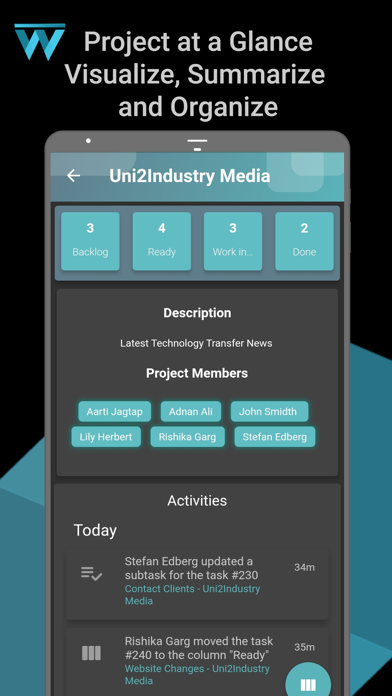
Get updates on every activity that takes place in the team. The activity stream keeps you updated when a task is updated. It is employed for every project page and a dedicated activity stream page, with a widescreen-split landscape view for tablets and bigger screens.
- Meet Your Objectives
Get the most out of your Kanban board and project management, track deadlines for each task, and encourage your teammates to do their best. Stay tuned for more updates; we will be releasing exciting new features soon.
Download the WiserBoard App now and systemize all your work from anywhere.
By downloading the WiserBoard App, you agree to our Terms and Conditions, available at: https://wiserboard.com/terms.