

WordHolic | DIY Flash Cards!
WordHolic | DIY Flash Cards! is made and published by Langholic Ltd. AppBrain is an independent app data site and isn't affiliated with Langholic Ltd. The app name, icon, screenshots and description belong to Langholic Ltd. and are shown as published on the App Store.
AppBrain's verdict
EstablishedLoved by users- Best rank
- #32
- Top Free, Japan
- Rating on App Store
- 4.74
- 552 ratings
- Last updated
- October 16, 2026
Users love it: 4.7 stars from 552 ratings. Its best ranking is #32 in Top Free, Education in Japan.
Rankings
App Store top charts- Highest rank
- #32
- Chart
- Top Free
- Education
- Country
- Japan
Competitors
Similar apps and more from Langholic Ltd.Alternatives to WordHolic | DIY Flash Cards!


Releases
Updates seen on the App Store- Version
- 3.26.8
- Launched
- November 2018
No changelog data
User feedback
Ratings and reviews on the App StoreComments on WordHolic | DIY Flash Cards! for iOS
We don't have enough comments to show example comments. Please check back later.
Technology
Found in the app by AppBrain- Price
- Free
- App size
- 108.3 MB
- Content rating
- Everyone
Technologies used by WordHolic | DIY Flash Cards!
About the app and developer
About WordHolic | DIY Flash Cards!
WordHolic | DIY Flash Cards! is an education app developed by Langholic Ltd.
User Ratings
WordHolic | DIY Flash Cards! is rated 4.74 out of 5 stars. The rating is based on 550 ratings.
App Information
WordHolic | DIY Flash Cards! is freely available from the App Store. The app size is 108.30 MB. The latest version available is 3.26.8. The last update was on October 16, 2026.
Technical Requirements
The app has a content rating of Everyone. The app has been available on the App Store since November 2018.
Developer information for Langholic Ltd.
Address:
Store listing
By Langholic Ltd., from the App Store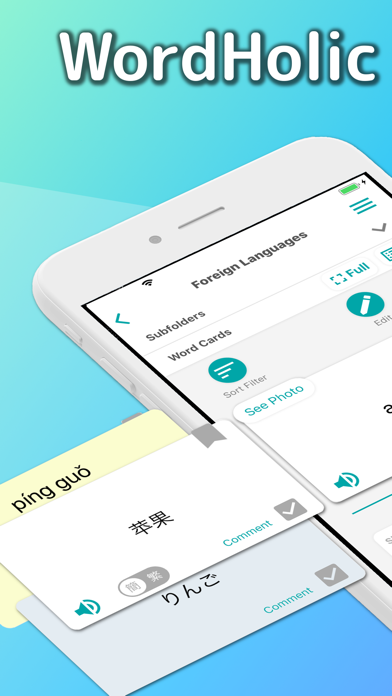


Description by Langholic Ltd. Written by the developer, not by AppBrain. Click to read.
● Easy to operate with easy-to-see design, so you can learn smoothly!
● Simple but sufficient functions, so you can use them conveniently!
● Create as many flash cards as you want for free and learn Chinese, French, Japanese, Korean, Spanish, etc. or prepare for your exams!
◇ Main learning functions ◇
● Learn effectively by utilizing bookmarks and memorize flags on cards (Front side, back side and tag comment)
● Practice listening with the voice reading function (30 languages)
(You can also play voice readings simultaneously while listening to music.)
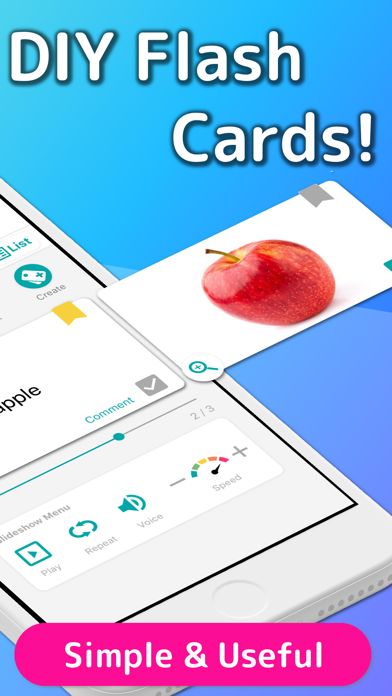
● Easy to learn with the auto rotate slideshow
(You can adjust speeds, reverse front and back sides, shuffle cards etc.)
● Enjoy the card list and the full screen multi mode which shows Front and Back sides at the same time
● Add photos or images on flashcards to memorize visually
● Review repeatedly based on forgetting curve
● Quizzes (Writing, Dictation, etc.)
◇ Main management functions ◇
● Organize cards in folders
(Multiple subfolders can be also provided.)
● Search folders and cards by keywords and so on.
● Export card backup files
(You can easily share your card data with your friends!)
● Import data files to create cards
(You can create data files in PC and import it!)
◇ Special functions for each language ◇
You can enjoy convenient functions for each language!
● Chinese: Character Converter (Simplified / Traditional), Pinyin Generator
● Japanese: Furigana Generator (Romaji / Hiragana / Katakana)
◇ Other useful functions ◇
● Set the default reading language. These are set as initial values when you create new cards, so you don’t have to set each time.
(This is available from the menu button on the upper right of the app screen > [Preferences] > [New Card Settings].)
● Set the horizontal alignments and text sizes on each side of cards!
(This is available from the menu button on the upper right of the app screen > [Preferences] > [Card Basic Display Settings].)
● Enjoy Night Mode to make backgrounds and texts dark when you feel your eyes are tired or at night.
(This is available from the menu button on the upper right of the app screen > [Preferences] > [Night Mode].)
◇ How to share cards with your friends ◇
(1) Select the menu button on the upper right of the app screen > [Export Backup]
(2) Follow the instructions and export a card data file in the way you like (mail attachment, iCloud, etc.) and share the file with your friends
(3) Store the file in a place of a friend’s phone (or iCloud, Google Drive, etc.) where your friend can view it with the file app.
(4) Select the menu button on the upper right of the app screen > [Import Card Data] and let the file imported into a folder.
◇ Upgrades (In-App Purchases) ◇
Go to [Menu] > [Upgrades] in the app to purchase the upgrades!
● Premium Plans
By upgrading to the premium plan, you will be able to use many features such as data sync, background player, ad free, etc.
- 1 year plan (Auto Renewal Subscription)etc.
● Restore Your Purchases
You can restore your purchases from:
[Menu] > [Upgrades] > [Restore]
* Before restoring, log in your device with your Apple ID that you purchased your plan with.
● Current Plan and Cancellation
The payments will be charged to your iTunes account. To check your current plans or turn off auto-renewal, go to:
Settings App in your device > iTunes & App Store > Apple ID > View Apple ID > Manage
● Auto-Renewal
Your iTunes account will be charged for renewal 24 hours prior to the end of the current period.
● Note
- To turn off auto-renewal, you have to do so in the iTunes Store and cannot cancel the month that your plan starts from.
- Before making a purchase, accept the following Terms of Use.
● Terms of Use
https://www.langholic.com/wordholic-terms-of-use-en
Enjoy WordHolic!