AppBrain
AppBrain
  • Apps
  • Apps being viewed right now Trending apps today Most popular apps All-time most installed apps Top rated apps iPhone and iPad apps
  • Intelligence ▾
    Intelligence overview → Track any Android app or your whole market
    Track & analyze
    Keyword Tracker & OptimizerTrack & improve Play rankings App Performance ReportOne-off PDF for any app StatisticsFree Android & Play market stats
    Promote your app
    Featured Apps App Links
  • Intelligence
  • Pricing
  • Dashboard
  • Sign up
  • Log in
App Store Apps > Productivity > Work Capy
App profile & analytics · Productivity · Data updated 2026-10-29
Work Capy icon

Work Capy

by Nelson Lai · Free · Version 1.0.4
Availability On the App Store since August 2026 ↗
Rating on App Store
–
Rating
–
0 reviews
Best rank
–
not in the top lists
Last updated
October 2, 2026
1.0.4

Work Capy is made and published by Nelson Lai. AppBrain is an independent app data site and isn't affiliated with Nelson Lai. The app name, icon, screenshots and description belong to Nelson Lai and are shown as published on the App Store.

About Work Capy

Work Capy is a productivity app developed by Nelson Lai.

User Ratings

The app has no ratings yet.

App Information

Work Capy is freely available from the App Store. The app size is 49.42 MB. The latest version available is 1.0.4. The last update was on October 2, 2026.

Technical Requirements

The app has a content rating of Everyone. The app has been available on the App Store since August 2026.

Description by Nelson Lai (from the App Store)
Work Capy is a focus timer with a capybara who is sitting in a hot spring on your time.

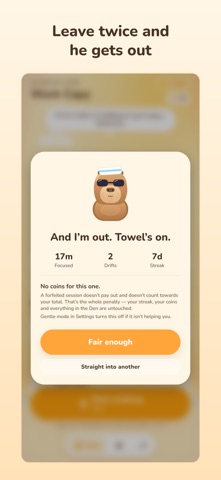
Start a session and put the phone down. Open something else mid-session and you get one warning. Do it again and Capy climbs out of the bath — the session is forfeit and pays nothing. That's the deal, and it's the whole reason it works.

SOMETHING TO LOSE
A timer with no consequences is a stopwatch. Leaving twice ends the run: no coins, and the time doesn't count towards your total. Nothing else is taken — your streak, your coins and everything you've unlocked are untouched. One slip costs you one session, not your week.

ONLY LEAVING COUNTS
Taking a call isn't leaving, and neither is locking the phone, however long the screen stays off (on an iPhone, that needs a passcode). Pausing is free. With notifications on, wander into another app and a heads-up can reach you while there's still time to come back.

GENTLE MODE
If stakes aren't what you need today, one switch in Settings turns them off entirely and Capy stays put no matter what. The app never decides that for you.

POMODORO SETS
Switch them on and soaks come in fours: a five-minute break after each, fifteen after the fourth. Or set one long block of deep work and leave it alone.

DESK MODE
Keeps the screen awake and dims everything down, so your phone becomes a desk buddy instead of a thing you pick up. On iPad too, where the bath is bigger. If you work better with someone beside you, a capybara counts.

HE LIVES OFF YOUR FOCUS
Capy sits in the water while you work. The hours you put in heat his bath: steam, a floating yuzu, then a bird, a turtle and a frog who all decide this is the spot. He is not proud of you. He is just very comfortable. You can name him, and pet him whenever you like. There is no reward for it; he enjoys it anyway.

SEASONS
Halloween, 20 October – 2 November: three hours of focus earn a jack-o'-lantern for the onsen, eight a witch hat. Winter, 1 December – 5 January: a snowman at three hours, a snowy onsen scene at eight. Both come back every year. Season items are earned, never sold.

CAPY COINS AND CAPY'S DEN
Every finished session pays out coins. Spend them on hats, sunglasses, outfit recolours, things for his bath and scenes that re-skin the whole app.

PROFESSION THEMES
Capy can be a student, a programmer, a designer, a doctor, a marketer or — regrettably — a vibecoder. Each one changes his outfit, the scene behind every screen and his job title. Buy the one you are, buy all six at once, or earn them with focus hours: Student at 15 hours in total, then Programmer at 30, Designer at 60, Doctor at 100, Marketer at 150 and Vibecoder at 220.

THE CAPY PASS
Bought once, kept for good. It switches off the ads, doubles the coins from every session, and adds the Chef Hat, the Halo, the Monocle and the Rainy Window scene. Everything does what it says: the Pass and all six professions, in one purchase.

ADS ONLY WHEN YOU ASK
No banners, no interstitials: only short videos you choose to watch, for coins.

STATS WORTH SHARING
A heatmap of your focus, day by day. An optional daily goal, shown as a ring. Streaks, clean runs, and a record of what you actually got done — including the sessions you lost. There's a recap card for the month, sized for stories, and milestones get cards too, if you feel like telling someone.

GOOD FOR
Homework, exam season and ADHD-friendly focus: one clear rule, one warning, and company while you work.

NO ACCOUNT, NO MUSIC
Your sessions and stats stay on your device, and the timer works offline. It runs on real wall time: reopen the app and you're back in the running session. There's no music or ambient sound, on purpose: if you focus to music, you already have something better than anything this app could ship.

Every purchase is one-time, never a subscription. The timer itself is never paywalled, and a forfeited session can never be bought back or watched back.

Privacy policy: https://work.chinesepowered.com/privacy.html
Show more Show less

More data about Work Capy

Price Free
Rating No ratings
Ranking Not ranked
Version 1.0.4
App size 49.4 MB
Suitable for Everyone

Screenshots

Work Capy Screenshot 1 of 7
Work Capy Screenshot 2 of 7
Work Capy Screenshot 3 of 7
Work Capy Screenshot 4 of 7
Work Capy Screenshot 5 of 7
Work Capy Screenshot 6 of 7
Work Capy Screenshot 7 of 7
Screenshots by Nelson Lai, from the the App Store listing
Official page on the App Store Also on Google Play

Also available on Google Play

Work Capy icon Work Capy
Chinese Powered Labs
0.0
Free
10+

Alternatives to Work Capy

Purrductive: Cosy Focus Timer icon Purrductive: Cosy Focus Timer
reshav shakya
0.0
Free
Note it - AI Note Taker icon Note it - AI Note Taker
Appnap Technologies Limited
4.8
Free
20 ratings
CapyPlan: Gentle Daily Planner icon CapyPlan: Gentle Daily Planner
FAMILY DOG PTY LTD
4.8
Free
10 ratings
Capybara Focus: Pomodoro Timer icon Capybara Focus: Pomodoro Timer
金霖 黄
4.9
Free
42 ratings
Buna Voice: AI Keyboard icon Buna Voice: AI Keyboard
Abenezer Nuro
4.7
Free
28 ratings
Scribe – AI Keyboard icon Scribe – AI Keyboard
Teklie Belay Bzuneh
4.7
Free
46 ratings
Habit Tracker - Habitty icon Habit Tracker - Habitty
Yury Paliashchuk
4.0
Free
275 ratings
Eva - Calendar & Daily Planner icon Eva - Calendar & Daily Planner
Dmitriy Biserov
5.0
Free
1.2K ratings

More from Nelson Lai

Private Transcribe icon Private Transcribe
Nelson Lai
5.0
Free
2 ratings
Flappy Kittens icon Flappy Kittens
Nelson Lai
5.0
Free
2 ratings
Xin icon Xin
Nelson Lai
5.0
Free
1 ratings
Frog Pond Game icon Frog Pond Game
Nelson Lai
3.0
Free
1 ratings
Private AI Models icon Private AI Models
Nelson Lai
1.0
Free
1 ratings
Sound Meter dB icon Sound Meter dB
Nelson Lai
5.0
Free
1 ratings
Credit Card Central icon Credit Card Central
Nelson Lai
0.0
Free
Full Clear icon Full Clear
Nelson Lai
0.0
Free

Changelog of Work Capy

No changelog data

Developer information for Nelson Lai

Nelson Lai

Address:

Share Work Capy

Comments on Work Capy for iOS

We don't have enough comments to show example comments. Please check back later.

App Store Rankings for Work Capy

This app is not ranked

Technologies used by Work Capy

Frequently asked questions about Work Capy

Is Work Capy free?

Yes. Work Capy is free on the App Store.

Is Work Capy still available?

Yes. Work Capy is on the App Store, and the last update we saw was on October 2, 2026.

How large is Work Capy?

Work Capy is 49.42 MB.

Is Work Capy suitable for children?

App Store rates the content of Work Capy as suitable for everyone.

Who made Work Capy?

Work Capy was developed by Nelson Lai. It is listed in the productivity category on the App Store.

What are the best alternatives to Work Capy?

People looking at Work Capy also look at these productivity apps: Purrductive: Cosy Focus Timer, Note it - AI Note Taker, CapyPlan: Gentle Daily Planner, Capybara Focus: Pomodoro Timer, Buna Voice: AI Keyboard.

Price drops on Google Play Popular Productivity Apps Top new apps Today's trending apps Apps other people are watching
Purrductive: Cosy Focus Timer icon Purrductive: Cosy Focus Timer
Note it - AI Note Taker icon Note it - AI Note Taker
CapyPlan: Gentle Daily Planner icon CapyPlan: Gentle Daily Planner
Capybara Focus: Pomodoro Timer icon Capybara Focus: Pomodoro Timer
Buna Voice: AI Keyboard icon Buna Voice: AI Keyboard
Scribe – AI Keyboard icon Scribe – AI Keyboard
Habit Tracker - Habitty icon Habit Tracker - Habitty
Eva - Calendar & Daily Planner icon Eva - Calendar & Daily Planner
Overview Alternatives Reviews Rankings Technology
AppBrain Intelligence premium content

Subscribe now to get full and unlimited access to AppBrain Intelligence. You'll have access to:

  • App Intelligence dashboard (performance timeline, competitor comparison, country rankings, insight cards)
  • Detailed ranking data per app
  • Full timeline per developer
  • Device market shares data per country
  • Unlimited keyword tracking
1 Month

$75/mo
(billed every month)

SAVE 0%
Subscribe
3 Months

$65/mo
($195 billed every 3 months)

SAVE 13%
Subscribe
1 Year

$57.50/mo
($690 billed every year)

SAVE 23%
Subscribe
Each subscription will automatically renew 3 days before the expiration date for the same time period. Subscriptions can be cancelled at any time before the renewal.

AppBrain is an app data site, we track rankings, ratings, installs for all apps and games on Google Play and the App Store. AppBrain doesn't host app files or APKs, all install links go directly to the official store. All trademarks are owned by their respective owners.

More apps

  • Top Android apps being viewed
  • DubTake: video dubbing
  • Happy Color®: Color by Number
  • View Secure Browser & Downloader

App statistics

  • Android statistics
  • Google Play Developer stats
  • Trending Android Apps
  • Trending iOS apps
  • Top popular Apps
  • Buy the best Android phone
  • Buy & sell app businesses

About AppBrain

  • Contact
  • Privacy
  • Documentation
  • DMCA takedowns
  • Blog
  • Monetization tips: Understanding your eCPM
© 2010-2026 - AppBrain