

Work Hours Log - Time Tracker
Work Hours Log - Time Tracker is made and published by Monali Paghadal. AppBrain is an independent app data site and isn't affiliated with Monali Paghadal. The app name, icon, screenshots and description belong to Monali Paghadal and are shown as published on the App Store.
AppBrain's verdict
- Last updated
- September 25, 2026
Rankings
App Store top chartsApp Store Rankings for Work Hours Log - Time Tracker
Competitors
Similar apps and more from Monali PaghadalAlternatives to Work Hours Log - Time Tracker


More from Monali Paghadal



Also available on Google Play

Releases
Updates seen on the App Store- Version
- 1.0.1
- Launched
- September 2026
No changelog data
User feedback
Ratings and reviews on the App StoreComments on Work Hours Log - Time Tracker for iOS
We don't have enough comments to show example comments. Please check back later.
Technology
Found in the app by AppBrain- Price
- Free
- App size
- 34.8 MB
- Content rating
- Everyone
Technologies used by Work Hours Log - Time Tracker
About the app and developer
About Work Hours Log - Time Tracker
Work Hours Log - Time Tracker is an utilities app developed by Monali Paghadal.
User Ratings
The app has no ratings yet.
App Information
Work Hours Log - Time Tracker is freely available from the App Store. The app size is 34.79 MB. The latest version available is 1.0.1. The last update was on September 25, 2026.
Technical Requirements
The app has a content rating of Everyone. The app has been available on the App Store since September 2026.
Developer information for Monali Paghadal
Address:
Frequently asked questions about Work Hours Log - Time Tracker
Is Work Hours Log - Time Tracker free?
Yes. Work Hours Log - Time Tracker is free on the App Store.
Is Work Hours Log - Time Tracker still available?
Yes. Work Hours Log - Time Tracker is on the App Store, and the last update we saw was on September 25, 2026.
How large is Work Hours Log - Time Tracker?
Work Hours Log - Time Tracker is 34.79 MB.
Is Work Hours Log - Time Tracker suitable for children?
App Store rates the content of Work Hours Log - Time Tracker as suitable for everyone.
Who made Work Hours Log - Time Tracker?
Work Hours Log - Time Tracker was developed by Monali Paghadal. It is listed in the utilities category on the App Store.
What are the best alternatives to Work Hours Log - Time Tracker?
People looking at Work Hours Log - Time Tracker also look at these utilities apps: Timely - Shift & Pay Tracker, LALUX easyAPP, Countdown Widget Timer, Earjoy Intelligence.
Store listing
By Monali Paghadal, from the App Store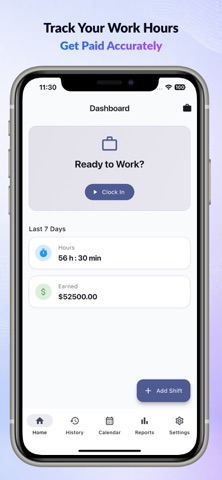


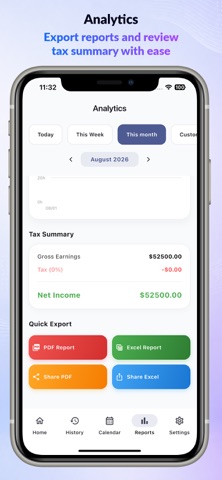

Description by Monali Paghadal Written by the developer, not by AppBrain. Click to read.
Employee Time Clock, Shift Scheduler, Timesheet & Salary Calculator
Track work hours, shifts, overtime, attendance, and salary easily with Work Hours Log - Time Tracker — the ultimate employee time tracking app for hourly workers, freelancers, contractors, remote employees, and shift workers.
Whether you need a smart work hour tracker, shift planner, timesheet manager, overtime calculator, or payroll helper, this app helps you manage everything in one place with a clean and easy-to-use interface.
Perfect for tracking daily work schedules, clock in & clock out times, overtime pay, break hours, attendance records, and employee payroll reports.
Powerful Features
Clock In & Clock Out
Track your work hours instantly with a smart employee time clock. Easily clock in and clock out to record accurate work time, attendance, and shift duration.
Shift Schedule & Work Calendar
Plan and organize your work schedule using the built-in shift calendar. Manage rotating shifts, night shifts, weekly schedules, holidays, and working days with ease.
Manual Timesheet Entry
Add, edit, or update work shifts manually anytime. Ideal for freelancers, contractors, remote workers, and employees with flexible schedules.
Break & Lunch Time Tracker
Automatically calculate break time, lunch deductions, and unpaid hours for accurate payroll and work hour calculations.
Overtime & Extra Pay Calculator
Track overtime hours, double-time shifts, weekend work, and extra earnings automatically using advanced overtime calculations.
Salary, Payroll & Paycheck Calculator
Calculate salary, hourly wages, net income, taxes, weekly pay, monthly earnings, and overtime payments directly inside the app.
Timesheet Reports & Export
Generate professional work reports and export timesheets to PDF and Excel format for payroll, invoicing, attendance tracking, and salary management.
Shift Reminders & Notifications
Never miss a shift again with smart work reminders, clock-in alerts, overtime notifications, and attendance reminders.
Backup & Restore
Securely backup and restore your work logs, timesheets, schedules, and reports when switching devices.
Dark Mode Support
Use the app comfortably day or night with a modern dark theme interface.
Multi-Language & Currency Support
Supports multiple languages and currencies for global users, international workers, and remote teams.
Why Choose Work Hours Log - Time Tracker?
Easy employee time tracker
Smart work hours calculator
Accurate overtime tracker
Powerful timesheet manager
Shift planner & work scheduler
Attendance & payroll tracker
Salary & paycheck calculator
Export PDF & Excel reports
Offline work time tracking
Fast, clean, and modern UI
Multi-language support
Easy-to-use work log system
Simplify your daily work routine with Work Hours Log - Time Tracker — the complete solution for work hour tracking, timesheet management, overtime calculation, attendance monitoring, payroll tracking, and employee scheduling.
Download now and manage your work hours, salary, overtime, shifts, and timesheets smarter than ever.
# Subscription Details #
• Upgrade to Premium for all premium features, without ads, best output quality.
• Monthly , Six Monthly and Yearly subscriptions are available.
• Payment will be charged to your iTunes account at confirmation of purchase.
• Your subscription will automatically renew unless auto-renew is disabled at least 24 hours before the end of the current subscription period.
• Automatic renewals will be charged at the same price you were originally charged for the subscription.
• Subscriptions can be managed by going to Account Settings on the App Store after purchase.
Privacy Policy:- https://sites.google.com/view/srg-privacy-policy
Terms of Service:- https://sites.google.com/view/srg-termsof-service/