

Work Hours Tracker: Hourly
Work Hours Tracker: Hourly is made and published by BetMetrics OÜ. AppBrain is an independent app data site and isn't affiliated with BetMetrics OÜ. The app name, icon, screenshots and description belong to BetMetrics OÜ and are shown as published on the App Store.
AppBrain's verdict
- Last updated
- October 20, 2026
Rankings
App Store top chartsApp Store Rankings for Work Hours Tracker: Hourly
Competitors
Similar apps and more from BetMetrics OÜAlternatives to Work Hours Tracker: Hourly


Releases
Updates seen on the App Store- Version
- 1.0.2
- Launched
- September 2026
No changelog data
User feedback
Ratings and reviews on the App StoreComments on Work Hours Tracker: Hourly for iOS
We don't have enough comments to show example comments. Please check back later.
Technology
Found in the app by AppBrain- Price
- Free
- App size
- 5.13 MB
- Content rating
- Everyone
Technologies used by Work Hours Tracker: Hourly
About the app and developer
About Work Hours Tracker: Hourly
Work Hours Tracker: Hourly is a productivity app developed by BetMetrics OÜ.
User Ratings
The app has no ratings yet.
App Information
Work Hours Tracker: Hourly is freely available from the App Store. The app size is 5.13 MB. The latest version available is 1.0.2. The last update was on October 20, 2026.
Technical Requirements
The app has a content rating of Everyone. The app has been available on the App Store since September 2026.
Developer information for BetMetrics OÜ
Address:
Frequently asked questions about Work Hours Tracker: Hourly
Is Work Hours Tracker: Hourly free?
Yes. Work Hours Tracker: Hourly is free on the App Store.
Is Work Hours Tracker: Hourly still available?
Yes. Work Hours Tracker: Hourly is on the App Store, and the last update we saw was on October 20, 2026.
How large is Work Hours Tracker: Hourly?
Work Hours Tracker: Hourly is 5.13 MB.
Is Work Hours Tracker: Hourly suitable for children?
App Store rates the content of Work Hours Tracker: Hourly as suitable for everyone.
Who made Work Hours Tracker: Hourly?
Work Hours Tracker: Hourly was developed by BetMetrics OÜ. It is listed in the productivity category on the App Store.
What are the best alternatives to Work Hours Tracker: Hourly?
People looking at Work Hours Tracker: Hourly also look at these productivity apps: timeME Pro, Nostora: Time Tracking, 仲裁证据-工时记录·加班台账·职场取证, HourLog: Work Hours Tracker, ViMS Mobile.
Store listing
By BetMetrics OÜ, from the App Store




Description by BetMetrics OÜ Written by the developer, not by AppBrain. Click to read.
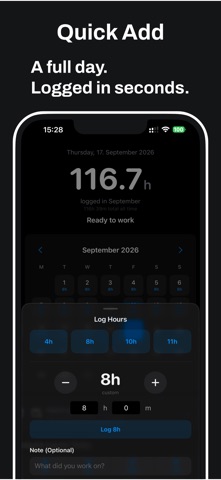
Hourly is a simple work hours tracker for freelancers, contractors, tradespeople, and anyone who needs an accurate record of their time. Log a workday in seconds, keep your totals clear, and export a clean timesheet whenever you need it.
START AND FINISH WORK
Tap to start when you begin and to finish when you are done. Hourly keeps the actual start and finish times so you can review and correct them later.
QUICK PRESETS
Save common work durations such as 4h, 8h, or 10h. With quick saving enabled, a preset logs immediately and gives you a short window to undo it. Keep review mode enabled when you want to check the details first.
CLEAR TIME CALCULATIONS
See the difference between raw time, break deductions, rounding, and final logged hours. Your totals and exports use the final duration shown in the review.
CATCH UP EASILY
Forgot to log a few days? Select the exact dates you want to fill, choose a preset or a previous workday, review the result, and confirm once. Empty days are never treated as workdays automatically.
REPEAT A WORKDAY
Copy a previous workday to another date, including duration, client, notes, rounding, and break settings. Existing entries are protected and are never silently overwritten.
SMART REMINDERS
Choose the days and time that suit your routine. Reminders can skip dates you have already logged, and you can snooze a reminder or mark a day off.
TIMESHEETS AND EXPORT
Copy a clean work log, export CSV data, build a timesheet to share, or create a local backup for safekeeping. Your data stays on your device unless you explicitly export it.
ORGANIZE BY CLIENT AND JOB SITE
Assign entries to clients so your hours line up with who you worked for. Save your regular workplaces and keep each job separate.
OPTIONAL WORKPLACE DETECTION
Hourly can detect when you are near a saved workplace and record local arrival or departure observations. These observations are suggestions, not logged hours. Location monitoring is best effort and may be delayed or imprecise. Hourly does not continuously track your location, start work, or stop work without your explicit settings and confirmation.
PRIVATE BY DESIGN
No account is required. No cloud account is required. No telemetry is used. Your work records stay local and under your control.
Important: export a backup before changing phones or deleting the app.
Hourly is designed to help you keep an accurate work record with as little effort as possible, without payroll, invoicing, or unnecessary business features.
gethourly.app/terms/
gethourly.app/privacy/
Terms of Use (EULA):
https://www.apple.com/legal/internet-services/itunes/dev/stdeula/