

Work Log: Billable Hours & Pay
Work Log: Billable Hours & Pay is made and published by Akira Takashima. AppBrain is an independent app data site and isn't affiliated with Akira Takashima. The app name, icon, screenshots and description belong to Akira Takashima and are shown as published on the App Store.
AppBrain's verdict
- Last updated
- September 26, 2026
- Size
- 1.88 MB
User feedback
Ratings and reviews on the App StoreComments on Work Log: Billable Hours & Pay for iOS
We don't have enough comments to show example comments. Please check back later.
Store listing
By Akira Takashima, from the App Store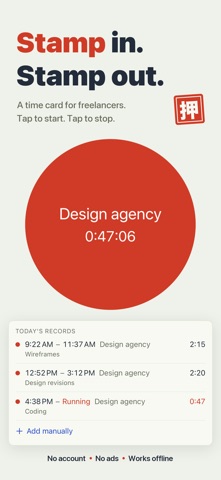



Description by Akira Takashima Written by the developer, not by AppBrain. Click to read.
No account. No subscription. No servers. Your hours never leave your iPhone.
A work log for people who bill by the hour, work for more than one client, and have never once managed to keep a timer running.
WHAT YOU ACTUALLY DO
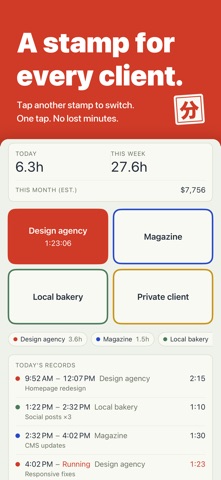
Every client gets its own stamp button in its own color. Press it when you start, press the same button when you finish. Press a different client and it switches over in that one tap — no confirmation, no menus, no project pickers.
While the clock runs you never have to open the app: a Live Activity on the Lock Screen and in the Dynamic Island, and a small Home Screen widget with today's total. "Start recording" and "Stop recording" also work as Shortcuts and with Siri, so you can put them on the Action button.
WHAT YOUR TAPS TURN INTO
• Home — today's total, this week's total, and this month's estimated earnings
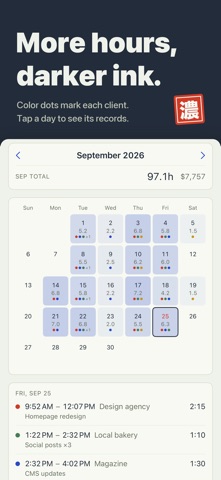
• Calendar — a month at a glance, each day shaded by how long you worked and dotted with the colors of the clients you worked for, with the monthly total on top
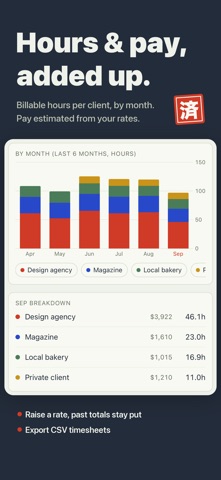
• Charts — the last 7 days and the last 6 months, stacked by client, plus this month broken down client by client
• Earnings estimate — give each client an hourly rate and your minutes become an approximate amount
• CSV export — date, start, end, end date, minutes, client, memo and rate; eight columns any spreadsheet will open
• JSON backup — export and import your whole history, free and unlimited. The app also keeps copies on the device (at most one an hour as you record and edit, and right before an import or a full delete), restores them automatically if a file is ever damaged, and lets you pick one by date in Settings > Backups on This iPhone
BILLABLE HOURS, KEPT PER CLIENT
Every client keeps its own color and its own hourly rate. A record you finish after setting a rate keeps that rate, so raising it next month will not move the numbers you already quoted. (A record finished before you set any rate picks up the rate you set later.)
IF YOU FORGET TO STOP
Turn on the optional reminder and it tells you once a record has been running for more than 12 hours. It stays off until you switch it on. Work that runs past midnight is split across both days in the calendar and the charts.
WHAT IT DELIBERATELY DOES NOT DO
• It does not write or send invoices. It hands you a clean CSV and gets out of the way
• It does not calculate tax, withholding or overtime. The earnings figure is an estimate and nothing more
• No team, no sharing, no cloud sync, no sign-in, no server, no ads
• No GPS and no automatic tracking. Nothing is recorded unless you press the button
• Built for iPhone — there is no iPad layout, and no Mac or Apple Watch app (on iPad it runs in iPhone compatibility mode)
WHAT IT COSTS
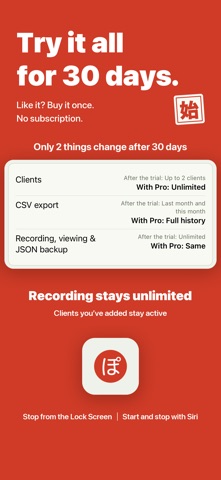
Free to download, with every limit off for 30 days from first launch.
After that, recording, editing, the calendar, the charts, the earnings estimate and JSON backup all stay free and unlimited, permanently.
Only two things narrow. You can add up to 2 clients — anything you created during the trial stays, and archiving one hides its button without freeing a slot. CSV export covers records started since the 1st of last month.
Lifting both is a single one-time purchase. Nothing renews and there is no second tier.
iOS 18 or later. English and Japanese. Everything works in airplane mode — the one-time purchase is the only thing that needs a connection.
Made by one person, in Canada, for the kind of week where you look up and cannot say where the hours went.
Safety and technology
Found in the app by AppBrain- Price
- Free
- App size
- 1.88 MB
- Content rating
- Everyone
Technologies used by Work Log: Billable Hours & Pay
Releases
Updates seen on the App Store- Version
- 1.1.5
- Launched
- August 2026
No changelog data
Alternatives
Similar apps and more from Akira TakashimaAlternatives to Work Log: Billable Hours & Pay


More from Akira Takashima


Rankings
App Store top chartsApp Store Rankings for Work Log: Billable Hours & Pay
About the app and developer
About Work Log: Billable Hours & Pay
Work Log: Billable Hours & Pay is a productivity app developed by Akira Takashima.
What is the rating of Work Log: Billable Hours & Pay?
Work Log: Billable Hours & Pay has no ratings yet.
Is Work Log: Billable Hours & Pay free?
Work Log: Billable Hours & Pay is free. The app size is 1.88 MB. The latest version available is 1.1.5. The last update was on September 26, 2026.
What are the requirements for Work Log: Billable Hours & Pay?
The app has a content rating of Everyone. The app has been available on the App Store since August 2026.
Developer information for Akira Takashima
Address:
Frequently asked questions about Work Log: Billable Hours & Pay
Is Work Log: Billable Hours & Pay free?
Yes. Work Log: Billable Hours & Pay is free on the App Store.
Is Work Log: Billable Hours & Pay still available?
Yes. Work Log: Billable Hours & Pay is on the App Store, and the last update we saw was on September 26, 2026.
How large is Work Log: Billable Hours & Pay?
Work Log: Billable Hours & Pay is 1.88 MB.
Is Work Log: Billable Hours & Pay suitable for children?
App Store rates the content of Work Log: Billable Hours & Pay as suitable for everyone.
Who made Work Log: Billable Hours & Pay?
Work Log: Billable Hours & Pay was developed by Akira Takashima. It is listed in the productivity category on the App Store.
What are the best alternatives to Work Log: Billable Hours & Pay?
People looking at Work Log: Billable Hours & Pay also look at these productivity apps: TimeTrackingTool, Plio: Time Tracker & Focus, Chronion, Hours Tracker : Nine To Five, 現場作業日報REC.