AppBrain
AppBrain
  • Apps
  • Apps being viewed right now Trending apps today Most popular apps All-time most installed apps Top rated apps iPhone and iPad apps
  • Intelligence ▾
    Intelligence overview → Track any Android app or your whole market
    Track & analyze
    Keyword Tracker & OptimizerTrack & improve Play rankings App Performance ReportOne-off PDF for any app StatisticsFree Android & Play market stats
    Promote your app
    Featured Apps App Links
  • Intelligence
  • Pricing
  • Dashboard
  • Sign up
  • Log in
App Store Apps > Business > Work Tab
Work Tab icon

Work Tab

1.16.1
Allocate Space
0.00
0 reviews
Free

Work Tab Screenshot 1 of 3
Work Tab Screenshot 2 of 3
Work Tab Screenshot 3 of 3
Screenshots by Allocate Space, from the the App Store listing
View on the App Store

AppBrain's verdict

Last updated
November 4, 2026
Size
36.6 MB
Official page on the App Store

Share Work Tab

User feedback

Ratings and reviews on the App Store

Comments on Work Tab for iOS

We don't have enough comments to show example comments. Please check back later.

Store listing

By Allocate Space, from the App Store
Description by Allocate Space Written by the developer, not by AppBrain. Click to read.
Work Tab by Allocate Space enables maintenance personnel to efficiently manage their tasks at the tip of their thumbs by accessing their work orders from the field.

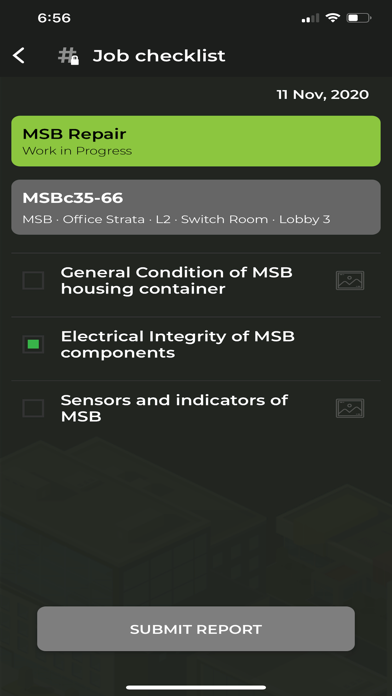
Snap a picture of a damaged equipment, follow the repair checklist, and send the task report.

Work Tab is designed to help you keep all of your maintenance tasks in one place through the mobile and desktop applications.

Work Tab by Allocate Space gives technicians the freedom to focus on the actual maintenance work instead of filling in unproductive paperwork.

Key Features:
1. Receive and update work orders on the move
- Calendar view on the tasks assigned to a specific technician
- Snap a photo of the asset to be maintained before, during and after the task is done
- Add comments onto the photos
- Submit the task report directly via the app
- View and organize your work orders by status (Scheduled, Work in Progress etc)

2. Track maintenance history
- Scan a QR code or NFC tags to access the previous service records and other general information
- Search and filter specific assets you are looking for
- Search Asset by name or location

3. Work Tab + Allocate Space Dashboard
- Pre-set workflow and sync offline data to the cloud
- Assign scheduled task to specific technician
- Change the format and edit the fields in the report
- Verify incoming work orders
- Manage financial claims from contractors

About Allocate Space

Allocate Space utilizes technology in all spaces, thus empowering real estate owners with the ability to analyze, learn, share, and ultimately leverage on insights to maximize the usage of their space.

Maintenance is crucial to ensure maximum efficiency of the utilities and assets in a building. With Allocate Space, we aim to extend the lifespan of assets, improve organization of the maintenance team and processes, therefore reducing costs over time.

Safety and technology

Found in the app by AppBrain
Price
Free
App size
36.6 MB
Content rating
Everyone

Technologies used by Work Tab

Releases

Updates seen on the App Store
Version
1.16.1
Launched
February 2021

No changelog data

Alternatives

Similar apps and more from Allocate Space

Alternatives to Work Tab

Invoice Maker‎ icon Invoice Maker‎
Vladimir Pronin
4.6
Free
163 ratings
Zoho Invoice Maker App icon Zoho Invoice Maker App
Zoho Corporation
4.9
Free
15.3K ratings
Eptura Engage icon Eptura Engage
Eptura, Inc.
4.5
Free
680 ratings
TipRanks Stock Market Analysis icon TipRanks Stock Market Analysis
TipRanks Ltd.
4.8
Free
18.7K ratings
Wallet - Daily Budget & Profit icon Wallet - Daily Budget & Profit
BudgetBakers s.r.o.
4.6
Free
5.9K ratings
Tap & Print: Smart Printer App icon Tap & Print: Smart Printer App
Smart Mobile Apps FZCO
4.2
Free
3.6K ratings
PDF Scanner App: Scanner+ Docs icon PDF Scanner App: Scanner+ Docs
Codespace Dijital Hizmetler Anonim Şirketi
4.6
Free
4.9K ratings
SumUp Business icon SumUp Business
SumUp Limited
3.8
Free
745 ratings

More from Allocate Space

Allocate Space icon Allocate Space
Allocate Space
0.0
Free
BURZT icon BURZT
Allocate Space
0.0
Free

Rankings

App Store top charts

App Store Rankings for Work Tab

This app is not ranked

About the app and developer

About Work Tab

Work Tab is a business app developed by Allocate Space.

What is the rating of Work Tab?

Work Tab has no ratings yet.

Is Work Tab free?

Work Tab is free. The app size is 36.61 MB. The latest version available is 1.16.1. The last update was on November 4, 2026.

What are the requirements for Work Tab?

The app has a content rating of Everyone. The app has been available on the App Store since February 2021.

Work Tab is made and published by Allocate Space. AppBrain is an independent app data site and isn't affiliated with Allocate Space. The app name, icon, screenshots and description belong to Allocate Space and are shown as published on the App Store.

Developer information for Allocate Space

Allocate Space

Address:

Frequently asked questions about Work Tab

Is Work Tab free?

Yes. Work Tab is free on the App Store.

Is Work Tab still available?

Yes. Work Tab is on the App Store, and the last update we saw was on November 4, 2026.

How large is Work Tab?

Work Tab is 36.61 MB.

Is Work Tab suitable for children?

App Store rates the content of Work Tab as suitable for everyone.

Who made Work Tab?

Work Tab was developed by Allocate Space. It is listed in the business category on the App Store.

What are the best alternatives to Work Tab?

People looking at Work Tab also look at these business apps: Invoice Maker‎, Zoho Invoice Maker App, Eptura Engage, TipRanks Stock Market Analysis, Wallet - Daily Budget & Profit.

Apps other people are watching Popular Business Apps Price drops on Google Play Top new apps Today's trending apps
Invoice Maker‎ icon Invoice Maker‎
Zoho Invoice Maker App icon Zoho Invoice Maker App
Eptura Engage icon Eptura Engage
TipRanks Stock Market Analysis icon TipRanks Stock Market Analysis
Wallet - Daily Budget & Profit icon Wallet - Daily Budget & Profit
Tap & Print: Smart Printer App icon Tap & Print: Smart Printer App
PDF Scanner App: Scanner+ Docs icon PDF Scanner App: Scanner+ Docs
SumUp Business icon SumUp Business
Overview Alternatives Reviews Rankings Technology
AppBrain Intelligence premium content

Subscribe now to get full and unlimited access to AppBrain Intelligence. You'll have access to:

  • App Intelligence dashboard (performance timeline, competitor comparison, country rankings, insight cards)
  • Detailed ranking data per app
  • Full timeline per developer
  • Device market shares data per country
  • Unlimited keyword tracking
  • AI assistant access via MCP (Claude, Cursor or any MCP client)
1 Month

$75/mo
(billed every month)

SAVE 0%
Subscribe
3 Months

$65/mo
($195 billed every 3 months)

SAVE 13%
Subscribe
1 Year

$57.50/mo
($690 billed every year)

SAVE 23%
Subscribe
Each subscription will automatically renew 3 days before the expiration date for the same time period. Subscriptions can be cancelled at any time before the renewal.

AppBrain is an app data site, we track rankings, ratings, installs for all apps and games on Google Play and the App Store. AppBrain doesn't host app files or APKs, all install links go directly to the official store. All trademarks are owned by their respective owners.

More apps

  • Top Android apps being viewed
  • CashlyEarn - Play & Earn stats
  • Plotta: Chat in Comics
  • Gift Game Play to Earn Rewards

App statistics

  • Android statistics
  • Google Play Developer stats
  • Trending Android Apps
  • Trending iOS apps
  • Top popular Apps
  • Buy the best Android phone
  • Buy & sell app businesses

About AppBrain

  • Contact
  • Privacy
  • Documentation
  • DMCA takedowns
  • Blog
  • Tips to improve your Android promotional campaign
© 2010-2026 - AppBrain