

WorkflowGen Plus is made and published by Advantys. AppBrain is an independent app data site and isn't affiliated with Advantys. The app name, icon, screenshots and description belong to Advantys and are shown as published on the App Store.
AppBrain's verdict
- Last updated
- February 1, 2022
- Size
- 22.1 MB
User feedback
Ratings and reviews on the App StoreComments on WorkflowGen Plus for iOS
We don't have enough comments to show example comments. Please check back later.
Store listing
By Advantys, from the App Store


Description by Advantys Written by the developer, not by AppBrain. Click to read.
Prerequisites
This app requires WorkflowGen server version 7.9.0 or later; the Quick Approval feature requires WorkflowGen server version 7.10.0 or later. The OIDC-compliant Azure Active Directory v2, AD FS 2016, and Auth0 authentication methods require WorkflowGen server v7.11.2 or later. The OIDC-compliant Okta authentication methods require WorkflowGen server v7.13.1 or later. For earlier versions of WorkflowGen, use the WorkflowGen Mobile app.
Requests screen
Display requests you can launch sorted by category
Launch a new request
Display your ongoing and closed requests
Go to a request's follow-up to access all request information in its current status: request data, actions history, actions to do, associated actions, attachments, web form static view, chat-style comments, workflow view, graphical follow-up, help, etc.
Display portal view
Cancel and delete requests via pop-up menu
Search your ongoing or closed requests filtering by process, category, or requester
Filter by request
Actions screen
Display your to-do or closed actions
Launch an action
Go to an action's follow-up to access all action information in its current status: request data, actions history, actions to do, associated actions, attachments, web form static view, workflow view, graphical follow-up, help, etc.
Search your ongoing or closed actions filtering by process, category, or requester
Filter by action
Assign or unassign actions
Access an action's request
Launch or relaunch actions
Display workflow or portal view
Quickly perform approvals with one tap
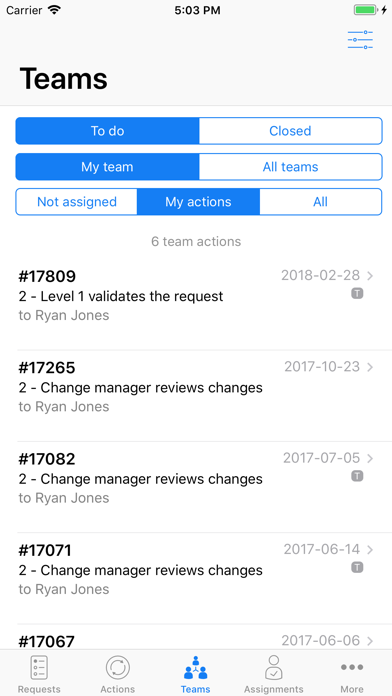
Teams screen
Similar to Actions screen but with specific filters for team
Assignments screen
Similar to Actions screen but with specific filters for assignment
Dashboard
Overview of your ongoing requests and actions in charts
Views
Display your saved views of search results and charts
Search screen
Search ongoing or closed requests by entering the request number
Display the details of the request searched
Delegations screen
Delegate actions associated with a request to another person for a defined period of time
Delegate users via search
Notify delegated users
Date picker
Display and manage the active delegations and all the delegations created
"All / Active" filter
Delete delegations (including via swipe left)
Delegation mode
Act on delegator's behalf to access delegated requests and actions
Optimized web forms layout
Users can fill out and submit the forms related to their actions via their iOS devices
Web form layout is automatically optimized at runtime according to the device resolution (smartphones, tablets)
Authentication
OIDC-compliant authentication with Azure AD v2, AD FS, Okta, or Auth0.
Important notes:
WorkflowGen must be installed on a web server that can be accessed via a VPN or extranet (publicly accessible).
This application is currently not compatible with WorkflowGen configured with Form authentication security mode.
If you are not using WorkflowGen or need help using this application please visit https://www.workflowgen.com
Safety and technology
Found in the app by AppBrain- Price
- Free
- App size
- 22.1 MB
- Content rating
- Everyone
Technologies used by WorkflowGen Plus
Releases
Updates seen on the App Store- Version
- 2.7.0
- Launched
- April 2018
No changelog data
Alternatives
Similar apps and more from AdvantysAlternatives to WorkflowGen Plus








Rankings
App Store top chartsApp Store Rankings for WorkflowGen Plus
About the app and developer
About WorkflowGen Plus
WorkflowGen Plus is a business app developed by Advantys.
User Ratings
The app has no ratings yet.
App Information
WorkflowGen Plus is freely available from the App Store. The app size is 22.05 MB. The latest version available is 2.7.0. The last update was on February 1, 2022.
Technical Requirements
The app has a content rating of Everyone. The app has been available on the App Store since April 2018.
Developer information for Advantys
Address:
Frequently asked questions about WorkflowGen Plus
Is WorkflowGen Plus free?
Yes. WorkflowGen Plus is free on the App Store.
Is WorkflowGen Plus still available?
Yes. WorkflowGen Plus is on the App Store, and the last update we saw was on February 1, 2022.
How large is WorkflowGen Plus?
WorkflowGen Plus is 22.05 MB.
Is WorkflowGen Plus suitable for children?
App Store rates the content of WorkflowGen Plus as suitable for everyone.
Who made WorkflowGen Plus?
WorkflowGen Plus was developed by Advantys. It is listed in the business category on the App Store.
What are the best alternatives to WorkflowGen Plus?
People looking at WorkflowGen Plus also look at these business apps: BizVoice UC, Workflows for business people, 4Industry, Sarbacane - Email & SMS, Unit4 HRMS.