

Worksheet Cleaner
Worksheet Cleaner is made and published by Thomas Hoche. AppBrain is an independent app data site and isn't affiliated with Thomas Hoche. The app name, icon, screenshots and description belong to Thomas Hoche and are shown as published on the App Store.
AppBrain's verdict
- Rating on App Store
- 2.00
- 1 ratings
- Last updated
- October 22, 2026
It doesn't have enough ratings yet to judge what users think.
Rankings
App Store top chartsApp Store Rankings for Worksheet Cleaner
Competitors
Similar apps and more from Thomas HocheAlternatives to Worksheet Cleaner


More from Thomas Hoche

Releases
Updates seen on the App Store- Version
- 1.0.8
- Launched
- June 2026
No changelog data
User feedback
Ratings and reviews on the App StoreComments on Worksheet Cleaner for iOS
We don't have enough comments to show example comments. Please check back later.
Technology
Found in the app by AppBrain- Price
- Free
- App size
- 117.2 MB
- Content rating
- Everyone
Technologies used by Worksheet Cleaner
About the app and developer
About Worksheet Cleaner
Worksheet Cleaner is an education app developed by Thomas Hoche.
User Ratings
Worksheet Cleaner is rated 2.00 out of 5 stars. The rating is based on one rating ratings.
App Information
Worksheet Cleaner is freely available from the App Store. The app size is 117.19 MB. The latest version available is 1.0.8. The last update was on October 22, 2026.
Technical Requirements
The app has a content rating of Everyone. The app has been available on the App Store since June 2026.
Developer information for Thomas Hoche
Address:
Store listing
By Thomas Hoche, from the App Store


Description by Thomas Hoche Written by the developer, not by AppBrain. Click to read.
HOW IT WORKS
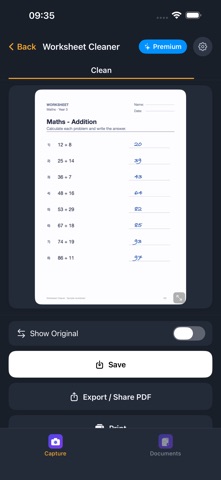
1. Photograph the sheet, scan it, or import a PDF
2. The app crops the sheet automatically
3. Tap "Clean"
4. View the result, save, print, or export as PDF
THE SHEET STAYS THE ORIGINAL
• No generative AI image model. The sheet is never redrawn — printed text, lines, boxes and illustrations stay pixel-for-pixel intact. That is exactly what redraw-style apps cannot do.
• Every pen colour is detected, not just pencil: ballpoint, felt tip, marker.
• Export the result as PDF, print it, share it, or keep it in the archive.
HOW DETECTION WORKS
• To find the handwritten areas, the app sends a downscaled copy of the sheet to our server. Only coordinates come back — no text, no edited image.
• The removal itself runs on your device.
• The copy is not stored; we do not pass it on for AI training.
• Cleaning therefore needs an internet connection. Viewing, printing and exporting sheets you already cleaned works offline.
EXTRAS
• Multi-page scan into one document
• Subject auto-detection from worksheet content
• Textbook recognition via ISBN scan
• Student profiles (multiple kids, separate histories)
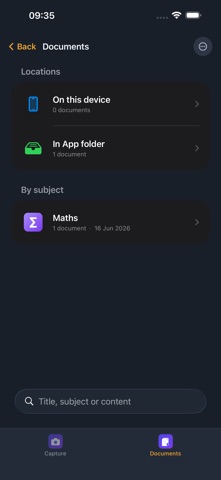
• Choose where files are stored: on the device or in any folder you pick, including iCloud Drive
• Spotlight search across all saved documents
• iPhone, iPad, and Apple-Silicon Mac
PRIVACY
• No login, no account, no ads, no tracking
• Cleaned sheets and student profiles stay on your device or in the folder you picked yourself
• Only the downscaled image copy is transmitted, for detection — no name, no account, no advertising ID
• Full privacy policy in the app and at https://www.worksheet-cleaner.com/legal/cleaner-datenschutz.html
SUBSCRIPTION
• 2 free pages within a 5-day window per installation
• Then Premium: up to 100 pages per month on the monthly plan, up to 300 pages per month on the yearly plan (fair use)
• Apple shows the current local price before purchase
• If Apple shows an introductory offer, it is available once per Apple ID
• Auto-renews, cancel anytime via your Apple ID
• Required Apple disclosures at the bottom of this description
PLEASE NOTE
Detection can miss handwritten areas or mark too much. Look at the result before you rely on it.
SUBSCRIPTION — REQUIRED DISCLOSURES
Worksheet Cleaner Premium is an auto-renewable subscription. Payment is charged to your Apple ID. The subscription automatically renews unless cancelled at least 24 hours before the end of the current period in your Apple Account settings. The renewal charge is applied within the 24 hours before the period ends. If Apple shows an introductory offer, it is available once per Apple ID; after that period the subscription renews at the regular price unless cancelled in time. Manage and cancel in Settings > Apple ID > Subscriptions.
Privacy Policy: https://www.worksheet-cleaner.com/legal/cleaner-datenschutz.html
Terms of Use: https://www.worksheet-cleaner.com/legal/cleaner-nutzungsbedingungen.html
Support: https://www.worksheet-cleaner.com/legal/cleaner-support.html · support@joshua-tree-labs.com