Wormhole: Secure Send is an utilities app developed by Staticflux.
User Ratings
Wormhole: Secure Send is rated 5.00 out of 5 stars. The rating is based on 2 ratings.
App Information
Wormhole: Secure Send costs $0.99. The app size is 10.76 MB. The latest version available is 1.0.0. The last update was on November 6, 2026.
Technical Requirements
The app has a content rating of Everyone. The app has been available on the App Store since November 2026.
Wormhole: Secure Send is made and published by
Staticflux.
AppBrain is an independent app data site and isn't affiliated with Staticflux.
The app name, icon, screenshots and description belong to Staticflux and are shown as published on the App Store.
Description by Staticflux(from the App Store)
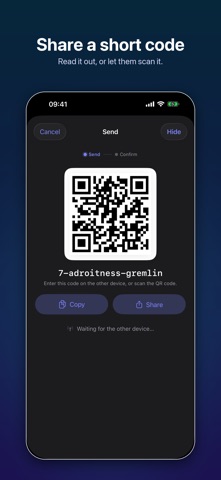
Wormhole sends files, folders, photos, videos, and text from your iPhone, iPad, or Mac to any other device — a phone, a tablet, or a Mac, Windows, or Linux computer — using a short code like 7-guitarist-revenge.
Read the code aloud, type it, or scan it as a QR code. The other side enters it, and the transfer begins. There are no accounts to create, no contacts to exchange, and no cloud storage holding a copy of your files.
PRIVATE BY DESIGN • End-to-end encrypted. The code sets up a key that only the two devices know, using a password-authenticated key exchange (SPAKE2). Servers that help the devices find each other never see your files or the key. • A code works once. An attacker gets a single guess, and a wrong guess ends the transfer for everyone. • Security codes let you confirm you're connected to the right device. • Turn off Direct Connections to send everything through the relay, keeping your IP address hidden from the other device. • No tracking, no analytics, no ads.
WORKS WITH MAGIC-WORMHOLE Wormhole speaks the open magic-wormhole protocol, so it works with the wormhole command on Mac, Windows, and Linux, and with other magic-wormhole apps. Share a code with a colleague at a terminal, or send a log file from your server to your phone.
SEND ANYTHING • Photos and videos at full quality, straight from your library • Any file or folder from Files, iCloud Drive, Dropbox, and other providers — folders are compressed automatically, as ZIP or a tarball (.tar, .tar.gz, .tar.bz2, .tar.xz) • Text and links, typed or pasted • Whatever is on your clipboard, with a preview before it goes • Items from other apps through the share sheet, or by drag and drop
RECEIVE ANYWHERE • Type a code with word suggestions, paste it, or scan its QR code • Preview a transfer's name and size before accepting • Save to any folder you choose, including iCloud Drive • Optionally add received photos and videos to your library
BUILT FOR iPHONE AND iPAD • Transfers keep running in the background, and several can run at once • Open Wormhole from Control Center or the Action button, or with Siri and Shortcuts
AT HOME ON THE MAC • Drop files on the Dock icon to send them, with progress right on the Dock • Send from the Share menu in Finder • Transfers open in a sheet on the main window, with a tray for the ones you hide, or in windows of their own
ON EVERY DEVICE • History of what you sent and received, with Send Again • Use your own mailbox and relay servers if you prefer
Each subscription will automatically renew 3 days before the expiration date for
the same time period. Subscriptions can be cancelled at any time before the renewal.