


AppBrain's verdict
- Rating on App Store
- 5.00
- 22 ratings
- Last updated
- November 11, 2026
- Size
- 123.1 MB
It doesn't have enough ratings yet to judge what users think.
User feedback
Ratings and reviews on the App StoreComments on Wren: AI Whiteboard & Notes for iOS
We don't have enough comments to show example comments. Please check back later.
Store listing
By NOTENEST LLC, from the App StoreDescription by NOTENEST LLC Written by the developer, not by AppBrain. Click to read.
On iPad, write with Apple Pencil, pause, and tap Keep. On iPhone or iPad, ask Study Buddy for a graph, steps or a table and tap Add to Note.
Most AI answers in a chat window. Wren answers on the page you are already writing on, in its own neat hand.
Stuck at 11pm on a problem you can't crack? Write it on your board and pause. Wren's AI writes the answer next to your work: the graph, the steps, the table. No chat window. No copy and paste. Just your notes, filling in.
START THE THOUGHT. WREN FINISHES IT.
Write half a definition, the first line of a proof or the start of a list, then stop. Wren's AI reads what you wrote and picks up where you left off, in ink, beside your notes. It writes in its own hand, so your notes stay yours.
A FRESH PAGE IN ONE TAP
Tap + and a fresh page opens, ready to name and write on. Work a problem at the top, sketch a cell below it, and add pages as you go. Want typed work instead? Hold + for a Document.
WHAT WREN'S AI CAN WRITE
Wren's AI writes with real pen strokes, the same kind of ink you write with. Ask, and it can put any of these on your page:
• A few lines of text, like a definition or a short explanation
• Step-by-step solves for math and science problems
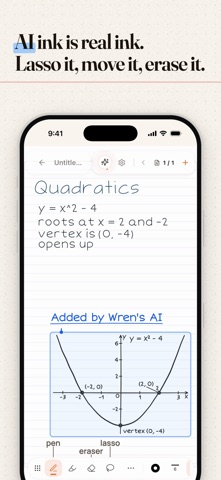
• Graphs of the function you are working on
• Tables that line facts up side by side
• Timelines, from cell division to the Cold War
• Checklists for what to do next
• Formulas
THREE WAYS TO ASK
Pen pause, on iPad. Write what you want with Apple Pencil, like "graph y = x^2 + 1", then pause. A preview appears next to the lines it answers, in the nearest clear space. Drag it where you want it, then tap Keep or Discard.
Study Buddy. Open the chat and ask for steps, a graph or a table about the page you are on. Tap Add to Note and the answer is written onto your page in ink.
AI Tutor. Pin a Tutor answer you like, then add it to your page. It goes on as ink.
YOU DECIDE WHAT STAYS
Every pen pause starts as a preview. Tap Keep and it becomes ink on your board. Tap Discard and it is gone. Kept ink is real ink: lasso it, move it, erase it or undo it, just like your own.
ONE NIGHT AT THE BOARD
9pm, calculus. You write "graph y = x^2 - 4" and pause. The curve shows up on the board next to your work.
10pm, biology. You ask Study Buddy for the stages of mitosis and tap Add to Note. A timeline is written beside your sketch of the cell.
11pm, physics. You write the first two steps of a projectile problem and pause. Wren's AI writes the next step underneath.
Midnight, chemistry. You ask for a table comparing ionic and covalent bonds. It is written in neat rows, right on the board.
WRITE ON IPAD OR IPHONE
On iPad, Wren works with Apple Pencil, with pressure and palm rejection, and pen pause is there whenever you stop to think. On iPhone, write with your finger and use Study Buddy's Add to Note to bring answers onto your page. Sign in and your notes sync across your devices.
WHY WE BUILT IT
We take notes every day, and we were tired of copying answers out of a chat window and into our notes. So we made the notes answer back. We are our own users, and Wren is the whiteboard we wanted.
Wren is free to download and free to use.
Terms of Use: https://www.wrenapp.ai/terms
Privacy Policy: https://www.wrenapp.ai/privacy
Safety and technology
Found in the app by AppBrain- Price
- Free
- App size
- 123.1 MB
- Content rating
- Everyone
Technologies used by Wren: AI Whiteboard & Notes
Releases
Updates seen on the App Store- Version
- 1.5.7
- Launched
- October 2025
No changelog data
Alternatives
Similar apps and more from NOTENEST LLCAlternatives to Wren: AI Whiteboard & Notes


Rankings
App Store top chartsApp Store Rankings for Wren: AI Whiteboard & Notes
About the app and developer
About Wren: AI Whiteboard & Notes
Wren: AI Whiteboard & Notes is a productivity app developed by NOTENEST LLC.
What is the rating of Wren: AI Whiteboard & Notes?
Wren: AI Whiteboard & Notes is rated 5.00 out of 5 stars, based on 22 ratings.
Is Wren: AI Whiteboard & Notes free?
Wren: AI Whiteboard & Notes is free. The app size is 123.09 MB. The latest version available is 1.5.7. The last update was on November 11, 2026.
What are the requirements for Wren: AI Whiteboard & Notes?
The app has a content rating of Everyone. The app has been available on the App Store since October 2025.
Wren: AI Whiteboard & Notes is made and published by NOTENEST LLC. AppBrain is an independent app data site and isn't affiliated with NOTENEST LLC. The app name, icon, screenshots and description belong to NOTENEST LLC and are shown as published on the App Store.
Developer information for NOTENEST LLC
Address:
Frequently asked questions about Wren: AI Whiteboard & Notes
Is Wren: AI Whiteboard & Notes free?
Yes. Wren: AI Whiteboard & Notes is free on the App Store.
Is Wren: AI Whiteboard & Notes still available?
Yes. Wren: AI Whiteboard & Notes is on the App Store, and the last update we saw was on November 11, 2026.
How large is Wren: AI Whiteboard & Notes?
Wren: AI Whiteboard & Notes is 123.09 MB.
Is Wren: AI Whiteboard & Notes suitable for children?
App Store rates the content of Wren: AI Whiteboard & Notes as suitable for everyone.
How do people rate Wren: AI Whiteboard & Notes?
Wren: AI Whiteboard & Notes scores 5.00 out of 5 stars, from 22 ratings on the App Store.
Who made Wren: AI Whiteboard & Notes?
Wren: AI Whiteboard & Notes was developed by NOTENEST LLC. It is listed in the productivity category on the App Store.
What are the best alternatives to Wren: AI Whiteboard & Notes?
People looking at Wren: AI Whiteboard & Notes also look at these productivity apps: New Year's Resolution Keeper, Focus Timer - Lock In, Persway: AI Negotiation Coach, Kwirk.io, CerTracker: License CEU Wallet.