

WristJot
by Yutaka Tsuhako
· Productivity
· $4.99
On the App Store since September 2026
· Data updated
WristJot is made and published by Yutaka Tsuhako. AppBrain is an independent app data site and isn't affiliated with Yutaka Tsuhako. The app name, icon, screenshots and description belong to Yutaka Tsuhako and are shown as published on the App Store.
AppBrain's verdict
- Last updated
- October 29, 2026
- Size
- 8.79 MB
User feedback
Ratings and reviews on the App StoreComments on WristJot for iOS
We don't have enough comments to show example comments. Please check back later.
Store listing
By Yutaka Tsuhako, from the App Store
Screenshots by Yutaka Tsuhako, from the the App Store listing
Description by Yutaka Tsuhako Written by the developer, not by AppBrain. Click to read.
Talk to your Apple Watch. The note is saved as a Markdown file in any folder you choose on your iPhone.
Text by default; you can also keep Transcribe on iPhone recordings as audio files (iOS 26 or later). One-time purchase, no subscription, no account.
Note: The main flow needs an Apple Watch. On iPhone alone you can save with Speak a Note (iOS 26 or later) or with Shortcuts.
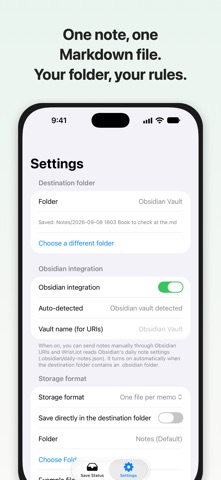
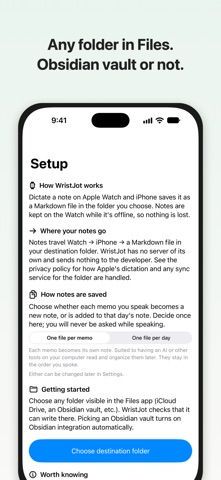
WristJot is for the moments when your hands are busy or your iPhone is out of reach. Dictate with the standard Apple Watch input (or record on the Watch and let the iPhone transcribe it), and your iPhone receives the text and saves it into any folder you pick in the Files app. Choose an Obsidian vault and the note is ready to use there; without Obsidian, any folder such as iCloud Drive works too.
■ Hands-free capture
• Start dictation with one tap from a watch face complication
• Or say "Jot with WristJot" to Siri on the Watch
• For longer thoughts, use Transcribe on iPhone: record up to 10 minutes on the Watch and the iPhone turns it into text (iOS 26 or later)
• An optional quick-send mode skips the confirmation screen
• Notes you've already dictated stay queued on the Watch while offline, and are delivered the next time you open WristJot
■ Plain Markdown, in your folder
• One file per note (default), or append to a daily note
• Customize the entry template and the heading to append under
• Your files stay in your folder — they remain even if you stop using the app
• Picking an Obsidian vault turns on integration automatically (reads your daily note settings, sends via Obsidian URI)
■ Nothing gets lost
• The same note is never saved twice
• Failed saves stay in Save Status with the reason, ready to retry
• Notes deleted before they're saved stay in Recently Deleted for 30 days so you can restore them
• WristJot never sends your notes or recordings to an external server (with the standard input, Apple's dictation turns speech into text; Transcribe on iPhone and Speak a Note transcribe on the iPhone itself)
■ Also
• Speak a Note (Control Center, Lock Screen, Action button) lets you talk to the iPhone and save in the same format (iOS 26 or later)
• Keep Transcribe on iPhone recordings as audio files next to your notes ("Keep recordings as audio files" in WristJot's Settings, off by default; iOS 26 or later)
• The "Save Text" Shortcuts action saves from the iPhone in the same format
• English and Japanese
Obsidian is a trademark of Dynalist Inc. WristJot is not affiliated with or endorsed by Dynalist Inc.
Text by default; you can also keep Transcribe on iPhone recordings as audio files (iOS 26 or later). One-time purchase, no subscription, no account.
Note: The main flow needs an Apple Watch. On iPhone alone you can save with Speak a Note (iOS 26 or later) or with Shortcuts.
WristJot is for the moments when your hands are busy or your iPhone is out of reach. Dictate with the standard Apple Watch input (or record on the Watch and let the iPhone transcribe it), and your iPhone receives the text and saves it into any folder you pick in the Files app. Choose an Obsidian vault and the note is ready to use there; without Obsidian, any folder such as iCloud Drive works too.
■ Hands-free capture
• Start dictation with one tap from a watch face complication
• Or say "Jot with WristJot" to Siri on the Watch
• For longer thoughts, use Transcribe on iPhone: record up to 10 minutes on the Watch and the iPhone turns it into text (iOS 26 or later)
• An optional quick-send mode skips the confirmation screen
• Notes you've already dictated stay queued on the Watch while offline, and are delivered the next time you open WristJot
■ Plain Markdown, in your folder
• One file per note (default), or append to a daily note
• Customize the entry template and the heading to append under
• Your files stay in your folder — they remain even if you stop using the app
• Picking an Obsidian vault turns on integration automatically (reads your daily note settings, sends via Obsidian URI)
■ Nothing gets lost
• The same note is never saved twice
• Failed saves stay in Save Status with the reason, ready to retry
• Notes deleted before they're saved stay in Recently Deleted for 30 days so you can restore them
• WristJot never sends your notes or recordings to an external server (with the standard input, Apple's dictation turns speech into text; Transcribe on iPhone and Speak a Note transcribe on the iPhone itself)
■ Also
• Speak a Note (Control Center, Lock Screen, Action button) lets you talk to the iPhone and save in the same format (iOS 26 or later)
• Keep Transcribe on iPhone recordings as audio files next to your notes ("Keep recordings as audio files" in WristJot's Settings, off by default; iOS 26 or later)
• The "Save Text" Shortcuts action saves from the iPhone in the same format
• English and Japanese
Obsidian is a trademark of Dynalist Inc. WristJot is not affiliated with or endorsed by Dynalist Inc.
Safety and technology
Found in the app by AppBrain- Price
- $4.99
- App size
- 8.79 MB
- Content rating
- Everyone
Technologies used by WristJot
Releases
Updates seen on the App Store- Version
- 1.3
- Launched
- September 2026
No changelog data
Rankings
App Store top charts- Highest rank
- #29
- Chart
- Top Paid
- Productivity
- Country
- Canada
App Store Rankings for WristJot
Top rankings
| Rank | Country | Category | List |
|---|---|---|---|
| 29 | Canada | Productivity | Top Paid |
| 40 | South Korea | Productivity | Top Paid |
Ranking history in Canada
About the app and developer
About WristJot
WristJot is a productivity app developed by Yutaka Tsuhako.
User Ratings
The app has no ratings yet.
App Information
WristJot costs $4.99. The app size is 8.79 MB. The latest version available is 1.3. The last update was on October 29, 2026.
Technical Requirements
The app has a content rating of Everyone. The app has been available on the App Store since September 2026.
Developer information for Yutaka Tsuhako
Address: