AppBrain
AppBrain
  • Apps
  • Apps being viewed right now Trending apps today Most popular apps All-time most installed apps Top rated apps iPhone and iPad apps
  • Intelligence ▾
    Intelligence overview → Track any Android app or your whole market
    Track & analyze
    Keyword Tracker & OptimizerTrack & improve Play rankings App Performance ReportOne-off PDF for any app StatisticsFree Android & Play market stats
    Promote your app
    Featured Apps App Links
  • Intelligence
  • Pricing
  • Dashboard
  • Sign up
  • Log in
App Store Apps > Utilities > Write on PDF: Edit & Annotate
Write on PDF: Edit & Annotate icon

Write on PDF: Edit & Annotate

by Fenuku Kekeli · Utilities · Free
On the App Store since September 2026 · Data updated 2026-11-02

Write on PDF: Edit & Annotate is made and published by Fenuku Kekeli. AppBrain is an independent app data site and isn't affiliated with Fenuku Kekeli. The app name, icon, screenshots and description belong to Fenuku Kekeli and are shown as published on the App Store.

AppBrain's verdict

Last updated
September 10, 2026
Size
21.8 MB
Official page on the App Store

User feedback

Ratings and reviews on the App Store

Comments on Write on PDF: Edit & Annotate for iOS

We don't have enough comments to show example comments. Please check back later.

Store listing

By Fenuku Kekeli, from the App Store
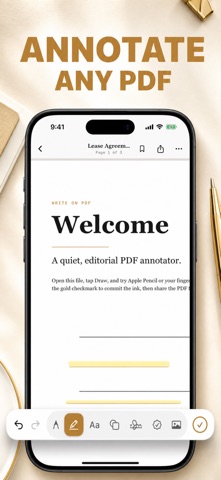
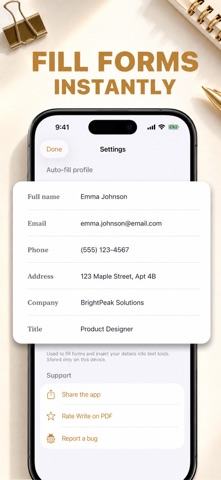
Write on PDF: Edit & Annotate Screenshot 1 of 3
Write on PDF: Edit & Annotate Screenshot 2 of 3
Write on PDF: Edit & Annotate Screenshot 3 of 3
Screenshots by Fenuku Kekeli, from the the App Store listing
Description by Fenuku Kekeli Written by the developer, not by AppBrain. Click to read.
# Write on PDF

Write, type, draw, highlight, sign, and add notes directly to your PDF documents.

Write on PDF gives you the tools you need to quickly mark up PDFs without complicated editing software. Open your document, make your changes, and save your updated PDF.

## WRITE & ADD TEXT

Add text anywhere on your PDF. Perfect for filling documents, adding answers, making corrections, or adding extra information.

## DRAW & ANNOTATE

Use drawing and annotation tools to mark up documents naturally. Circle important information, add handwritten notes, or draw directly on the page.

## FILL PDF FORMS

Complete PDF documents and forms from your iPhone or iPad. Add the information you need without printing the document first.

## SIGN DOCUMENTS

Add your signature directly to PDF documents for a fast and convenient way to complete forms and paperwork.

## HIGHLIGHT IMPORTANT TEXT

Highlight important sections of your documents so you can quickly find the information that matters.

## ADD NOTES

Add notes and annotations while reading, reviewing, or studying PDF documents.

## MADE FOR EVERYDAY PDF EDITING

Write on PDF is useful for:

* Filling PDF forms
* Signing documents
* Adding text to PDFs
* Annotating documents
* Highlighting important information
* Writing notes
* Drawing on PDFs
* Reviewing documents
* Completing worksheets
* Marking up study materials

Whether you're working with forms, notes, school documents, business files, or personal PDFs, Write on PDF makes it easy to make changes directly from your device.

Open your PDF and start writing.

Subscription Details:
• Title: Savory All Access
• Length: 1 year
• Price: $39.99 per year and $7.99 per month (auto-renews)
• Terms of Use: https://www.apple.com/legal/internet-services/itunes/dev/stdeula/
• Privacy Policy: https://docs.google.com/document/d/1b2FQZ_HK2I_6ZBJhiaJw_Vii5aKW9D4dYjGfP9C8efU/edit?usp=sharing
Official page on the App Store

Safety and technology

Found in the app by AppBrain
Price
Free
App size
21.8 MB
Content rating
Everyone

Technologies used by Write on PDF: Edit & Annotate

Releases

Updates seen on the App Store
Version
1.0
Launched
September 2026

No changelog data

Alternatives

Similar apps and more from Fenuku Kekeli

Alternatives to Write on PDF: Edit & Annotate

قول وسجّل - حاسبة بلوت icon قول وسجّل - حاسبة بلوت
MUHANNA HAMOUD O ALALWANI
0.0
Free
eSign - Signature Maker + icon eSign - Signature Maker +
Joshua Kelly
0.0
Free
Play Later: Background Player icon Play Later: Background Player
brahim largou
5.0
Free
1 ratings
Percentage Calc: Calculator icon Percentage Calc: Calculator
Ottorino Bruni
3.7
Free
3 ratings
LockBox – Photo Video Vault icon LockBox – Photo Video Vault
Jaydeep Dhameliya
5.0
Free
1 ratings
Unit Converter ++ icon Unit Converter ++
Nirav Patel
1.6
Free
10 ratings
Call Screen-Colorful Call Show icon Call Screen-Colorful Call Show
金国 刘
4.6
Free
48 ratings
Secret Recorder (Black Screen) icon Secret Recorder (Black Screen)
Simonas Armonas
4.0
Free
2 ratings

More from Fenuku Kekeli

Photo Collage Maker – Picframe icon Photo Collage Maker – Picframe
Fenuku Kekeli
4.9
Free
23 ratings
Spin The Wheel: Spin & Decide icon Spin The Wheel: Spin & Decide
Fenuku Kekeli
4.4
Free
16 ratings
Lap Counter - Run, Swim, Cycle icon Lap Counter - Run, Swim, Cycle
Fenuku Kekeli
4.5
Free
12 ratings
Voice Journal - Audio Diary icon Voice Journal - Audio Diary
Fenuku Kekeli
4.9
Free
7 ratings
Bluetooth Speaker Microphone icon Bluetooth Speaker Microphone
Fenuku Kekeli
4.9
Free
7 ratings
PDF Invoice &  Receipt Maker icon PDF Invoice & Receipt Maker
Fenuku Kekeli
5.0
Free
6 ratings
Video To Text - Transcribe MP4 icon Video To Text - Transcribe MP4
Fenuku Kekeli
3.7
Free
6 ratings
Video to Audio Converter | MP3 icon Video to Audio Converter | MP3
Fenuku Kekeli
2.2
Free
5 ratings

Rankings

App Store top charts

App Store Rankings for Write on PDF: Edit & Annotate

This app is not ranked

About the app and developer

About Write on PDF: Edit & Annotate

Write on PDF: Edit & Annotate is an utilities app developed by Fenuku Kekeli.

User Ratings

The app has no ratings yet.

App Information

Write on PDF: Edit & Annotate is freely available from the App Store. The app size is 21.83 MB. The latest version available is 1.0. The last update was on September 10, 2026.

Technical Requirements

The app has a content rating of Everyone. The app has been available on the App Store since September 2026.

Developer information for Fenuku Kekeli

Fenuku Kekeli

Address:

Frequently asked questions about Write on PDF: Edit & Annotate

Is Write on PDF: Edit & Annotate free?

Yes. Write on PDF: Edit & Annotate is free on the App Store.

Is Write on PDF: Edit & Annotate still available?

Yes. Write on PDF: Edit & Annotate is on the App Store, and the last update we saw was on September 10, 2026.

How large is Write on PDF: Edit & Annotate?

Write on PDF: Edit & Annotate is 21.83 MB.

Is Write on PDF: Edit & Annotate suitable for children?

App Store rates the content of Write on PDF: Edit & Annotate as suitable for everyone.

Who made Write on PDF: Edit & Annotate?

Write on PDF: Edit & Annotate was developed by Fenuku Kekeli. It is listed in the utilities category on the App Store.

What are the best alternatives to Write on PDF: Edit & Annotate?

People looking at Write on PDF: Edit & Annotate also look at these utilities apps: قول وسجّل - حاسبة بلوت, eSign - Signature Maker +, Play Later: Background Player, Percentage Calc: Calculator, LockBox – Photo Video Vault.

Share Write on PDF: Edit & Annotate

Popular Utilities Apps Top new apps Price drops on Google Play Apps other people are watching Today's trending apps
قول وسجّل - حاسبة بلوت icon قول وسجّل - حاسبة بلوت
eSign - Signature Maker + icon eSign - Signature Maker +
Play Later: Background Player icon Play Later: Background Player
Percentage Calc: Calculator icon Percentage Calc: Calculator
LockBox – Photo Video Vault icon LockBox – Photo Video Vault
Unit Converter ++ icon Unit Converter ++
Call Screen-Colorful Call Show icon Call Screen-Colorful Call Show
Secret Recorder (Black Screen) icon Secret Recorder (Black Screen)
Overview Alternatives Reviews Rankings Technology
AppBrain Intelligence premium content

Subscribe now to get full and unlimited access to AppBrain Intelligence. You'll have access to:

  • App Intelligence dashboard (performance timeline, competitor comparison, country rankings, insight cards)
  • Detailed ranking data per app
  • Full timeline per developer
  • Device market shares data per country
  • Unlimited keyword tracking
1 Month

$75/mo
(billed every month)

SAVE 0%
Subscribe
3 Months

$65/mo
($195 billed every 3 months)

SAVE 13%
Subscribe
1 Year

$57.50/mo
($690 billed every year)

SAVE 23%
Subscribe
Each subscription will automatically renew 3 days before the expiration date for the same time period. Subscriptions can be cancelled at any time before the renewal.

AppBrain is an app data site, we track rankings, ratings, installs for all apps and games on Google Play and the App Store. AppBrain doesn't host app files or APKs, all install links go directly to the official store. All trademarks are owned by their respective owners.

More apps

  • Top Android apps being viewed
  • Fluid Video Player
  • Puppy Pet Salon Game
  • NovelaPlay: Romance Drama & TV

App statistics

  • Android statistics
  • Google Play Developer stats
  • Trending Android Apps
  • Trending iOS apps
  • Top popular Apps
  • Buy the best Android phone
  • Buy & sell app businesses

About AppBrain

  • Contact
  • Privacy
  • Documentation
  • DMCA takedowns
  • Blog
  • Tips to improve your Android promotional campaign
© 2010-2026 - AppBrain