

Writone - Reply Assistant
Writone - Reply Assistant is made and published by BRIDGE Labs. AppBrain is an independent app data site and isn't affiliated with BRIDGE Labs. The app name, icon, screenshots and description belong to BRIDGE Labs and are shown as published on the App Store.
AppBrain's verdict
- Last updated
- February 20, 2026
Rankings
App Store top chartsApp Store Rankings for Writone - Reply Assistant
Competitors
Similar apps and more from BRIDGE LabsMore from BRIDGE Labs


Releases
Updates seen on the App Store- Version
- 1.0.3
- Launched
- February 2026
No changelog data
User feedback
Ratings and reviews on the App StoreComments on Writone - Reply Assistant for iOS
We don't have enough comments to show example comments. Please check back later.
Technology
Found in the app by AppBrain- Price
- $2.99
- App size
- 1.30 MB
- Content rating
- Everyone
Technologies used by Writone - Reply Assistant
About the app and developer
About Writone - Reply Assistant
Writone - Reply Assistant is a social networking app developed by BRIDGE Labs.
User Ratings
The app has no ratings yet.
App Information
Writone - Reply Assistant costs $2.99. The app size is 1.30 MB. The latest version available is 1.0.3. The last update was on February 20, 2026.
Technical Requirements
The app has a content rating of Everyone. The app has been available on the App Store since February 2026.
Developer information for BRIDGE Labs
Address:
Frequently asked questions about Writone - Reply Assistant
Is Writone - Reply Assistant free?
No. Writone - Reply Assistant costs $2.99 on the App Store.
Is Writone - Reply Assistant still available?
Yes. Writone - Reply Assistant is on the App Store, and the last update we saw was on February 20, 2026.
How large is Writone - Reply Assistant?
Writone - Reply Assistant is 1.30 MB.
Is Writone - Reply Assistant suitable for children?
App Store rates the content of Writone - Reply Assistant as suitable for everyone.
Who made Writone - Reply Assistant?
Writone - Reply Assistant was developed by BRIDGE Labs. It is listed in the social networking category on the App Store.
Store listing
By BRIDGE Labs, from the App Store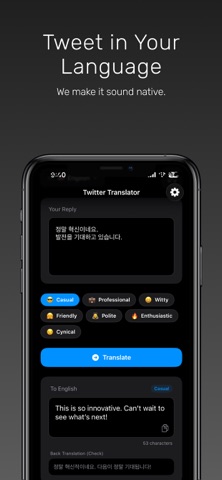


Description by BRIDGE Labs Written by the developer, not by AppBrain. Click to read.
• Write in any language, then reshape your text into natural, tweet-ready writing.
• This is not a word-for-word translation.
• The app focuses on how people actually post on X/Twitter, producing clear, concise, and context-aware phrasing that feels natural in real conversations.
• Supports 15+ languages with automatic language detection.
• Manual input and output language selection is also available.
• Reply faster, with the right voice.
• Paste an existing post and generate multiple reply suggestions based on context.
• Adjust the tone using simple controls such as casual, professional, friendly, or witty until it sounds like something you would actually post.
Important: API key required (Gemini or OpenAI).
• This app requires you to add your own Gemini API key or OpenAI API key to enable AI rewriting, tone adjustment, and reply suggestions.
• Your API key is stored on-device only and is never uploaded to our servers.
Free tier note.
• A limited free tier may be available.
• It typically uses a fixed model and a single rewrite style.
• For consistent quality, better tone control, and full flexibility, we recommend using your own API key.
How to get an API key.
OpenAI API key:
• Create an account at platform.openai.com
• Go to API keys in your account dashboard
• Create a new secret key
• Copy the key and paste it into the app’s API key setting
Tip: Treat your API key like a password.
Do not share it publicly.
Gemini API key:
• Open Google AI Studio (aistudio.google.com)
• Create an API key for the Gemini API
• Copy the key and paste it into the app’s API key setting
Tip: Keep your API key private
and rotate it if you suspect exposure.
With Writone, you can shape your words for global conversations, post with confidence, and reply with tone that fits the moment without sounding translated.