

XdoList is made and published by Yong Zhang. AppBrain is an independent app data site and isn't affiliated with Yong Zhang. The app name, icon, screenshots and description belong to Yong Zhang and are shown as published on the App Store.
AppBrain's verdict
- Last updated
- July 28, 2026
Rankings
App Store top chartsApp Store Rankings for XdoList
Competitors
Similar apps and more from Yong ZhangAlternatives to XdoList


Releases
Updates seen on the App Store- Version
- 0.2.1
- Launched
- July 2026
No changelog data
User feedback
Ratings and reviews on the App StoreComments on XdoList for iOS
We don't have enough comments to show example comments. Please check back later.
Technology
Found in the app by AppBrain- Price
- Free
- App size
- 28.5 MB
- Content rating
- Everyone
Technologies used by XdoList
About the app and developer
About XdoList
XdoList is a productivity app developed by Yong Zhang.
User Ratings
The app has no ratings yet.
App Information
XdoList is freely available from the App Store. The app size is 28.52 MB. The latest version available is 0.2.1. The last update was on July 28, 2026.
Technical Requirements
The app has a content rating of Everyone. The app has been available on the App Store since July 2026.
Developer information for Yong Zhang
Address:
Frequently asked questions about XdoList
Is XdoList free?
Yes. XdoList is free on the App Store.
Is XdoList still available?
Yes. XdoList is on the App Store, and the last update we saw was on July 28, 2026.
How large is XdoList?
XdoList is 28.52 MB.
Is XdoList suitable for children?
App Store rates the content of XdoList as suitable for everyone.
Who made XdoList?
XdoList was developed by Yong Zhang. It is listed in the productivity category on the App Store.
What are the best alternatives to XdoList?
People looking at XdoList also look at these productivity apps: Doblin: One-Task To-Do List, AnyHabit: App Blocker & Focus, B&W To-Do, Daily - To‑Do List & Planner, ClearDo: To Do List & Tasks.
Store listing
By Yong Zhang, from the App Store

Description by Yong Zhang Written by the developer, not by AppBrain. Click to read.
WHY XDOLIST?
WORKFLOW FREEDOM
Your tasks, your structure. Start with the workflow that feels familiar: Things, Todoist, OmniFocus, TickTick, Reminders, or build your own Custom workflow.
ONE MODEL, MANY VIEWS
Tasks, Projects, Areas, and Tags share one powerful domain model. Mix and match Saved Views to see exactly what you need, when you need it.
SAVED VIEWS
Create custom filters, groupings, and sorts. Save them once, switch instantly. From today to upcoming, from project hubs to tag clouds.
OFFICIAL PACKS
Choose from 6 official workflow styles at setup. Each style brings a proven task-management structure into XdoList, so you never start from scratch.
FAST AND RELIABLE SYNC
Your data stays in your control. Optional cloud sync is fast, reliable, and built for people who move between devices.
CLEAN DESIGN
Beautiful, distraction-free interface with smooth animations. Dark mode included for comfortable viewing.
FEATURES:
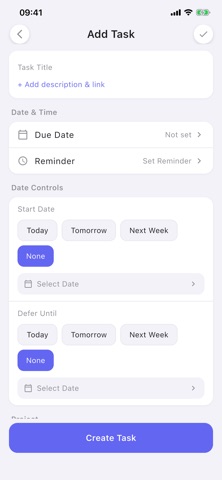
- Create tasks with titles, descriptions, due dates, and priorities
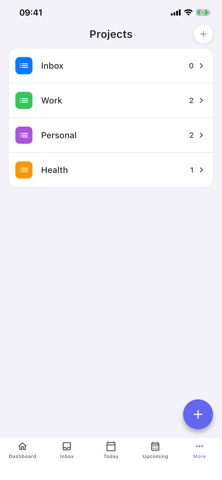
- Organize with Projects, Areas, and Tags
- Choose a built-in workflow style or design your own workflow
- Save custom views with filters, groupings, and sorts
- Search and filter tasks instantly
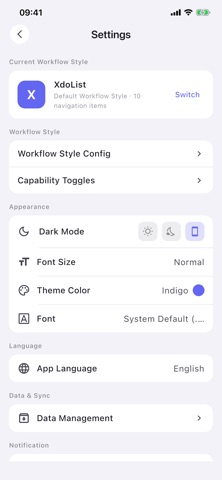
- Dark mode and light mode support
WHO IS IT FOR?
Students, professionals, parents, and anyone who wants a task app that adapts to their workflow. Perfect for daily todos, work tasks, project planning, and personal organization.
SUPPORT
Have feedback? We would love to hear from you!
Email: support@xdolist.com
Website: https://xdolist.com/
Download XdoList today and start working the way you want.