




AppBrain's verdict
Established- Rating on App Store
- 3.87
- 55 ratings
- Last updated
- November 4, 2025
- Size
- 55.9 MB
It doesn't have enough ratings yet to judge what users think.
User feedback
Ratings and reviews on the App StoreComments on xFormula - Equation Editor for iOS
We don't have enough comments to show example comments. Please check back later.
Store listing
By 煦 张, from the App StoreDescription by 煦 张 Written by the developer, not by AppBrain. Click to read.
Include variables, binary operators, arrows, relations, brackets, underline, overline, accents, fraction, radical, large operator...
Just download and have a try.
-----
Functions:
1. Mathematical formula editing.
2. Import & Export
- LaTeX (Pages, Keynote)
- MathML (Pages, Keynote)
- UnicodeMath (Word)
- Image
- SVG: If the .svg file is exported by xFormula, then it could be imported and edit again.
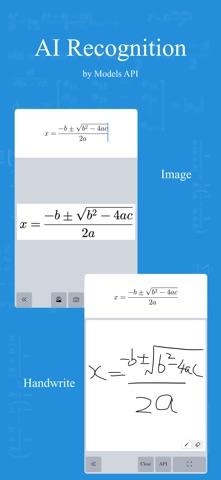
3. Image recognition
- Setup large model API to recognize the math formula in the image.
- The recognition of mathematical formulas in large models is getting better and better, but due to the large number of LaTeX commands for mathematical formulas, there may be some situations where the same symbol is different for different commands. xFormula cannot support all LaTeX commands yet, so there may be some exceptions. However, we will continue to optimize and be compatible with more commands in future versions
4. Mathematical formula library:
- You can create several formula libraries at the same time, and each formula library can be exported and imported separately;
- Under each formula library, there can be many categories, and under each category, there can be many groups. Under each group, formulas can be created and edited
- Example 1: High School Mathematics Formula Library > Classification 1: Set, Classification 2: Geometry, Classification 3: Algebra
- Example 2: Junior High School Mathematics Formula Library>Classification 1: Rational Numbers, Classification 2: Trigonometric Functions, Classification 3: Geometry
5. Mathematical style:
- Due to font limitations, the mathematical formulas currently provided may have some pixel spacing flaws, and each style may also have several mathematical characters that are not supported. Please use them as appropriate.
- We will continue to optimize mathematical styles, which is what we are concerned about.
6. Custom keyboard:
-The frequency of mathematical symbols used varies at each stage, from elementary school, middle school, high school to university; The frequency of symbols used for sets, limits, matrices, functions, and each knowledge range is also different. So if you use it for a long time or frequently, it is strongly recommended to create a suitable input symbol keyboard for yourself, which is more efficient and saves more time than a universal keyboard.
7. Keyboard Extension
- Could be directly used in the form of a keyboard in other text editing software
- Due to the system's restrictions on keyboard Extension, there may be some abnormal situations. After installing the keyboard, if it cannot appear in the keyboard list, please restart the device and try again
- Although currently compatible with iOS 15, it is recommended to use new devices as old devices may experience loading failures due to memory limitations and other issues
8. Help Document
-----
Purchase:
1. This is a paid software and is provided for free download in the hope that users will know what features this software has and whether it is useful before purchasing.
2. As the payment methods for iOS and macOS were not unified when this software was first released, xFormula (iOS) and xFormula (macOS) need to be paid separately.
The advantage of separate payment is pricing splitting, which means that if you only have a mobile device and don't have a Mac, you can save on the purchase cost of the Mac. If merged, the pricing will also be the sum of the current two pricing.
3. If you plan to use this software for a long time and consider upgrading more features in the future, it is recommended to purchase the Professional Edition.
Terms of Service : https://www.apple.com/legal/internet-services/itunes/dev/stdeula/
Privacy Policy: http://guizhenjiaoyu.com/xformula/en/privacy.html
Safety and technology
Found in the app by AppBrain- Price
- Free
- App size
- 55.9 MB
- Content rating
- Everyone
Technologies used by xFormula - Equation Editor
Releases
Updates seen on the App Store- Version
- 4.8
- Launched
- October 2019
No changelog data
Alternatives
Similar apps and more from 煦 张Alternatives to xFormula - Equation Editor



More from 煦 张



Rankings
App Store top chartsApp Store Rankings for xFormula - Equation Editor
About the app and developer
About xFormula - Equation Editor
xFormula - Equation Editor is an education app developed by 煦 张.
User Ratings
xFormula - Equation Editor is rated 3.87 out of 5 stars. The rating is based on 55 ratings.
App Information
xFormula - Equation Editor is freely available from the App Store. The app size is 55.93 MB. The latest version available is 4.8. The last update was on November 4, 2025.
Technical Requirements
The app has a content rating of Everyone. The app has been available on the App Store since October 2019.
xFormula - Equation Editor is made and published by 煦 张. AppBrain is an independent app data site and isn't affiliated with 煦 张. The app name, icon, screenshots and description belong to 煦 张 and are shown as published on the App Store.
Developer information for 煦 张
Address:
Frequently asked questions about xFormula - Equation Editor
Is xFormula - Equation Editor free?
Yes. xFormula - Equation Editor is free on the App Store.
Is xFormula - Equation Editor still available?
Yes. xFormula - Equation Editor is on the App Store, and the last update we saw was on November 4, 2025.
How large is xFormula - Equation Editor?
xFormula - Equation Editor is 55.93 MB.
Is xFormula - Equation Editor suitable for children?
App Store rates the content of xFormula - Equation Editor as suitable for everyone.
How do people rate xFormula - Equation Editor?
xFormula - Equation Editor scores 3.87 out of 5 stars, from 55 ratings on the App Store.
Who made xFormula - Equation Editor?
xFormula - Equation Editor was developed by 煦 张. It is listed in the education category on the App Store.
What are the best alternatives to xFormula - Equation Editor?
People looking at xFormula - Equation Editor also look at these education apps: MathPad, SymEditor - Formula editor, LaTeX Editor Tex Pro, Mathpix Snip, MathTech min.