

Xmd: Web & PDF to Markdown
Xmd: Web & PDF to Markdown is made and published by Marco Tini. AppBrain is an independent app data site and isn't affiliated with Marco Tini. The app name, icon, screenshots and description belong to Marco Tini and are shown as published on the App Store.
AppBrain's verdict
- Last updated
- September 20, 2026
- Size
- 8.85 MB
User feedback
Ratings and reviews on the App StoreComments on Xmd: Web & PDF to Markdown for iOS
We don't have enough comments to show example comments. Please check back later.
Store listing
By Marco Tini, from the App Store


Description by Marco Tini Written by the developer, not by AppBrain. Click to read.
Paste a link, pick a PDF, hit Convert. That's it.
WHY Xmd
• Smart per-source extraction. Xmd detects WordPress, news articles, documentation sites, PDFs, X / Twitter threads, Reddit, App Store, Google Play and Amazon — and picks the right technique for each, not a one-size-fits-all clipper.
• Works on X / Twitter. Longform articles AND tweet threads. Most clippers can't read X because it's a JavaScript app; Xmd renders the page in a real WebView and walks the DOM.
• More than articles. Beyond web pages and PDFs, Xmd recognizes structured pages too — Reddit discussions, App Store / Mac App Store / Google Play listings, and Amazon product pages — and turns them into clean Markdown. App Store listings can include the app's public user reviews.
• PDFs done right. Paragraphs are recomposed instead of being shredded into one line per visual row.
• Built-in OCR for scanned PDFs. When a PDF page has no text layer (a scan, a photo of a document), Xmd falls back to on-device OCR via Apple's Vision framework — Italian and English out of the box. No cloud round-trip, no separate app.
• Cookie banners handled. Iubenda, OneTrust, Didomi and IAB TCF prompts are auto-dismissed so they don't pollute your Markdown.
• Documentation-aware. On docs.* / readthedocs / github.io sites, fenced code blocks keep their language hints.
• Show WebView toggle. For SPA-heavy or login-protected pages, interact with the page first, then extract.
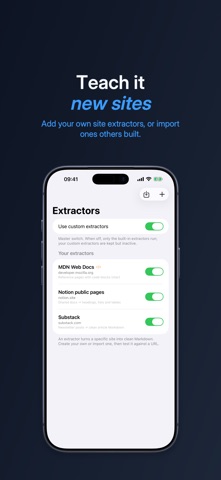
• Extensible. Hit a site Xmd doesn't recognize yet? Build your own extractor — map a few fields with CSS selectors and a template, or an advanced one for trickier pages. Test it against a live URL, then import/export to share.
BUILT-IN MCP SERVER ON MAC (FOR ANY AI AGENT)
On Mac, Xmd doubles as a Model Context Protocol server. Open the MCP tab, hit Start, and any MCP-compatible AI agent — Claude Desktop, Claude Code, Cursor, Zed, custom clients you build yourself — can call:
• convert_url_to_markdown
• convert_pdf_path_to_markdown
• scrape_url — run targeted extraction on any page
• save_extractor / list_extractors — teach Xmd a new site, reusable from then on
Because the server reuses Xmd's real WebView, your agent can fetch JavaScript-rendered pages that pure HTTP-fetch tools can't — pull exactly what it needs from a page, then save it as a reusable extractor so Xmd handles that site automatically next time. One-click config snippet, live request log, all local on 127.0.0.1. No cloud relay, no API key, no subscription.
This makes Xmd probably the easiest way to give an LLM agent first-class web and PDF reading capabilities on macOS.
PRIVATE & LOCAL
No account. No subscription. No cloud round-trip. Extraction happens on your device. Files stay on your device.
NATIVE EVERYWHERE
SwiftUI on iPhone, iPad, Mac and Vision Pro. Share Sheet extension on iOS — send a link from Safari, get a Markdown file back. Keyboard shortcut to convert (⌘↩). Save as .md or copy to clipboard.
GREAT FOR
• Note-takers building a personal knowledge base in Obsidian / Logseq / Bear
• Researchers archiving sources in a readable, diff-friendly format
• Writers collecting reference material
• Engineers saving documentation pages offline
• Mac users who run AI agents locally (Claude Desktop, Cursor, Zed, custom MCP clients) and want them to read the live web and PDFs
Made with care. Built to be extended — bring your own extractors.
Safety and technology
Found in the app by AppBrain- Price
- $9.99
- App size
- 8.85 MB
- Content rating
- Everyone
Technologies used by Xmd: Web & PDF to Markdown
Releases
Updates seen on the App Store- Version
- 1.0.4
- Launched
- May 2026
No changelog data
Alternatives
Similar apps and more from Marco TiniMore from Marco Tini


Rankings
App Store top chartsApp Store Rankings for Xmd: Web & PDF to Markdown
About the app and developer
About Xmd: Web & PDF to Markdown
Xmd: Web & PDF to Markdown is a productivity app developed by Marco Tini.
What is the rating of Xmd: Web & PDF to Markdown?
Xmd: Web & PDF to Markdown has no ratings yet.
Is Xmd: Web & PDF to Markdown free?
Xmd: Web & PDF to Markdown costs $9.99. The app size is 8.85 MB. The latest version available is 1.0.4. The last update was on September 20, 2026.
What are the requirements for Xmd: Web & PDF to Markdown?
The app has a content rating of Everyone. The app has been available on the App Store since May 2026.
Developer information for Marco Tini
Address: