

XML to PDF: Code Printer
XML to PDF: Code Printer is made and published by Muhammad Mujahid Khan. AppBrain is an independent app data site and isn't affiliated with Muhammad Mujahid Khan. The app name, icon, screenshots and description belong to Muhammad Mujahid Khan and are shown as published on the App Store.
AppBrain's verdict
- Last updated
- May 28, 2026
- Size
- 1.99 MB
User feedback
Ratings and reviews on the App StoreComments on XML to PDF: Code Printer for iOS
We don't have enough comments to show example comments. Please check back later.
Store listing
By Muhammad Mujahid Khan, from the App Store

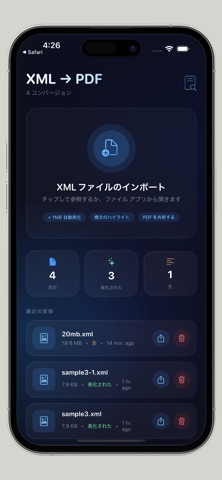

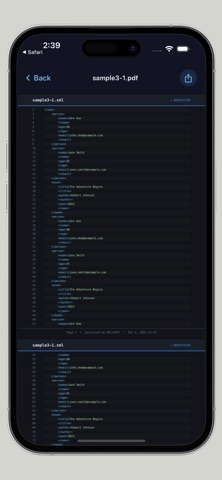
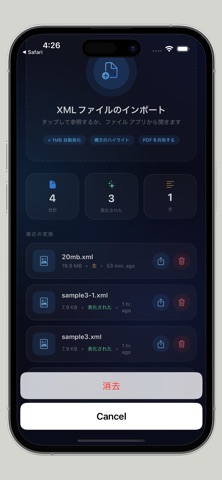
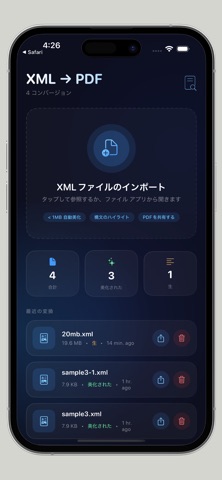

Description by Muhammad Mujahid Khan Written by the developer, not by AppBrain. Click to read.
PRO VERSION: Unlimited conversions (subscription)
Convert XML Code to Beautiful PDFs with Syntax Highlighting
Perfect for developers, students, and anyone who needs to print XML with syntax highlighting and line numbers. Transform raw XML code into professionally formatted PDF documents - completely offline with no uploads and no tracking.
WHAT MAKES THIS APP DIFFERENT
Most XML to PDF tools just dump raw text. This app adds syntax highlighting, line numbers, and beautiful formatting so your code is actually readable when printed or shared.
KEY FEATURES
Syntax Highlighting
Tags, attributes, values, and comments appear in different colors - just like your favorite code editor. Green for values, blue for tags, orange for attributes.
Line Numbers
Every line of XML is numbered for easy reference during code reviews, documentation, or team discussions.
Auto-Beautify (Files Under 1MB)
Small XML files are automatically formatted with proper indentation. No more messy, unreadable XML. Just clean, structured code.
Dark Theme PDF Output
PDFs use a dark background with light text - easier on the eyes when reviewing code on screen or printing.
100% Offline Processing
Everything happens on your device. No internet connection required. No uploads to any server. Your data never leaves your phone.
No Tracking. No Accounts.
Zero data collection. No sign-up required. No email requests. Just download and use.
Fast Rendering Engine
Handles large XML files efficiently with real-time progress indicators. You always know how much longer the conversion will take.
Share Anywhere
Export PDFs via AirDrop, Mail, Messages, Files app, or any app that accepts PDFs.
Open From Files App
Convert any XML file directly using the Open In menu. Works seamlessly with the iOS Files app.
Conversion History
Every PDF you create is saved automatically. Access previously converted files anytime without reconverting.
PERFECT USE CASES
Code Reviews
Review XML structure on paper or iPad. Line numbers make team discussions precise and efficient.
Student Assignments
Students learning XML can print their code with proper syntax highlighting for submission.
Data Archiving
Save important XML data as PDFs for long-term storage. No need to keep raw XML files.
Developer Portfolios
Showcase your XML work in a professional PDF format that non-technical people can review.
Business Reports
Convert XML data exports into readable PDFs for stakeholders who don't understand raw XML.
HOW IT WORKS
Step 1: Open XML File
Tap the import button or use Open In from the Files app. Your app supports XML files of any size.
Step 2: Auto-Beautify
Files under 1MB are automatically beautified with proper indentation. Larger files process as-is for speed.
Step 3: Preview with Colors
See your XML with syntax highlighting before converting. Tags, attributes, values, and comments are color-coded.
Step 4: Export as PDF
Tap the share button. Your PDF is generated instantly with line numbers, syntax highlighting, and dark theme.
FREE VS PRO
Free Version (Always Available)
- 1 conversion per day
- All features included (syntax highlighting, line numbers, beautify, sharing)
- No time limit on the app itself
Pro Version (Subscription)
- Unlimited conversions per day
- Same great features, no daily limit
- Priority support if you need help
SUBSCRIPTION DETAILS
Weekly Subscription: $2.99
Monthly Subscription: $6.99
Yearly Subscription: $17.99 (best value)
SUPPORT & LEGAL
Support: https://justclack.blogspot.com
Privacy Policy: https://justclack.blogspot.com/p/privacy-policy.html
Terms of Use (EULA): https://www.apple.com/legal/internet-services/itunes/dev/stdeula
ABOUT THE DEVELOPER
This app was built for developers by a developer. No corporate tracking. No hidden agendas. Just a tool that solves a real problem - printing XML code with proper syntax highlighting and line numbers.
Safety and technology
Found in the app by AppBrain- Price
- Free
- App size
- 1.99 MB
- Content rating
- Everyone
Technologies used by XML to PDF: Code Printer
Releases
Updates seen on the App Store- Version
- 1.2
- Launched
- March 2026
No changelog data
Alternatives
Similar apps and more from Muhammad Mujahid KhanAlternatives to XML to PDF: Code Printer


More from Muhammad Mujahid Khan


Rankings
App Store top chartsApp Store Rankings for XML to PDF: Code Printer
About the app and developer
About XML to PDF: Code Printer
XML to PDF: Code Printer is a productivity app developed by Muhammad Mujahid Khan.
What is the rating of XML to PDF: Code Printer?
XML to PDF: Code Printer has no ratings yet.
Is XML to PDF: Code Printer free?
XML to PDF: Code Printer is free. The app size is 1.99 MB. The latest version available is 1.2. The last update was on May 28, 2026.
What are the requirements for XML to PDF: Code Printer?
The app has a content rating of Everyone. The app has been available on the App Store since March 2026.
Developer information for Muhammad Mujahid Khan
Address:
Frequently asked questions about XML to PDF: Code Printer
Is XML to PDF: Code Printer free?
Yes. XML to PDF: Code Printer is free on the App Store.
Is XML to PDF: Code Printer still available?
Yes. XML to PDF: Code Printer is on the App Store, and the last update we saw was on May 28, 2026.
How large is XML to PDF: Code Printer?
XML to PDF: Code Printer is 1.99 MB.
Is XML to PDF: Code Printer suitable for children?
App Store rates the content of XML to PDF: Code Printer as suitable for everyone.
Who made XML to PDF: Code Printer?
XML to PDF: Code Printer was developed by Muhammad Mujahid Khan. It is listed in the productivity category on the App Store.
What are the best alternatives to XML to PDF: Code Printer?
People looking at XML to PDF: Code Printer also look at these productivity apps: eFactura Xml Pdf, Image Resize Photo Editor, GEA Aliseda, Night Calendar, Convert Image to PDF App.