AppBrain
AppBrain
  • Apps
  • Apps being viewed right now Trending apps today Most popular apps All-time most installed apps Top rated apps iPhone and iPad apps
  • Intelligence ▾
    Intelligence overview → Track any Android app or your whole market
    Track & analyze
    Keyword Tracker & OptimizerTrack & improve Play rankings App Performance ReportOne-off PDF for any app StatisticsFree Android & Play market stats
    Promote your app
    Featured Apps App Links
  • Intelligence
  • Pricing
  • Dashboard
  • Sign up
  • Log in
App Store Apps > Business > XR-3 Remote
App profile & analytics · Business · Data updated 2026-10-15
XR-3 Remote icon

XR-3 Remote

by Applied Instruments, Inc. · Free · Version 1.4.0
Availability On the App Store since April 2018 ↗
Rating on App Store
5.00/5
1 ratings
Rating
5.00
1 reviews
Best rank
–
not in the top lists
Last updated
December 5, 2021
1.4.0
AppBrain's verdict Established

It doesn't have enough ratings yet to judge what users think.

XR-3 Remote is made and published by Applied Instruments, Inc. AppBrain is an independent app data site and isn't affiliated with Applied Instruments, Inc. The app name, icon, screenshots and description belong to Applied Instruments, Inc. and are shown as published on the App Store.

About XR-3 Remote

XR-3 Remote is a business app developed by Applied Instruments, Inc.

User Ratings

XR-3 Remote is rated 5.00 out of 5 stars. The rating is based on one rating ratings.

App Information

XR-3 Remote is freely available from the App Store. The app size is 3.76 MB. The latest version available is 1.4.0. The last update was on December 5, 2021.

Technical Requirements

The app has a content rating of Everyone. The app has been available on the App Store since April 2018.

Description by Applied Instruments, Inc. (from the App Store)
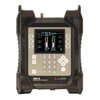
Use the XR-3 Remote companion app to remotely monitor and control Applied Instruments' WiFi enabled XR-3 Modular Test Instrument when paired with a compatible iPhone or iPad. The iOS mobile device connects to the XR-3 satellite meter using WiFi technology without using any 4G data and without going through the internet.

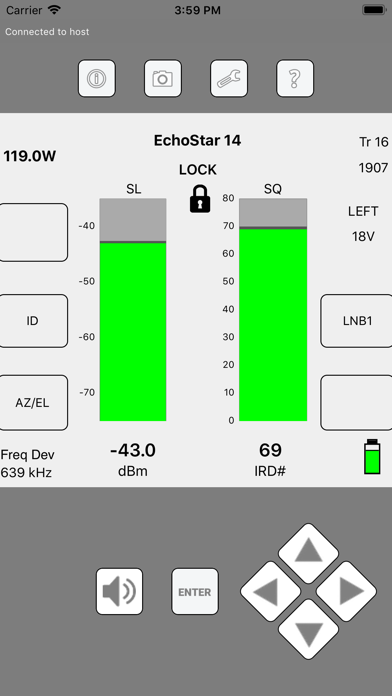
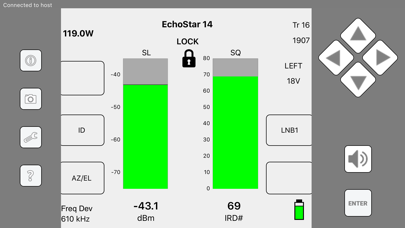
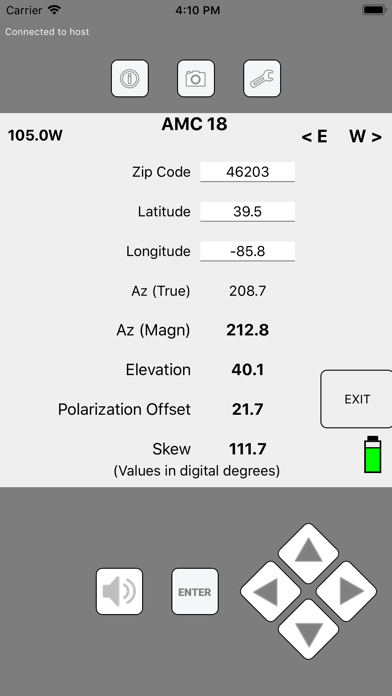
Application example: Connect your XR-3 satellite meter at the ground block location and power on the XR-3. Then pair your XR-3 to your iOS mobile device via WiFi. Climb the ladder with your phone on an armband, run the XR-3 Remote app, and check signal level and quality and re-align your satellite dish without having to first remove the LNBF head and temporarily connect short coax jumper cables from the LNBF to your satellite meter. The XR-3 meter's screen is mirrored on your mobile device, allowing you to identify the satellite, toggle to different satellites and transponders and measure RF level, demodulated signal quality, and LNB LO drift. This method offers safety and speed advantages for the satellite technician.

Present Limitations:
1) Only works with XR-3 hardware version 3.01 (XR-3's with optional WiFi hardware module installed). To confirm the hardware version of your XR-3, press MENU, select Versions from the Main Menu and refer to the Base HW Version field. If your XR-3 doesn't have hardware version 3.01, contact Applied Instruments for a quote to have it modified.
2) XR-3 Remote app only works with the XR-3's satellite meter modules. Support for the cable modules will be coming soon!
3) Only the XR-3's main Run screen, AZ/EL screens, and limit scan screens are viewable and controllable via the mobile device. Increased functionality (more screens) will be offered at a later date via software updates.
4) Only 1 mobile device can be connected to each XR-3 at a time.
5) WiFi range of iOS mobile device to XR-3 satellite meter varies depending on obstacles and terrain, but is approximately 100 to 300 feet.

What do I need to get started?
1) iPhone or iPad
2) WiFi Enabled XR-3 Modular Test Instrument (hardware version 3.01) with a related satellite meter module

For more details about WiFi functions of the WiFi-enabled XR-3, visit http://www.appliedin.com/www/assets/products/XR_3/downloads/XR-3_Meter_WiFi_Operations.pdf

For more details about the XR-3 Remote iOS app, visit http://www.appliedin.com/www/assets/products/XR_3/downloads/XR-3_Remote_iOS_App.pdf

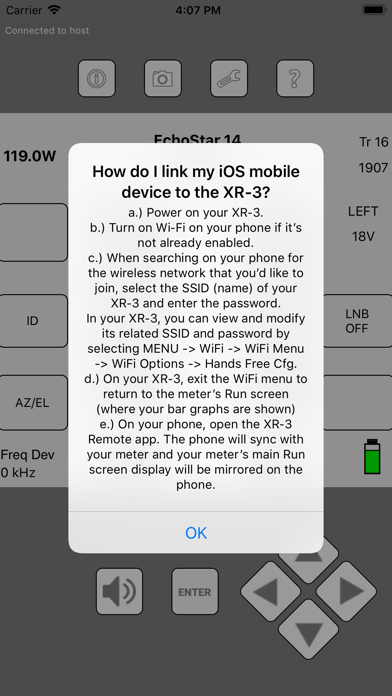
How do I link my iOS mobile device to the XR-3?
1) Power on your XR‐3.
2) Turn on Wi‐Fi on your iPhone or iPad if it’s not already enabled.
3) When searching on your iOS device for the wireless network that you’d like to join, select the SSID (name) of your
XR‐3 and enter the password.
4) In your XR‐3, you can view and modify its related SSID and password by selecting MENU --> WiFi -->
WiFi Menu --> WiFi Options --> Hands Free Cfg.
5) On your XR‐3, exit the WiFi menu to return to the meter’s Run screen (where your bar graphs are shown)
6) On your iPhone or iPad, open the XR‐3 Remote app. The phone will sync with your meter and your meter’s main Run screen display will be mirrored on the phone.

Learn more about the Applied Instruments XR-3 and other Applied Instruments products at www.appliedin.com
Show more Show less

More data about XR-3 Remote

Price Free
Rating 5.00 based on a single rating
Ranking Not ranked
Version 1.4.0
App size 3.76 MB
Suitable for Everyone

Screenshots

XR-3 Remote Screenshot 1 of 8
XR-3 Remote Screenshot 2 of 8
XR-3 Remote Screenshot 3 of 8
XR-3 Remote Screenshot 4 of 8
XR-3 Remote Screenshot 5 of 8
XR-3 Remote Screenshot 6 of 8
XR-3 Remote Screenshot 7 of 8
XR-3 Remote Screenshot 8 of 8
Screenshots by Applied Instruments, Inc., from the the App Store listing
Official page on the App Store

Alternatives to XR-3 Remote

Actors Abacus icon Actors Abacus
Evan Bates
5.0
Free
2 ratings
Emoji Copy And Paste icon Emoji Copy And Paste
Emoji World
4.3
Free
17 ratings
x2y icon x2y
Joseph Cieplinski
5.0
Free
8 ratings
EXFO Exchange icon EXFO Exchange
EXFO Inc.
1.6
Free
9 ratings
VoiceAI Chat icon VoiceAI Chat
伟 葛
0.0
Free
mbDrive - WiFi flash disk icon mbDrive - WiFi flash disk
Haw-Yuan Yang
3.1
$2.99
27 ratings
Team Summit icon Team Summit
DISH Network LLC
3.0
Free
7 ratings
Cash Drawer Keeper icon Cash Drawer Keeper
John Coumerilh
4.7
Free
3 ratings

Changelog of XR-3 Remote

No changelog data

Developer information for Applied Instruments, Inc.

Applied Instruments, Inc.

Address:

Share XR-3 Remote

Comments on XR-3 Remote for iOS

We don't have enough comments to show example comments. Please check back later.

App Store Rankings for XR-3 Remote

This app is not ranked

Technologies used by XR-3 Remote

Frequently asked questions about XR-3 Remote

Is XR-3 Remote free?

Yes. XR-3 Remote is free on the App Store.

Is XR-3 Remote still available?

Yes. XR-3 Remote is on the App Store, and the last update we saw was on December 5, 2021.

How large is XR-3 Remote?

XR-3 Remote is 3.76 MB.

Is XR-3 Remote suitable for children?

App Store rates the content of XR-3 Remote as suitable for everyone.

How do people rate XR-3 Remote?

XR-3 Remote has one rating of 5.00 stars on the App Store.

Who made XR-3 Remote?

XR-3 Remote was developed by Applied Instruments, Inc. It is listed in the business category on the App Store.

What are the best alternatives to XR-3 Remote?

People looking at XR-3 Remote also look at these business apps: Actors Abacus, Emoji Copy And Paste, x2y, EXFO Exchange, VoiceAI Chat.

Today's trending apps Popular Business Apps Top new apps Apps other people are watching Price drops on Google Play
Actors Abacus icon Actors Abacus
Emoji Copy And Paste icon Emoji Copy And Paste
x2y icon x2y
EXFO Exchange icon EXFO Exchange
VoiceAI Chat icon VoiceAI Chat
mbDrive - WiFi flash disk icon mbDrive - WiFi flash disk
Team Summit icon Team Summit
Cash Drawer Keeper icon Cash Drawer Keeper
Overview Alternatives Reviews Rankings Technology
AppBrain Intelligence premium content

Subscribe now to get full and unlimited access to AppBrain Intelligence. You'll have access to:

  • App Intelligence dashboard (performance timeline, competitor comparison, country rankings, insight cards)
  • Detailed ranking data per app
  • Full timeline per developer
  • Device market shares data per country
  • Unlimited keyword tracking
1 Month

$75/mo
(billed every month)

SAVE 0%
Subscribe
3 Months

$65/mo
($195 billed every 3 months)

SAVE 13%
Subscribe
1 Year

$57.50/mo
($690 billed every year)

SAVE 23%
Subscribe
Each subscription will automatically renew 3 days before the expiration date for the same time period. Subscriptions can be cancelled at any time before the renewal.

AppBrain is an app data site, we track rankings, ratings, installs for all apps and games on Google Play and the App Store. AppBrain doesn't host app files or APKs, all install links go directly to the official store. All trademarks are owned by their respective owners.

More apps

  • Top Android apps being viewed
  • SH028 Watch Face, WearOS watch
  • PlayWell: Play to Earn Money
  • View SmartCam View

App statistics

  • Android statistics
  • Google Play Developer stats
  • Trending Android Apps
  • Trending iOS apps
  • Top popular Apps
  • Buy the best Android phone
  • Buy & sell app businesses

About AppBrain

  • Contact
  • Privacy
  • Documentation
  • DMCA takedowns
  • Articles
  • Blog
  • The AppBrain advertising system
© 2010-2026 - AppBrain