

XYLO Dashboard is made and published by XYLO LLC. AppBrain is an independent app data site and isn't affiliated with XYLO LLC. The app name, icon, screenshots and description belong to XYLO LLC and are shown as published on the App Store.
AppBrain's verdict
- Rating on App Store
- 5.00
- 1 ratings
- Last updated
- September 1, 2026
It doesn't have enough ratings yet to judge what users think.
Rankings
App Store top chartsApp Store Rankings for XYLO Dashboard
Competitors
Similar apps and more from XYLO LLCAlternatives to XYLO Dashboard




Also available on Google Play

Releases
Updates seen on the App Store- Version
- 1.0.26
- Launched
- August 2025
No changelog data
User feedback
Ratings and reviews on the App StoreComments on XYLO Dashboard for iOS
We don't have enough comments to show example comments. Please check back later.
Technology
Found in the app by AppBrain- Price
- Free
- App size
- 32.0 MB
- Content rating
- High
Technologies used by XYLO Dashboard
About the app and developer
About XYLO Dashboard
XYLO Dashboard is a business app developed by XYLO LLC.
What is the rating of XYLO Dashboard?
XYLO Dashboard is rated 5.00 out of 5 stars, based on one rating ratings.
Is XYLO Dashboard free?
XYLO Dashboard is free. The app size is 32.01 MB. The latest version available is 1.0.26. The last update was on September 1, 2026.
What are the requirements for XYLO Dashboard?
The app has a content rating of High Maturity. The app has been available on the App Store since August 2025.
Developer information for XYLO LLC
Address:
Frequently asked questions about XYLO Dashboard
Is XYLO Dashboard free?
Yes. XYLO Dashboard is free on the App Store.
Is XYLO Dashboard still available?
Yes. XYLO Dashboard is on the App Store, and the last update we saw was on September 1, 2026.
How large is XYLO Dashboard?
XYLO Dashboard is 32.01 MB.
Is XYLO Dashboard suitable for children?
App Store gives XYLO Dashboard a high maturity rating. It is meant for adults.
How do people rate XYLO Dashboard?
XYLO Dashboard has one rating of 5.00 stars on the App Store.
Who made XYLO Dashboard?
XYLO Dashboard was developed by XYLO LLC. It is listed in the business category on the App Store.
What are the best alternatives to XYLO Dashboard?
People looking at XYLO Dashboard also look at these business apps: Public Wisdom, Tower - Agentic AI Dashboards, item Pass, CG Sales Dashboard, OCR Studio.
Store listing
By XYLO LLC, from the App Store



Description by XYLO LLC Written by the developer, not by AppBrain. Click to read.
Whether you're managing a grocery store, restaurant, supermarket, retail shop, or convenience store, XYLO Dashboard provides you with real-time visibility, efficient control, and actionable insights to help you make smarter business decisions.
Real-time Monitoring
Stay on top of your business with live updates:
• View sales activities by the minute
• Monitor product performance
• Track item-level transactions and refunds
• See which categories or brands are selling best
Employee & Branch Management
Manage staff and easily switch between branches from a single dashboard:
• Switch between branches with one tap inside settings
• Track employee activity per location
• Monitor staff performance across all branches
Comprehensive Reporting
Unlock powerful analytics and trends:
• Daily, weekly, and monthly reports
• Filter by date.
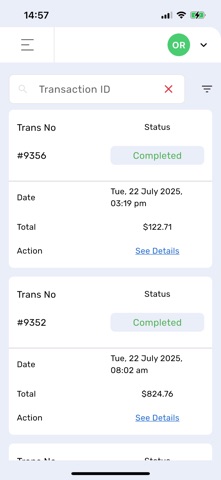
Order & Transaction History
All your order details are a tap away:
• Access full invoice data for each order
• Search and reprint old receipts
• Track customer purchases
• Review canceled or refunded transactions
Access Control
Keep your business secure with
• Role-based access for admins and staff, each function has a permissions where owner or admin can assign to each specific user.
• Roles are easily manageable as an admin has the options to create many roles with different permissions and assign different users to each role.
• Role & permissions can be change anytime and update user profile.
• Track key actions with full activity logs
Multi-location Support
Manage all your branches in one place:
• Switch between store locations
• dashboard view
User-Friendly & Fast
Designed for simplicity and speed:
• Clean interface optimized for Phone.
• Smooth sync with your in-store XYLO POS system
Designed for Business Owners on the Go
Check your store stats while traveling, manage staff remotely, and never miss an important update again. XYLO Dashboard puts full operational control in your hands — even when you’re miles away.
Why Choose XYLO Dashboard?
• Boost operational efficiency
• Minimize human error
• Improve transparency across teams
• Make confident, data-driven decisions
Take your store management to the next level. Download XYLO Dashboard today and unlock the true power of your POS system.