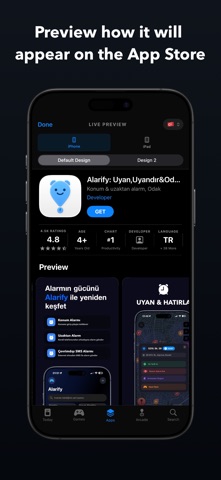
Yada Studio: App Screenshots
Yada Studio: App Screenshots is made and published by Alper Duman. AppBrain is an independent app data site and isn't affiliated with Alper Duman. The app name, icon, screenshots and description belong to Alper Duman and are shown as published on the App Store.
AppBrain's verdict
- Last updated
- September 19, 2026
Rankings
App Store top chartsApp Store Rankings for Yada Studio: App Screenshots
Competitors
Similar apps and more from Alper DumanAlternatives to Yada Studio: App Screenshots
More from Alper Duman
Releases
Updates seen on the App Store- Version
- 1.1.1
- Launched
- June 2026
No changelog data
User feedback
Ratings and reviews on the App StoreComments on Yada Studio: App Screenshots for iOS
We don't have enough comments to show example comments. Please check back later.
Technology
Found in the app by AppBrain- Price
- Free
- App size
- 120.3 MB
- Content rating
- Everyone
Technologies used by Yada Studio: App Screenshots
About the app and developer
About Yada Studio: App Screenshots
Yada Studio: App Screenshots is an overall app developed by Alper Duman.
What is the rating of Yada Studio: App Screenshots?
Yada Studio: App Screenshots has no ratings yet.
Is Yada Studio: App Screenshots free?
Yada Studio: App Screenshots is free. The app size is 120.28 MB. The latest version available is 1.1.1. The last update was on September 19, 2026.
What are the requirements for Yada Studio: App Screenshots?
The app has a content rating of Everyone. The app has been available on the App Store since June 2026.
Developer information for Alper Duman
Address:
Frequently asked questions about Yada Studio: App Screenshots
Is Yada Studio: App Screenshots free?
Yes. Yada Studio: App Screenshots is free on the App Store.
Is Yada Studio: App Screenshots still available?
Yes. Yada Studio: App Screenshots is on the App Store, and the last update we saw was on September 19, 2026.
How large is Yada Studio: App Screenshots?
Yada Studio: App Screenshots is 120.28 MB.
Is Yada Studio: App Screenshots suitable for children?
App Store rates the content of Yada Studio: App Screenshots as suitable for everyone.
Who made Yada Studio: App Screenshots?
Yada Studio: App Screenshots was developed by Alper Duman. It is listed in the overall category on the App Store.
What are the best alternatives to Yada Studio: App Screenshots?
People looking at Yada Studio: App Screenshots also look at these overall apps: Oriora Dev, Deploy Studio, Vibecode: AI App Builder, StoreMate: App Analytics, Vulk - AI App Builder.
Store listing
By Alper Duman, from the App StoreDescription by Alper Duman Written by the developer, not by AppBrain. Click to read.
This studio eliminates technical hurdles in design, localization, video, and A/B testing, allowing you to manage your product page end-to-end.
Key Features
Screenshot Design and 39+ Language Localization
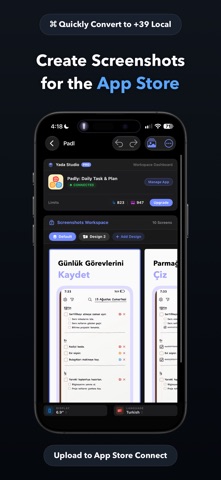
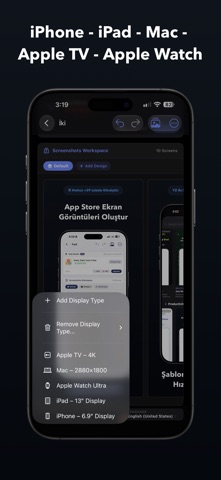
- Design pixel-perfect screenshots for iPhone, iPad, Mac, Apple Watch, and Apple TV.
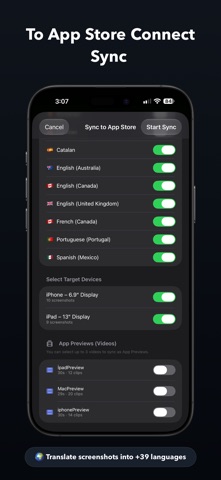
- Create your design and texts (title, subtitle, description, etc.) in a single language; the system instantly translates them into 39 different languages and automatically generates all variations.
- Create professional compositions that highlight your app's interface with the AI-powered background generator.
Error-Free App Preview Videos
- Prepare your App Preview videos without being hindered by Apple's strict requirements such as resolution, frame rate (FPS), codec, and duration.
- Leave behind size mismatch and format rejection errors encountered during upload.
In-App Event Cards
- Create event cards and detail visuals for live streams, contests, or seasonal updates directly in the correct standards.
- Get your events ready without wasting time with Apple-compliant visual layout and text limits.
A/B Testing with Product Page Optimization (PPO)
- Test which screenshot set performs better to increase your app's conversion rate.
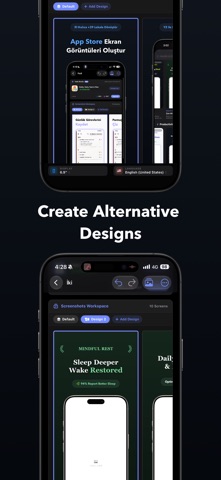
- Prepare alternative screenshot variations with different visual layouts, color palettes, and messages; sync directly with App Store Connect for your PPO tests.
Direct App Store Connect Sync
- Transfer all your prepared screenshots, PPO variations, App Preview videos, and localized metadata to App Store Connect with a single click.
- Save yourself the hassle of uploading hundreds of visuals and localization files one by one from the browser.
Real-Time App Store Preview
- Review live how your designs and videos will look on the App Store before publishing.
Instead of getting lost between design tools, video converters, translation tables, and the App Store Connect panel; gather your entire product page operation into a single workflow.
Terms of Use (EULA): https://www.apple.com/legal/internet-services/itunes/dev/stdeula/