

Yes Secure Next
Yes Secure Next is made and published by Yes Bank Limited. AppBrain is an independent app data site and isn't affiliated with Yes Bank Limited. The app name, icon, screenshots and description belong to Yes Bank Limited and are shown as published on the App Store.
AppBrain's verdict
- Rating on App Store
- 1.00
- 1 ratings
- Last updated
- June 10, 2026
It doesn't have enough ratings yet to judge what users think.
Rankings
App Store top chartsApp Store Rankings for Yes Secure Next
Competitors
Similar apps and more from Yes Bank LimitedAlternatives to Yes Secure Next


More from Yes Bank Limited





Releases
Updates seen on the App Store- Version
- 1.0.3
- Launched
- November 2024
No changelog data
User feedback
Ratings and reviews on the App StoreComments on Yes Secure Next for iOS
We don't have enough comments to show example comments. Please check back later.
Technology
Found in the app by AppBrain- Price
- Free
- App size
- 28.2 MB
- Content rating
- Everyone
Technologies used by Yes Secure Next
About the app and developer
About Yes Secure Next
Yes Secure Next is a finance app developed by Yes Bank Limited.
User Ratings
Yes Secure Next is rated 1.00 out of 5 stars. The rating is based on one rating ratings.
App Information
Yes Secure Next is freely available from the App Store. The app size is 28.17 MB. The latest version available is 1.0.3. The last update was on June 10, 2026.
Technical Requirements
The app has a content rating of Everyone. The app has been available on the App Store since November 2024.
Developer information for Yes Bank Limited
Address:
Store listing
By Yes Bank Limited, from the App Store



Description by Yes Bank Limited Written by the developer, not by AppBrain. Click to read.
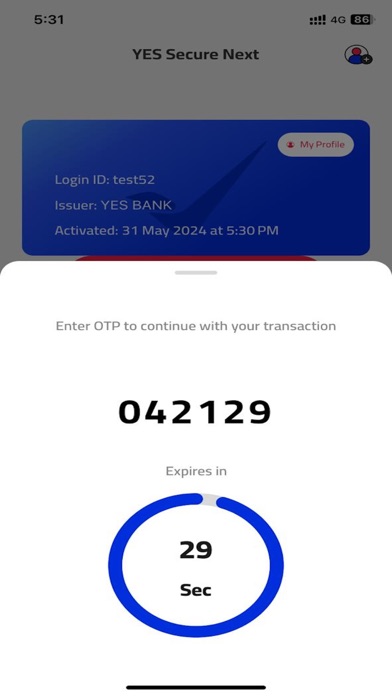
Rule out network dependency for One Time Password (OTP). Generate OTP with YES Secure Next app without mobile network on your mobile device.
Authenticate all your Retail Net Banking transactions with YES Secure Next. It is safe and convenient for frequent travellers and for low/ no mobile network locations.
Register with ease on YES Secure Next app
1) Login to YES Online (Retail Net Banking) and go to Manage Profile.
2) Select ‘Under Security Preferences’ > ‘Register for YES Secure Next’.
3) Choose the operating system of your device.
4) Set YES Secure Next PIN.
5) Download and activate the application on your mobile device.
6) Verify YES Secure Next by entering the OTP on YES Online.
Important Note
To activate YES Secure Next app, you need to have Mobile Internet/ Wi-Fi connectivity on your device linked to your registered mobile number with the Bank.
Once YES Secure Next is enabled, you will stop receiving OTP through SMS/IVR.