






AppBrain's verdict
Established- Rating on App Store
- 5.00
- 5 ratings
- Last updated
- November 18, 2025
- Size
- 59.1 MB
It doesn't have enough ratings yet to judge what users think.
User feedback
Ratings and reviews on the App StoreComments on YMGuide for iOS
We don't have enough comments to show example comments. Please check back later.
Store listing
By Sothear Ly, from the App StoreDescription by Sothear Ly Written by the developer, not by AppBrain. Click to read.
Remote control video playback(Remote Play) on iPad/Mac/Vision Pro with your iPhone, the YMGuide app controls the other YMGuide app on another Apple device.
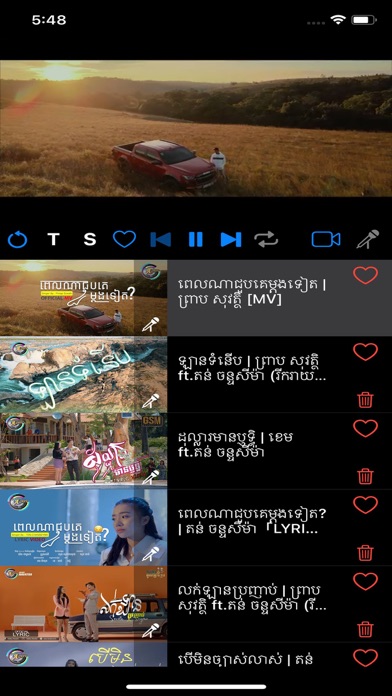
Edit chapters* and allows you to play directly to the chapters in the order you want and skip the chapters you don't want to watch.
Have you ever wanted to automatically skip intros and outros of YouTube videos?
Edit the start and end times of each video* you watch and save it so that you only watch the parts that you want, using our T button.
Record your karaoke singing sessions.*
Listen to the original song, so you can learn how to sing it, then switch to the karaoke version of the video instantaneously at the press of a microphone button. Switch from one video to a similarly linked video that you customize.
Located at the top of our Player Page:
● Y button opens video in YouTube page
● M button for connecting to Remote Player(iPhone YMGuide app connects to web player)**
● G button to generate access code for our web player(password less)
● Network button(Peer 2 Peer) - allows using iPhone(YMGuide app) as remote control of an iPad(running YMGuide app)*
Remote Play** feature allows you to use your phone as a remote control for YouTube videos playing on your TV, Tesla screen, or Apple Vision Pro.
Steps to connect YMGuide app to external device(web enabled TV/Laptop, on Chromecast use TV Bro browser app, on FireTV use Silk browser)
Step 1. Visit our page at https://www.ymguide.org/player (if using iPad/Mac/Vision Pro/Tesla)
Step 2. Login using your login or by access code. Get access code by pressing G button at the top of Player page in our mobile app.
Step 3. On mobile device, press M button(located next to G button), after adding some videos, to connect app to web player.
Visit our X page (formerly Twitter) for "how to" use our app: https://www.twitter.com/YMGuideApp
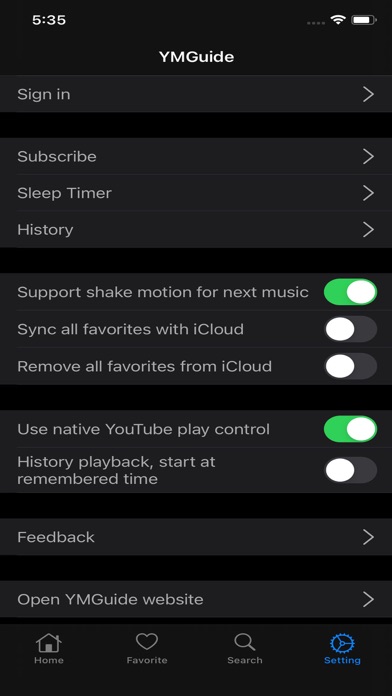
Picture-in-Picture is available on iPhone, minimize our mobile app to allow background audio to play in the lock screen. Elite subscribers can use remote control mode on iPad/MacBook to have PiP capability, users have to open browser to https://www.ymguide.org/player where our mobile app sends the playlist to the iPad browser which can go into PiP.
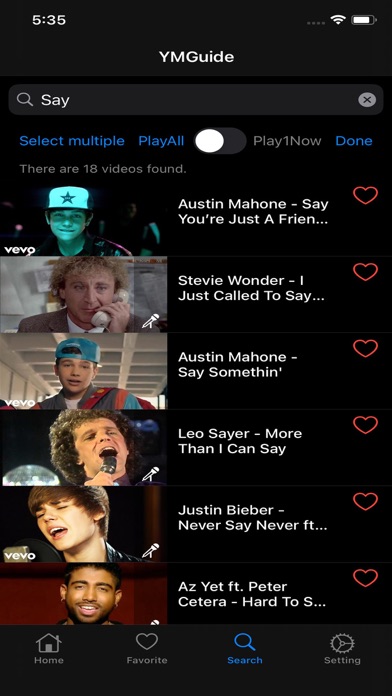
New with My Home, organize your favorite videos into playlists and place them in custom categories and subcategories so that you can quickly go back to them. We provide YMGuide Home, our own example playlists that update daily that we curated for users and place them in our created categories and sub categories.
New widgets, allows you to select recently played, country, playlist, playlist grouping, and category to open to.
*Requires Premium subscription
**Requires Elite subscription -- 7 day free trial from first login.
Additional Subscription information
● Subscription automatically renews unless auto-renew is turned off at least 24-hours before the end of the current period.
● Account will be charged for renewal in accordance with your plan, within 24-hours prior to the end of the current period.
● Subscriptions may be managed by the user and auto-renewal may be turned off by going to the user's Account Settings after purchase.
● Any unused portion of a free trial period, if offered, will be forfeited when the user purchases a subscription to that publication, where applicable.
Legal:
Terms of Use: https://www.ymguide.org/term_of_use
Privacy Policy: https://www.ymguide.org/privacy_policy
All the content is provided by YouTube services, please follow these:
https://www.youtube.com/t/terms
https://www.youtube.com/yt/copyright/
https://www.youtube.com/yt/policyandsafety/
Support:
Twitter/X: @YMGuideApp
Safety and technology
Found in the app by AppBrain- Price
- Free
- App size
- 59.1 MB
- Content rating
- High
Technologies used by YMGuide
Releases
Updates seen on the App Store- Version
- 4.2.2
- Launched
- July 2020
No changelog data
Alternatives
Similar apps and more from Sothear LyAlternatives to YMGuide



Rankings
App Store top chartsApp Store Rankings for YMGuide
About the app and developer
About YMGuide
YMGuide is a music app developed by Sothear Ly.
User Ratings
YMGuide is rated 5.00 out of 5 stars. The rating is based on 5 ratings.
App Information
YMGuide is freely available from the App Store. The app size is 59.07 MB. The latest version available is 4.2.2. The last update was on November 18, 2025.
Technical Requirements
The app has a content rating of High Maturity. The app has been available on the App Store since July 2020.
YMGuide is made and published by Sothear Ly. AppBrain is an independent app data site and isn't affiliated with Sothear Ly. The app name, icon, screenshots and description belong to Sothear Ly and are shown as published on the App Store.
Developer information for Sothear Ly
Address: