

Yomoyo: Japanese Reader
Yomoyo: Japanese Reader is made and published by Miles Wilson. AppBrain is an independent app data site and isn't affiliated with Miles Wilson. The app name, icon, screenshots and description belong to Miles Wilson and are shown as published on the App Store.
AppBrain's verdict
- Rating on App Store
- 5.00
- 5 ratings
- Last updated
- May 20, 2025
It doesn't have enough ratings yet to judge what users think.
Rankings
App Store top chartsApp Store Rankings for Yomoyo: Japanese Reader
Competitors
Similar apps and more from Miles WilsonAlternatives to Yomoyo: Japanese Reader


Releases
Updates seen on the App Store- Version
- 1.0
- Launched
- May 2025
No changelog data
User feedback
Ratings and reviews on the App StoreComments on Yomoyo: Japanese Reader for iOS
We don't have enough comments to show example comments. Please check back later.
Technology
Found in the app by AppBrain- Price
- Free
- App size
- 264.8 MB
- Content rating
- Everyone
Technologies used by Yomoyo: Japanese Reader
About the app and developer
About Yomoyo: Japanese Reader
Yomoyo: Japanese Reader is an education app developed by Miles Wilson.
User Ratings
Yomoyo: Japanese Reader is rated 5.00 out of 5 stars. The rating is based on 5 ratings.
App Information
Yomoyo: Japanese Reader is freely available from the App Store. The app size is 264.78 MB. The latest version available is 1.0. The last update was on May 20, 2025.
Technical Requirements
The app has a content rating of Everyone. The app has been available on the App Store since May 2025.
Developer information for Miles Wilson
Address:
Frequently asked questions about Yomoyo: Japanese Reader
Is Yomoyo: Japanese Reader free?
Yes. Yomoyo: Japanese Reader is free on the App Store.
Is Yomoyo: Japanese Reader still available?
Yes. Yomoyo: Japanese Reader is on the App Store, and the last update we saw was on May 20, 2025.
How large is Yomoyo: Japanese Reader?
Yomoyo: Japanese Reader is 264.78 MB.
Is Yomoyo: Japanese Reader suitable for children?
App Store rates the content of Yomoyo: Japanese Reader as suitable for everyone.
How do people rate Yomoyo: Japanese Reader?
Yomoyo: Japanese Reader scores 5.00 out of 5 stars, from 5 ratings on the App Store.
Who made Yomoyo: Japanese Reader?
Yomoyo: Japanese Reader was developed by Miles Wilson. It is listed in the education category on the App Store.
What are the best alternatives to Yomoyo: Japanese Reader?
People looking at Yomoyo: Japanese Reader also look at these education apps: Immersion Reader, 10ten Japanese Reader, Learn Japanese: Manabi Reader, Bunpro Japanese SRS, Ringotan.
Store listing
By Miles Wilson, from the App Store


Description by Miles Wilson Written by the developer, not by AppBrain. Click to read.
The best way to learn to read Japanese isn’t by hours of flashcards or grammar textbooks — it’s by actually reading Japanese. Because reading doesn’t just teach you how to read — it teaches you how to describe, reason, and think in Japanese too.
Reading doesn’t just teach you kanji — it builds fluency.
And true fluency comes from immersion: real context, real sentences, real Japanese. That’s why we built Yomoyo, so you can have your reading content, dictionary, and study tools for immersion all in one place. 読もうよ!
-- KEY FEATURES --
• Real Japanese Content
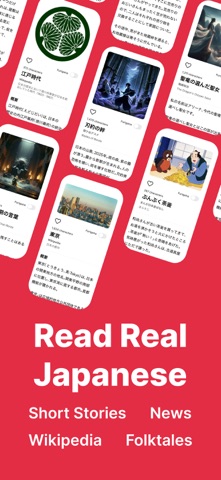
Read authentic Japanese from real sources — including folktales, Japanese news articles, Wikipedia, and original stories written by Japanese authors.
• Scan Physical Books
Snap a photo of any Japanese book. Yomoyo pulls out the text so you can read it with furigana, dictionary lookups, and more.
• AI-Powered Reading Generator
Type in a topic — anime, travel, cooking, whatever you want — and instantly get a Japanese story for your reading level and interests.
• Pop-up Dictionary + Kanji Breakdown
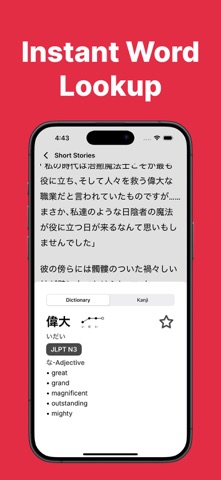
Tap any word to instantly see its definition, reading, pitch accent, and a breakdown of each kanji character. No need to switch apps or guess — it’s all right there.
• Vocabulary Lists + Flashcards
Every word you tap can be saved to a vocabulary list and studied later with flashcards.
• Export to Anki
Prefer Anki or other SRS software? Export any vocab list as .tsv files to keep your flashcard system in sync.
• Favorites & Recents
Save your favorite stories and access them anytime — even offline. Your recently read stories are also stored automatically so you can pick up where you left off.
• Furigana Toggle
Show or hide furigana to control how much help you want.
-- CONTACT --
Have questions or need support? Reach out to us at support@yomoyo.ai. We're here to help!
-- TERMS & PRIVACY --
By using this app, you agree to Yomoyo's Terms and Conditions and Privacy Policy.
Terms and Conditions: https://yomoyo.framer.website/terms
Privacy Policy: https://yomoyo.framer.website/privacy-policy